
Preview

Description
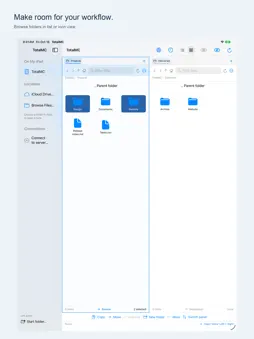
Your files, side by side. TotalMC brings local folders, file servers and transfers together in a focused workspace for Mac and iPad. Open a location in each panel, select what you need and copy it to the other side. TWO PANELS. ONE WORKSPACE. Browse folders independently, keep useful locations in tabs and see which panel is the source and which is the destination. Filter names, select by pattern and return to your saved workspace when you reopen the app. CONNECT TO YOUR FILES Use FTP, implicit FTPS or SFTP to browse your servers and transfer files and folders. Save connection profiles and choose where to open them. SFTP supports password and compatible private-key sign-in, with server fingerprint confirmation. Remembering sign-in details in Keychain is optional. KEEP TRANSFERS ORGANIZED Copies join the queue automatically while another transfer is running. Follow progress in Activity, cancel waiting jobs or pause after the current copy. Unfinished jobs are saved for recovery. SFTP downloads can reuse checked partial files when possible. Enable SHA-256 verification for new copies when you want an additional content check. HANDLE EVERYDAY FILE WORK Create folders, rename or duplicate local items, preview supported files with Quick Look, and compress selections into ZIP archives. Extract ZIPs into new folders, rename a batch with a preview, or update an existing folder while keeping files found only in the destination. AT HOME ON MAC AND IPAD On Mac, browse local disks and mounted network shares, reveal files in Finder and open a local folder in Terminal. On iPad, choose folders through Files, including available iCloud Drive folders, shared folders, external drives and other providers. Keep folder shortcuts in the sidebar and share local files with other apps. Available locations depend on your device and providers. YOUR LOCATIONS. YOUR CHOICES. Choose the folders TotalMC may access. Work with local files without creating a TotalMC account. Server connections use the account you provide for that server. SFTP is SSH file transfer. FTPS is implicit FTP over TLS; explicit FTPS is not supported. Supported SFTP private keys are unencrypted Ed25519 OpenSSH or ECDSA OpenSSH/PEM keys. Keep TotalMC active on iPad during long transfers.
Technical Analysis
Package Overview Basic metadata
Bundle ID
es.totaljs.TotalCommander Current Version 1.0
Minimum iOS 18.0
Package Size App Store Size
Package Metadata 0 / 0 version records
Detailed binary, privacy manifest, framework, and Info.plist results have not been indexed for this package yet. The verified App Store and archive metadata above remains available.
Developer Information
Known Version Records
0 version records with stored package metadata
Stored metadata does not guarantee a package is currently available to download.
| Details | Version / IDs | Version date | Action |
|---|