
Preview

Description
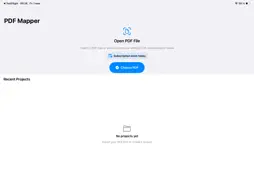
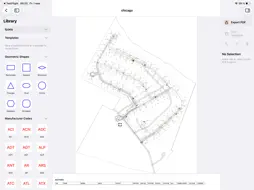
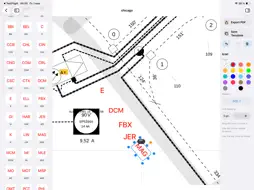
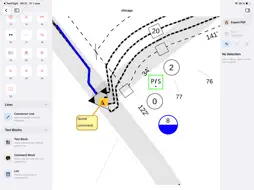
PDF Mapper helps you turn static PDF maps, floor plans, site plans, and project documents into clean visual markups. Import a PDF, place precise symbols and labels, draw connector lines, add comments or text blocks, and export a finished PDF you can share with your team, clients, or field crew. Built for planning, inspection, construction, mapping, facility work, and any workflow where a PDF needs clear, repeatable annotations. Key features: • Import PDF maps, drawings, plans, and documents • Add icons, standardized markers, geometric shapes, manufacturer codes, and custom text labels • Move, resize, rotate, and style objects directly on the PDF • Add connector lines with draggable endpoints • Create text blocks, comment callouts, and styled lists • Save frequently used objects as reusable templates • Customize colors, borders, fill, text style, line width, and line patterns • Work with saved projects and continue editing later • Export marked-up PDFs for sharing or archiving PDF Mapper is designed to keep markup fast and focused: your project list, tool library, PDF canvas, and inspector are organized for repeated professional use. Subscription: PDF Mapper requires an active subscription for full access. Available plans, trials, and renewal details are shown in the app before purchase. Subscriptions are managed through your Apple ID and can be canceled in App Store settings. Subscription Terms: • Payment will be charged to your Apple ID account at confirmation of purchase • Subscription automatically renews unless auto-renew is turned off at least 24 hours before the end of the current period • Your account will be charged for renewal within 24 hours prior to the end of the current period • You can manage and cancel subscriptions in your App Store account settings Terms of Use (EULA): https://www.apple.com/legal/internet-services/itunes/dev/stdeula/
What's New
Version 2.38 2026-09-16
- Added 5 Bluebeam-compatible line types with correct metadata, colors, thicknesses, and dash patterns. - Improved line rendering when zooming, especially for d...- Added 5 Bluebeam-compatible line types with correct metadata, colors, thicknesses, and dash patterns. - Improved line rendering when zooming, especially for dashed lines. - Fixed Bluebeam icon codes, names, and metadata, including incorrect mappings and the DC Splitter symbol. - Improved PDF export compatibility with Bluebeam Revu, including annotation appearance, border styles, geometry, and metadata. - Fixed grouped symbols so elements such as Church, School, and Fractional Count stay together during import/export. - Added better round-trip support: Bluebeam → PDF Mapper → Bluebeam, preserving annotations, groups, editable lines, and metadata. - Added Open PDF with PDF Mapper support. A new project is created automatically, with (1), (2), etc. for duplicate names. - Reduced the default icon and selection-frame size by 50%. - Identified 19 additional Bluebeam presets that are not yet available as separate tools in PDF Mapper. Technical Analysis
Package Overview Basic metadata
Bundle ID
com.ooshkap.PDF-Mapper Current Version 2.38
Minimum iOS 18.6
Package Size App Store Size
Package Metadata 0 / 2 version records
Detailed binary, privacy manifest, framework, and Info.plist results have not been indexed for this package yet. The verified App Store and archive metadata above remains available.
Known Version Records
0 version records with stored package metadata • 2 known version records
Stored metadata does not guarantee a package is currently available to download.
| Details | Version / IDs | Version date | Action |
|---|---|---|---|
| Not archived | App Store ID: 886333105 | Unknown | Request Version |
| Not archived | App Store ID: 885138247 | Unknown | Request Version |