
Preview






Description
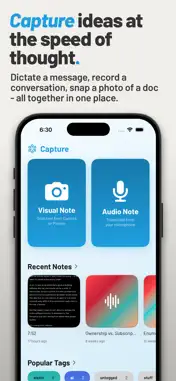
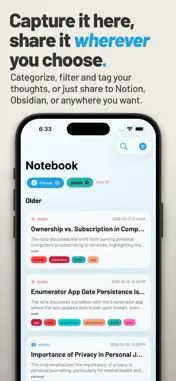
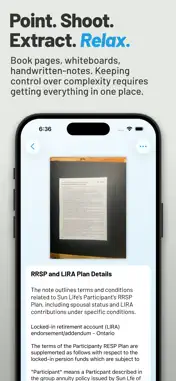
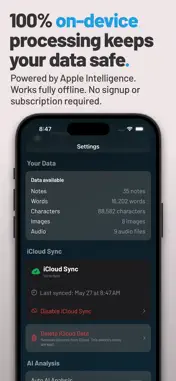
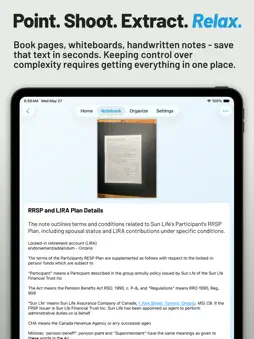
Capture turns photos and voice memos into searchable, organized text — entirely on your device. CAPTURE FASTER THAN YOU CAN TYPE Point your camera at a book page, whiteboard, or handwritten note. Capture extracts the text automatically. Or record a voice memo and get a full transcript with timecodes — pause, resume, and tap any timestamp to jump back to that moment. POWERED BY APPLE INTELLIGENCE On-device AI suggests tags, generates titles, and summarizes your notes automatically. It adapts to your own categories and gets more useful over time. No cloud required. No waiting. YOUR DATA STAYS ON YOUR PHONE OCR, transcription, and AI all run locally using Apple's built-in frameworks — Vision, Speech Analyzer, and Foundation Models. Nothing is uploaded to external servers. No signup required. Works fully offline. ORGANIZE YOUR WAY The Organize tab gives you full control of your library. Search and sort your tags, group notes into categories, assign colors in bulk, and sync everything across your devices with iCloud. SHARE ANYWHERE The native iOS share sheet sends your notes to any app — Obsidian, Notion, Apple Notes, email, wherever your workflow lives. No proprietary formats. No lock-in. BUILT FOR - Personal journaling and private notes - Capturing ideas during walks, meetings, or reading - Knowledge workers using Obsidian, Notion, or Apple Notes - Journalists, researchers, and anyone with confidentiality needs Apple Intelligence features require a compatible device running iOS 26. Apple, Apple Intelligence, and Foundation Models are trademarks of Apple Inc.
What's New
Version Capture 2.6 2026-08-30
Version 2 — a complete redesign and major new features. New Home tab: your most recent notes and favorite tags, one tap away. New Organize tab: manage categor...Version 2 — a complete redesign and major new features. New Home tab: your most recent notes and favorite tags, one tap away. New Organize tab: manage categories and tags in one place, with bulk recoloring and full search. Liquid Glass design: Capture now uses Apple's iOS 26 visual language throughout — translucent cards, refined typography, and an updated look on iPhone and iPad. Smarter iCloud sync: more reliable across devices, with friendly status messages so you always know when your notes are current. Improved AI analysis: on-device Apple Intelligence now adapts tag and category suggestions to your own library, not a fixed list. Better iPad support: layouts and typography scale properly across all screen sizes. Error reporting, on your terms. If Capture encounters a problem, you'll now see the full diagnostic report before anything leaves your device — and sending is always your choice. No automatic telemetry. No background uploads. You see exactly what we'd see. Technical Analysis
Package Overview Basic metadata
Bundle ID
com.sistnt.capture Current Version Capture 2.6
Minimum iOS 26.0
Package Size App Store Size
Package Metadata 0 / 8 version records
Detailed binary, privacy manifest, framework, and Info.plist results have not been indexed for this package yet. The verified App Store and archive metadata above remains available.
Developer Information
Known Version Records
0 version records with stored package metadata • 8 known version records
Stored metadata does not guarantee a package is currently available to download.
| Details | Version / IDs | Version date | Action |
|---|---|---|---|
| Not archived | App Store ID: 887802881 | Unknown | Request Version |
| Not archived | App Store ID: 886927340 | Unknown | Request Version |
| Not archived | App Store ID: 886835891 | Unknown | Request Version |
| Not archived | App Store ID: 886745836 | Unknown | Request Version |
| Not archived | App Store ID: 886584465 | Unknown | Request Version |
| Not archived | App Store ID: 886197042 | Unknown | Request Version |
| Not archived | App Store ID: 883878587 | Unknown | Request Version |
| Not archived | App Store ID: 882407580 | Unknown | Request Version |