
Preview






Description
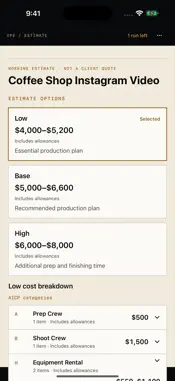
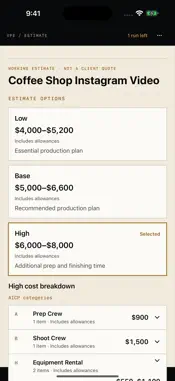
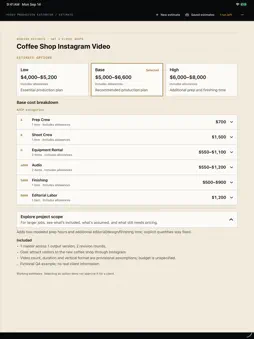
Video Production Estimator helps commercial producers turn client requests into Low, Base, and High working estimates. START WITH THE REQUEST Choose a client email screenshot, PDF, Word document, spreadsheet, presentation, text file, or CSV. On Mac and iPad, you can also drop files into New estimate. You can paste an email or rough notes instead. No client, project, or budget form is required. COMPARE THE NUMBERS Review three production options and their working price ranges. Pricing combines quantities, reference rates, and clearly labeled estimated allowances. When details are unclear or detailed processing cannot finish, broad planning ranges provide a starting point with explicit assumptions. OPEN ONLY THE DETAIL YOU NEED The cost breakdown follows an AICP-style category structure. Only categories used by the estimate appear. Each starts collapsed with its subtotal; expand it to see line items, quantities, effective rates, and amounts. Open Details for assumptions and source references, or Edit cost to adjust a working amount on your device. EXPLORE PROJECT SCOPE For larger jobs, open Explore project scope to review what is included, excluded, assumed, or still unpriced. Scope detail stays secondary to the numbers. Return to your work from Saved estimates. PROCESSING AND PRIVACY Screenshot text recognition happens on your device. Document extraction and AI processing use the hosted service and require internet access. The app asks for permission before sending files or text for processing. No account or sign-in is required. These are working estimates, not client-ready quotes. Check quantities, local rates, licenses, and scope before client use. Selecting an option is not client approval. This release does not send client estimates, issue invoices, collect client payments, send email, or book vendors. ESTIMATE CREDITS The free download includes one initial estimate credit per installation. Buy one or five more through Apple when needed. One completed request uses one credit for all three options; cost editing and scope exploration are included. Failed processing returns the run credit, including when broad planning ranges are provided. Credits do not expire, and there is no subscription. Credits apply to the installation where purchased, do not sync between devices, and may be lost if you delete the app.
What's New
Version 1.3 2026-09-30
Send your selected working estimate to a client through the system share menu. Preview the scope, budget and questions, add a project name or client notes, then...Send your selected working estimate to a client through the system share menu. Preview the scope, budget and questions, add a project name or client notes, then use Mail, Messages or another app. Clients can reply there with approval or requested changes. Sharing uses no estimate credit. More resilient working estimates from incomplete requests. Clearer livestream scope and setup-day coverage. Broad planning ranges when detailed processing cannot finish, with visible assumptions and follow-up questions. Failed processing returns the run credit. The same improvements are available on iOS and macOS. Technical Analysis
Package Overview Basic metadata
Bundle ID
com.joeyarcisz.videoproductionestimator Current Version 1.3
Minimum iOS 17.0
Package Size App Store Size
Package Metadata 0 / 0 version records
Detailed binary, privacy manifest, framework, and Info.plist results have not been indexed for this package yet. The verified App Store and archive metadata above remains available.
Developer Information
Known Version Records
0 version records with stored package metadata
Stored metadata does not guarantee a package is currently available to download.
| Details | Version / IDs | Version date | Action |
|---|