Preview


Description
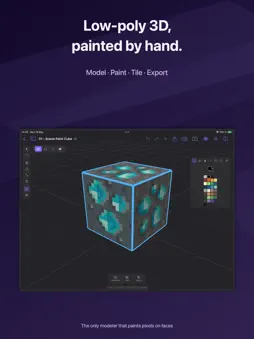
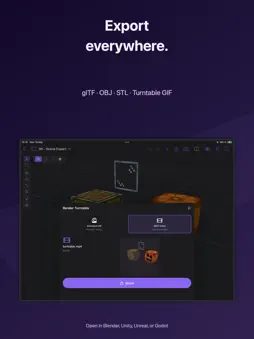
Qwartz is a low-poly 3D modeler with built-in pixel painting on faces. Model game-ready assets, paint pixel art directly onto mesh faces with no UV mapping required, stamp tile sheets to build levels, and export to glTF, OBJ, or STL. Designed for indie game developers, pixel artists exploring 3D, and anyone who wants a focused 3D tool that respects their time. START IN SECONDS • A home screen with your models as thumbnails • Starters: Cube, Grid, Blocky Character, a Tiled Room and a Terrain Block — the tiled ones come with their tile sheets, ready to stamp • Isolate one object to work on it alone • Tips on first launch, and Help from the app's menus AUTO PIXEL PAINT • Tap any face and start painting — pixels appear directly on the mesh • Per-face pixel grid sized automatically from the geometry • Built-in palettes: PICO-8, DB16, DB32, Endesga 32, or your own • Pencil, eraser, fill, line, rectangle, circle, eyedropper • Move vertices and the pixel grid resizes with nearest-neighbor resample • No UV mapping required. No external tools. LOW-POLY MODELING • Object, face, edge, and vertex selection modes • Extrude, inset, loop cut, subdivide, merge, slide, dissolve • Transform gizmo with axis constraints and snapping • Edge-loop and face-loop selection on double-click • Seven primitives: cube, plane, cylinder, sphere, cone, torus, quad grid • Full undo / redo for every operation TILE MODE • Import a tile sheet PNG and stamp tiles onto mesh faces • Up to four layers per face: a base tile plus decals like windows, doors and signs • Per-stamp rotation and flip, and Flip H / Flip V on any textured face • Extrude faces to make walls, extrude edges to grow the grid • The whole level stays one editable mesh MATERIALS & UV EDITOR • Color materials and PNG-textured materials • Built-in UV editor with planar and box auto-unwrap • Pixel-perfect paint tools directly on the UV texture • Live preview synced between 3D viewport and UV editor IMPORT & EXPORT • Export to glTF (.glb), OBJ + MTL + PNG, and STL — pixel paint and tile layers baked in • Render turntable GIFs and MP4 videos • Import FBX and OBJ files • Open your models in Blender, Unity, Unreal, Godot, or any 3D tool • Open glTF and OBJ exports in any voxel or game-asset pipeline NATIVE & UNIVERSAL • Universal app — one purchase covers tablet and desktop • Pencil drives tools, finger orbits the camera on touch devices • Full hardware keyboard support • Open and save models anywhere through the Files app • Metal renderer, no compromises PRIVACY FIRST • All files stored locally on your device • No account, no login, no tracking • Works fully offline ONE-TIME PURCHASE Qwartz is free to download and evaluate. Every modeling and painting tool works during evaluation, for up to five models; renders carry a watermark. A single one-time purchase unlocks exporting and unlimited models, and removes the watermark.
What's New
Version 26.4 2026-10-22
Combine arrives: cut a hole or merge shapes in one step. • Select one shape and tap Combine to cut it out of every shape it touches. Or select two or more and ... Technical Analysis
Package Overview Basic metadata
Bundle ID
com.gargant.qwartz Current Version 26.4
Minimum iOS 17.6
Package Size App Store Size
Package Metadata 0 / 0 version records
Detailed binary, privacy manifest, framework, and Info.plist results have not been indexed for this package yet. The verified App Store and archive metadata above remains available.
Developer Information
Known Version Records
0 version records with stored package metadata
Stored metadata does not guarantee a package is currently available to download.
| Details | Version / IDs | Version date | Action |
|---|