Preview



Description
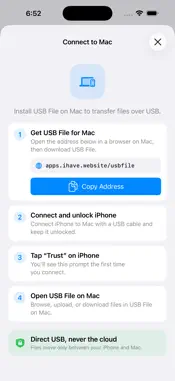
USB File is a simple wired file transfer utility for iPhone and Mac. Install the companion USB File app on your Mac, connect and unlock your iPhone, and you can browse and transfer files and folders directly between your devices. WHAT YOU CAN DO • Transfer files and folders from Mac to iPhone • Download files and folders from iPhone to Mac • Import photos, videos, and documents on iPhone • Receive files shared from other apps • Browse folders and preview supported files • Share files through the system Share Sheet • Organize and delete files stored in USB File • Use the app without creating an account PRIVATE USB TRANSFERS File contents are transferred directly over USB. They are not sent through Wi-Fi, a local network, the internet, or cloud storage. USB File does not require an account and does not upload your files to a developer-operated server. REQUIREMENTS • iPhone running iOS 15 or later • Mac running macOS 12 or later • A USB cable that supports data transfer • Your iPhone must be unlocked during connection • The first connection may require you to tap “Trust” on your iPhone Download USB File for Mac: https://apps.ihave.website/usbfile IMPORTANT USB File can only manage files stored in its own Documents directory. It cannot access private files belonging to other apps or the entire iPhone file system.
Technical Analysis
Package Overview Basic metadata
Bundle ID
website.ihave.files Current Version 1.0.0
Minimum iOS 15.0
Package Size App Store Size
Package Metadata 0 / 0 version records
Detailed binary, privacy manifest, framework, and Info.plist results have not been indexed for this package yet. The verified App Store and archive metadata above remains available.
Developer Information
Known Version Records
0 version records with stored package metadata
Stored metadata does not guarantee a package is currently available to download.
| Details | Version / IDs | Version date | Action |
|---|