Noteday: Notes, PDF & Notebook App Icon

Noteday: Notes, PDF & Notebook

Productivity • Gambit Global LTD
4+ v1.5 Recorded price: Free App Store →
IPA Analysis
Technical Specs
Bundle ID com.gambit.noteday
Version 1.5
App Store Size 33.88 MB
Minimum iOS 17.0
Devices iPhone, iPad, iPod touch
Catalog release date 2026-09-14
Latest recorded version date 2026-11-01
Features & Support
Advisory 4+
Languages (2)
EN, TR
Top In App Purchases
No In App Purchases Listed

Preview

Noteday: Notes, PDF & Notebook screenshot 1 Noteday: Notes, PDF & Notebook screenshot 2 Noteday: Notes, PDF & Notebook screenshot 3 Noteday: Notes, PDF & Notebook screenshot 4 Noteday: Notes, PDF & Notebook screenshot 5 Noteday: Notes, PDF & Notebook screenshot 6 Noteday: Notes, PDF & Notebook screenshot 7 Noteday: Notes, PDF & Notebook screenshot 8 Noteday: Notes, PDF & Notebook screenshot 9 Noteday: Notes, PDF & Notebook screenshot 10 Noteday: Notes, PDF & Notebook screenshot 11 Noteday: Notes, PDF & Notebook screenshot 12 Noteday: Notes, PDF & Notebook screenshot 13 Noteday: Notes, PDF & Notebook screenshot 14

Description

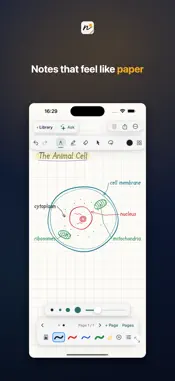
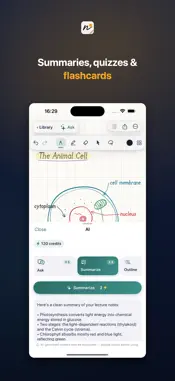
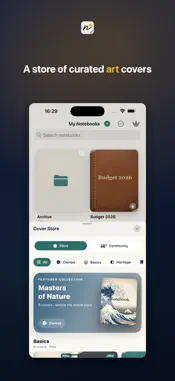
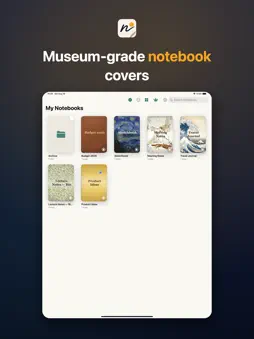
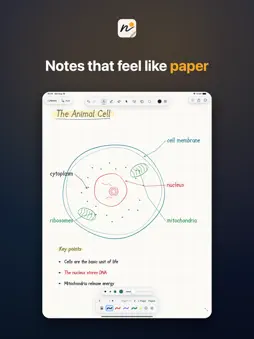
Noteday is the notebook that feels like paper and thinks like a study partner. Write with buttery, low-latency Apple Pencil ink at up to 120Hz — pressure, tilt, and shapes that snap into place. Then let Noteday AI turn what you wrote into summaries, flashcards, quizzes, and even images, right on the page. WRITE THAT FEELS LIKE PAPER • Ultra-responsive 120Hz ink with real pressure • Straight-line snap and instant shape recognition • Partial eraser, lasso select, and a laser pointer for presenting • Zoom-write box and a ruler for precise work PAGES BUILT FOR REAL LIFE • Add text, images, stickers, sticky notes, and tables to any page • Organize with folders and search your typed content • Reorder, duplicate, and manage pages with ease • Record audio right alongside your notes • Set local reminders so nothing slips TEMPLATES MADE TO BE USED • Free hero planners, to-do lists, Cornell notes, and more built in • A growing marketplace of à-la-carte packs — productivity, student, finance, fitness, medical, music, travel and more • Buy once, own forever — apply any template as a page in any notebook COVERS WORTH COLLECTING • Museum-art covers from Hokusai, Van Gogh, Klimt, Monet, William Morris, and İznik masters • Full Gold, Full Silver, and Rose Gold metal covers with a live, moving gleam • Personalize with your name, monogram, and font • Import your own PDF or PNG as a cover NOTEDAY AI THAT STUDIES WITH YOU • Ask your notes and get answers with page references • Summarize, outline, make flashcards, build quizzes, and rewrite • Turn a description into an image placed straight onto your page • Start with 25 welcome credits, top up with credit packs anytime EXPORT & SHARE • Export any notebook as PDF or image to share anywhere NOTEDAY PRO Go unlimited with Noteday Pro: • Unlimited notebooks (free plan includes 2) • No ads • Premium stickers • 1,000 AI credits every month Noteday Pro is $2.99/month or $19.99/year with a 7-day free trial. • Payment is charged to your Apple Account at confirmation of purchase. • Subscriptions renew automatically unless canceled at least 24 hours before the end of the current period. • Your account is charged for renewal within 24 hours before the end of the current period. • Manage or cancel anytime in your Apple Account settings. • Any unused portion of a free trial is forfeited when you buy a subscription. • Templates, covers, and credit packs are one-time purchases you own forever. Privacy Policy: https://getnoteday.com/privacy Terms of Use (EULA): https://www.apple.com/legal/internet-services/itunes/dev/stdeula/ Questions? getnoteday.com/support

What's New

Version 1.5 2026-11-01
Made for iPhone Duo — and the first iOS update since 1.2, so everything from the two releases in between is here too. IPHONE DUO • Open the Duo and your notebo...Made for iPhone Duo — and the first iOS update since 1.2, so everything from the two releases in between is here too. IPHONE DUO • Open the Duo and your notebook can open as a two-page spread, with the device's fold as the spine. Turn it on or off anytime from the "Page options" menu → "Two pages"; the same option appears on iPad in landscape. Two-page view works in notebooks created from this update on; a one-tap upgrade for your existing notebooks is coming in the next update. • Desk mode: half-fold the Duo flat on a table and the layout splits itself — your Ask conversation or PDF reference stays on the top half, your writing surface on the bottom, with the tool palette docked to its bottom edge. • Everything adapts live as you fold and unfold: your open notebook stays open through the transition and your AI conversation comes with you instead of starting over. The tool palette remembers where you docked it on each display separately. • On the Duo's outer display the palette starts as a small tab, so it never covers the page — tap it to open. ALSO NEW SINCE 1.2 • Notes: a tab for typed notes with checklists, headings, images, links, tags and folders. Lock a note with Face ID, scan a document, record a voice memo, drag to reorder, undo anything. And AI inside a note: summarize, turn into a checklist, rewrite, continue writing or translate. • Week: a full-screen weekly task list. Tap a day, add a task, swipe to complete, swipe between weeks. Unfinished tasks carry over. • Quick access: Home and Lock Screen widgets, a Control Center button, Siri shortcuts, and a share extension that saves text, links and images into Notes. • Pages now keep a fixed paper shape and size, so rotating your device no longer stretches the page, moves your ink, or loses your place. Pinch to zoom, scroll vertically between pages, and pull past the last page to add a new one. A "Page options" menu in the top bar covers add, duplicate, insert, delete, move, paper settings and go to page. • Draw a shape and hold still at the end of the stroke to snap it: circle, square, rectangle, triangle, polygon or arrow. • The eraser has an Object mode next to the size slider — it removes a whole stroke instead of only the part inside the circle. • The tool palette now floats: drag it to any edge, collapse it to a small tab, or leave it docked. • Select text or a region inside an imported PDF, including scanned pages, to copy, translate or ask Noteday about it — from the ••• menu, "Select on page." • Undo now covers images and sticky notes together with your ink, in one timeline. Sticky notes are placed ready to type in and stay where you put them. • Notebooks open on the page you left, and you can pin your favorites. Importing a PDF or picking a custom cover works again. Questions or ideas? [email protected]

Technical Analysis

Package Overview Basic metadata
Bundle ID com.gambit.noteday
Current Version 1.5
Minimum iOS 17.0
Package Size App Store Size
Package Metadata 0 / 0 version records
Detailed binary, privacy manifest, framework, and Info.plist results have not been indexed for this package yet. The verified App Store and archive metadata above remains available.

Developer Information

Known Version Records

0 version records with stored package metadata

Stored metadata does not guarantee a package is currently available to download.

Details Version / IDs Version date Action