
Preview






Description
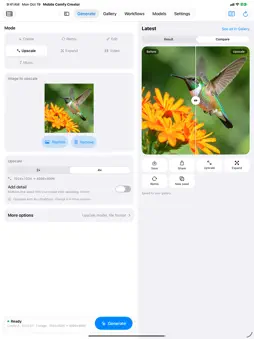
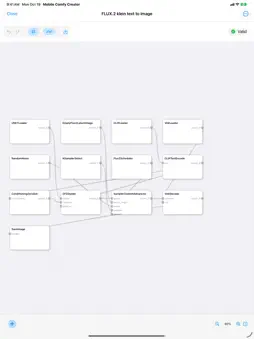
Mobile Comfy Creator is a native app for iPhone and iPad that runs ComfyUI and SwarmUI. Make images, video and music with the models on your own computer or a cloud GPU you rent: no credits, no subscription. FREE TO DOWNLOAD • Create, Remix and Edit images with any model on your ComfyUI or SwarmUI server • Scan your Wi-Fi to find your server, or type an address. The app detects it, tests the connection and shows your GPU and models • A gallery with folders, favorites and search; Share and Save to Photos • Prompt help from Apple Intelligence, or Smart Templates that work with no AI model at all • Try Pro features free: your first 3 Pro generations are on us COMFYMOBILE PRO: ONE PURCHASE, YOURS FOREVER • Video: Wan 2.2 (5B and 14B), HunyuanVideo 1.5 and LTX-Video, from text or from a photo • Music: songs and instrumentals with ACE-Step 1.5. Pick a style, add lyrics or go instrumental, up to 4 minutes • Upscale 2× or 4× with added detail, and Expand a photo past its edges to 16:9, 9:16 or square • Edit by describing the change with FLUX.1 Kontext or Qwen-Image-Edit, with up to two reference images • Batch generation and one-tap seed variations • The visual node editor and your own workflow imports • Rent a cloud GPU on Vast.ai right from the app • iCloud sync of images, videos, workflows and settings across iPhone and iPad • Switch between several saved servers in one tap If you used Mobile Comfy Creator before 2.0, you already have Pro. EVERY MODEL, SET UP FOR YOU • SDXL, Illustrious, Pony, SD 3.5, FLUX.1, FLUX.2, Chroma, Z-Image, Qwen-Image, HiDream and more • Split-file models are assembled automatically: text encoders and VAEs are found on your server • Each model says whether it's ready, or exactly which file it still needs, and whether your GPU or Mac can run it • Starting settings tuned for each model family, with Fast, Balanced and Best quality SIMPLE BY DEFAULT, POWERFUL WHEN YOU WANT IT • Pick a mode and a shape, type a prompt, tap Generate • More options: negative prompt, LoRAs, seed, number of images • Expert controls: CFG, steps, sampler, scheduler and custom sizes MADE FOR IPHONE AND IPAD • Widgets, Control Center controls and a Live Activity for generation progress • Larger text works: layouts rearrange instead of cutting off • On iPad: sidebar navigation and options in an inspector PRIVATE BY DESIGN • No tracking and no analytics. Your prompts and images go only to the servers you choose • iCloud sync is off until you turn it on, and uses your own iCloud account Requires your own ComfyUI or SwarmUI server (on your network, over Tailscale or on a rented cloud GPU). The app doesn't generate images on the phone itself. Music, Expand and some video models need ComfyUI. Terms of Use: https://gallahadd.com/legal/mobile-comfy-creator/terms Privacy Policy: https://gallahadd.com/legal/mobile-comfy-creator/privacy
What's New
Version 2.0.3 2026-10-24
Importing files is reliable again: • Importing a workflow from Files or iCloud Drive could fail with "you don't have permission to view it". Picked files are no... Technical Analysis
Package Overview Basic metadata
Bundle ID
com.brandonharvey.ComfyMobile Current Version 2.0.3
Minimum iOS 26.1
Package Size App Store Size
Package Metadata 2 / 5 version records
Detailed binary, privacy manifest, framework, and Info.plist results have not been indexed for this package yet. The verified App Store and archive metadata above remains available.
Developer Information
Known Version Records
2 version records with stored package metadata • 5 known version records
Stored metadata does not guarantee a package is currently available to download.
| Details | Version / IDs | Version date | Action |
|---|---|---|---|
| 21.63 MB | v1.5 App Store ID: 892021890Build: 1.5 | 2026-09-26 19:06:35 | Get Version |
| Not archived | App Store ID: 891649116 | Unknown | Request Version |
| 19.15 MB | v1.4 App Store ID: 884676677Build: 1.4 | 2026-04-19 22:33:17 | Get Version |
| Not archived | v1.3 App Store ID: 881685052Build: 1.3 | 2026-01-21 07:52:10 | Request Version |
| Not archived | v1.0 App Store ID: 878366825Build: 1.0 | 2025-09-24 21:16:20 | Request Version |