
Preview







Description
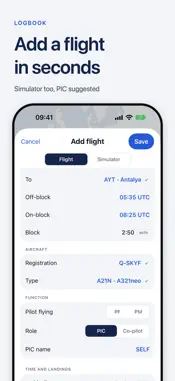
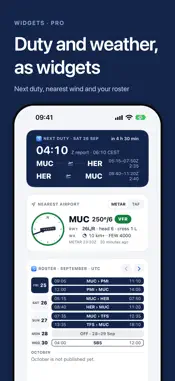
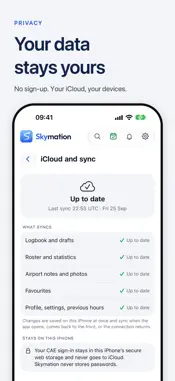
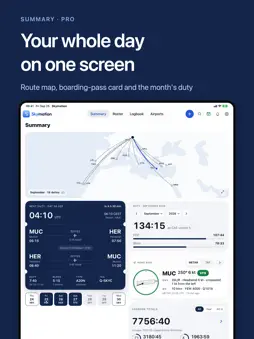
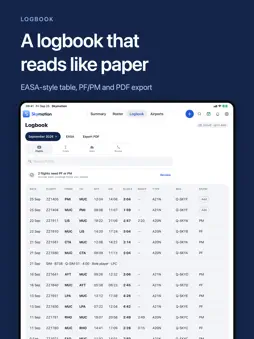
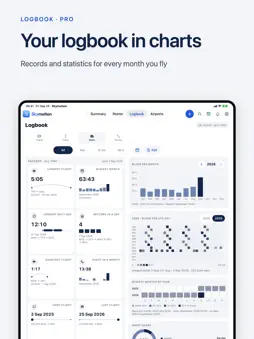
Skymation is the pilot's personal assistant: digital logbook, roster, duty and flight time limits, and airport METAR and TAF in one app for iPhone, iPad and iPhone Duo, with widgets and an Apple Watch app. SUMMARY • Next duty on a boarding-pass card: report in UTC and local, each leg's STD/STA, block, type and tail. • The month's routes on a map; in flight, time to landing and progress, also offline. • The Duty card: duty left and any month's Duty, FDP and Block. Your last 10 flights and logbook totals. ROSTER • The whole month as a list or a calendar, on UTC days. • Month, year and all-time duty, FDP and block, matching the portal's Statistics. • Flight time limits at a glance (ORO.FTL.210: 28 days, calendar year, 12 months) and a warning before you reach one. Information only; your operator's FTL system governs. • Read your roster from your airline's supported crew portal with your own login (read-only; Skymation never sees or stores your password), or import a file (PDF, iCal, CSV). LOGBOOK • Only the flights you really flew, with actual off- and on-block times. Block, night, IFR, multi-pilot and landings fill in for you and stay editable. • Add a flight by hand: a number pad that fills from the right, airport and PIC suggestions, PF/PM in one tap, then your roster's next leg. • Simulator sessions too, never counted as flight time. • Pick any date range and see every logbook column totalled. • Export PDF and CSV in EASA and SHGM layouts. AIRPORTS • Raw METAR and TAF first, then decoded, with category colours and a TAF ribbon marked with your STD/STA. • Runways with a wind dial, headwind and crosswind; sunrise, sunset, local time, DST and ATIS frequencies. • Favourites, folders, private notes and photos per airport; an offline METAR guide. • Weather from NOAA's Aviation Weather Center; it does not replace an official briefing. WATCH, WIDGETS, DEVICES • Apple Watch: next duty, roster, nearest airport wind and METAR/TAF, PF/PM; complications with the nearest raw METAR, date and UTC. • Widgets for your next duty, nearest airport weather and roster. • iPad: roster calendar beside the day's card. iPhone Duo: unfold for two columns; half-folded, pages stay clear of the hinge. • Fully offline with your last data and its age. Roster and limit notifications. English or Turkish, Face ID, light and dark. PRIVATE BY DESIGN No Skymation account, no ads, no tracking. Your data stays on your devices, and in your own iCloud if you choose sync. Skymation is not affiliated with any airline, crew portal provider or aviation authority. It does not replace your official logbook, crew documents or an operational briefing. Skymation Pro (auto-renewing subscription) Free, without a subscription: view, search, edit, export and delete your logbook; add up to 20 flights a month by hand, and simulator sessions; enter previous hours; logbook totals for any dates, duty and block totals by month, year and all time; airport search, METAR and TAF, up to 3 favourites. Skymation Pro adds live roster sync, unlimited flights, FDP and each day's duty, flight time limits with rings and warnings, logbook stats and records, the full Airports tab (flight-window TAF, runway wind, notes and photos, folders), notifications, widgets, the Apple Watch app, and calendar and file imports. Pro is monthly or yearly, and new subscribers get a 1-week free trial. Payment is charged to your Apple Account when you confirm the purchase or, if you start the free trial, when the trial ends. The subscription renews automatically unless you cancel at least 24 hours before the end of the current period; your account is charged for the renewal within 24 hours before the period ends. Manage or cancel it in your Apple Account settings after purchase. Any unused part of a free trial is forfeited when you buy a subscription. Terms of Use (EULA): https://www.apple.com/legal/internet-services/itunes/dev/stdeula/ Privacy Policy: https://skymation.net/privacy
What's New
Version 1.1.0 2026-11-23
- Roster history (Pro): every month Skymation has kept, from its first plan to today, in three sections. "Changes" lists the plan changes CAE published, refresh...- Roster history (Pro): every month Skymation has kept, from its first plan to today, in three sections. "Changes" lists the plan changes CAE published, refresh by refresh; actual off-block and on-block times are not counted as changes. "Hours" goes from the first plan to today: the plan changes, then the actual times CAE published. "First roster" shows what became of every duty of the first published roster, with a map. It stays with your roster, on your device and in your iCloud when iCloud is on, and is readable offline. Your airline's system remains the official roster. - A day whose plan changed has a blue frame in the Roster. Tap it to see what changed; the duty page shows it too. - Duty details: - Simulator and training days show the lesson, the venue and your role. - A "Duty and FTL" card (Pro) shows duty, minimum rest, acclimatisation and the FTL flags CAE sets. - Trips show their hotel and transport. - Roster hours: Duty left and Total duty side by side, with the change since the first plan, and Block left underneath. - A calmer Roster list: every row is the same size, codes stand as the roster writes them, without icons, and a night away has its own row with the hotel. - Every CAE task now gets a meaning and a duty rule: simulators by device and city, ground courses, standby and leave. Where CAE sends no duty time, the figure is marked "Skymation's estimate". - A deadhead leg shows its duration and no longer counts as block. - Leaving a page with unsaved changes asks first: Save, Discard changes, or keep editing. - Free Pro from a code: Settings › Subscription shows when it ends. A code that does not renew shows "Subscribe" there, plus one short card three days before it ends. - Duty, FDP and block come straight from CAE wherever CAE provides them, so your month matches CAE Statistics. Standby counts at 25% (SB1, SB2 and every other standby code). - See who you fly with: the crew list opens inside the flight (the Roster duty page and a Logbook entry). Cockpit and Cabin are listed in the order CPT, FO, SCCM, CCM, and the list stays readable offline. Crew lists now download with your roster and are checked again before each flight, so they are usually there when you open one. Logged flights keep their crew; you can remove one person or the whole list. - METAR Guide: redesigned, with a section bar and a menu of all sections, in English and Turkish, offline. For information only. - Tap the tail on the boarding pass, or the registration of a logged flight, to see the aircraft: how long until your leg on it lands, your flights on it, and a map. "View on Flightradar24" opens their website inside the app; when the aircraft is flying, Skymation looks for its live flight in their list and opens it, and when Flightradar24 shows none, it says so. - iPad: closer to the iPhone, with a tidier layout in both orientations. Summary shows the Duty card with Duty left, your last logged flights as tickets, and the nearest airport's METAR (fixed: it did not always load); two or more notices are grouped in one card. Logbook rows swipe to edit and delete and take PF or PM with one tap; a held roster change can be reviewed; the roster status is on every page. - Settings › Support Skymation: rate Skymation on the App Store. - Aircraft types: CAE's 7S8 now shows as B738, SunExpress flights are always B738 or B38M, and a type you delete in Previous hours stays deleted. - First officers: older flights in the CAE window without a PIC now get the captain's surname too, and PIC names you have used are suggested as you type. - Smaller fixes and improvements. Technical Analysis
Package Overview Basic metadata
Bundle ID
tr.fayntech.skymation Current Version 1.1.0
Minimum iOS 17.5
Package Size App Store Size
Package Metadata 0 / 0 version records
Detailed binary, privacy manifest, framework, and Info.plist results have not been indexed for this package yet. The verified App Store and archive metadata above remains available.
Developer Information
Known Version Records
0 version records with stored package metadata
Stored metadata does not guarantee a package is currently available to download.
| Details | Version / IDs | Version date | Action |
|---|