
Preview




Description
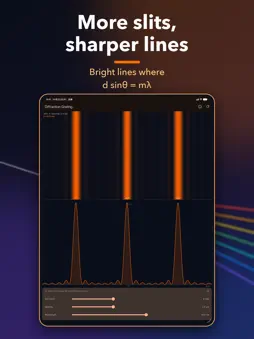
KORAKU is an interactive educational app that visualizes how light behaves in real time. Bend rays with lenses and mirrors, overlap light as a wave, and explore color and photons to connect the equations with what you see. Developer: Fuji Bit Inc. KORAKU is the optics edition of the "-raku" physics simulation series. It turns the optics of school and university physics into moving pictures, not just formulas. 12 simulations in 3 categories: - Rays & Images - Lens: Trace rays through convex and concave lenses. Change the focal length, object distance and height to see the image switch between real and virtual, inverted and upright. Explore 1/f = 1/a + 1/b. - Mirror: Switch between concave and convex mirrors. Move the radius R and object distance a to see how the image changes around the focal point F and center of curvature C, and why a virtual image appears behind the mirror. - Eye & Glasses (new): See the cornea and lens focus an image on the retina. Choose a normal, nearsighted or farsighted eye and change the viewing distance, glasses power (diopters) and accommodation to see where the image forms and how blurry it looks. One tap sets matching glasses. - Prism: Watch white light split into a spectrum. Change the apex angle, angle of incidence and refractive index to see dispersion bend each color differently, with the deviation and minimum deviation. - Optical fiber: See light travel by total internal reflection. Change the launch angle and refractive indices to explore the critical angle, numerical aperture (NA) and when light leaks into the cladding. - Light as a Wave - Diffraction grating: Change the number of slits, spacing and wavelength to find the bright lines at d sin(theta) = m lambda, and watch them sharpen as slits are added. - Thin film: Recreate the colors of soap bubbles and oil films. Change the thickness, refractive index and angle to shift the bright and dark wavelengths. - Polarization: Rotate a polarizer and an analyzer to see Malus's law, I = I0 cos^2(theta): brightest at 0 and 180 degrees, blocked at 90. - Color & the Nature of Light - Color mixing: Compare additive mixing of light (RGB) with subtractive mixing of paint (CMY) using three sliders. - Rainbow: Follow sunlight as it refracts into a raindrop, reflects inside and refracts out. See why the primary bow appears about 42 degrees from the antisolar point, the secondary about 51 degrees, with the colors reversed. - Blue Sky & Sunset (new): See sunlight scattered in the atmosphere. Switch between Rayleigh scattering (proportional to 1/lambda^4) and Mie scattering (cloud droplets, haze), and change the sun altitude and air density. As the air mass grows, the sky and sun turn from daytime blue to sunset colors. - Photoelectric effect: Shine light on a metal and watch electrons fly out. Change the frequency, intensity and work function to explore E = hf, Kmax = hf - W and the threshold frequency f0, with the visible and UV bands marked. Features: - Clean, modern design (dark and light themes) - Home screen organized by category - Tips and a play button in the control panel - Parameter sliders with results that update in real time - Legends and labels for every symbol and colored ray on screen - An explanation sheet with formulas for every simulation - In landscape, the canvas and control panel are shown side by side - Supports larger text sizes - VoiceOver reads out each screen's result (real or virtual image, total internal reflection, and more) - 73 languages including English and Japanese, following your device language - No sign-in: start exploring right away Price: - Free - In-app purchases: none - Subscriptions: none - Ads: a banner ad by Pangle at the bottom of the screen The "-raku" educational app series: - SUUGAKU - Mathematics - BUTURAKU - Mechanics - DENRAKU - Electromagnetism - HARAKU - Waves - KORAKU - Optics
What's New
Version 6.0 2026-10-23
- Redesigned screens (home organized into "Rays & Images", "Light as a Wave" and "Color & the Nature of Light", tips and a play button in the control panel, sup... Technical Analysis
Package Overview Basic metadata
Bundle ID
com.koraku.app Current Version 6.0
Minimum iOS 15.0
Package Size App Store Size
Package Metadata 1 / 6 version records
Detailed binary, privacy manifest, framework, and Info.plist results have not been indexed for this package yet. The verified App Store and archive metadata above remains available.
Developer Information
Known Version Records
1 version record with stored package metadata • 6 known version records
Stored metadata does not guarantee a package is currently available to download.
| Details | Version / IDs | Version date | Action |
|---|---|---|---|
| 24.07 MB | v5.0 App Store ID: 885706011Build: 5.0 | 2026-05-15 18:23:17 | Get Version |
| Not archived | App Store ID: 885177961 | Unknown | Request Version |
| Not archived | App Store ID: 883896374 | Unknown | Request Version |
| Not archived | App Store ID: 883739768 | Unknown | Request Version |
| Not archived | App Store ID: 883280752 | Unknown | Request Version |
| Not archived | App Store ID: 883123645 | Unknown | Request Version |