Preview




Description
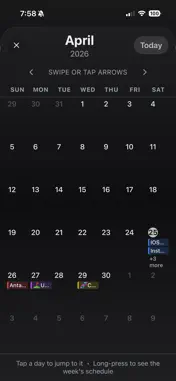
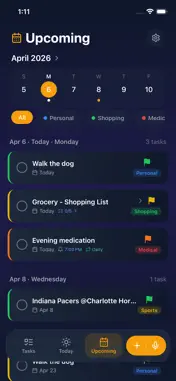
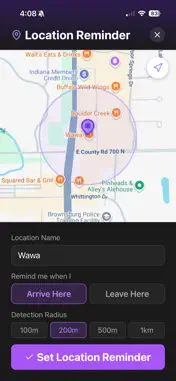
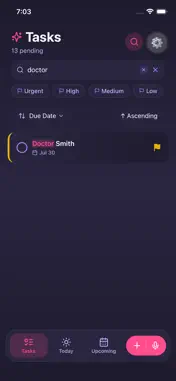
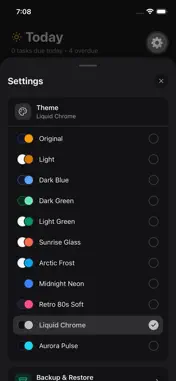
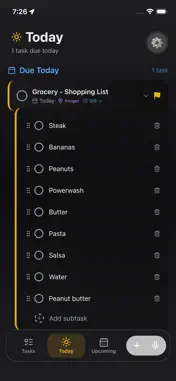
FlashToDo - Smart To-Do List & Reminders Stay organized with the simplest, most powerful to-do app designed for everyone - especially those who want clarity without the clutter. NEW IN 2.0: MONTH CALENDAR VIEW See your entire month at a glance. Tap the month name in Upcoming to open a full-screen calendar with every task on the day it's due — color-coded by category. Tap any day to jump straight to it in your list, or long-press for a detailed view of everything due that day. Prev/next navigation, a "Today" button, and smooth transitions make it feel right at home. NEW IN 2.0: WEEK TIME-AXIS VIEW Finally see your timed tasks on an actual timeline, not just a list. A full Sunday–Saturday grid lays out your week hour-by-hour, with tasks rendered as colored blocks at their exact start time. A live "Now" indicator updates every minute so you always know where you are in your day. The view auto-scrolls to your earliest task and intelligently shows only the hours that matter. VOICE TASK CREATION Press and hold to dictate tasks. FlashToDo automatically extracts the title and due date - just say "Walk the dog Wednesday at 10 AM" and you're done. LOCATION REMINDERS Get reminded when you arrive at or leave a place. "Remind me to buy milk when I get to Walmart" - it just works, even when the app is closed. SMART REMINDERS Set one-time or recurring reminders - daily, weekly, monthly, or custom intervals. Persistent alerts keep you on track until you're ready. CALENDAR SYNC Two-way sync with your iOS Calendar. Tasks with due dates appear as events, and changes reflect back in FlashToDo automatically. COLOR-CODED CATEGORIES Organize tasks into custom categories with color-coded labels. Filter instantly by category across every view - Tasks, Today, Upcoming, and now your Calendar views too. POWERFUL SEARCH AND FILTERS Search across titles, notes, and subtasks in real time. Filter by priority, due date, status, attachments, or location - combine any filters you need. NOTES AND ATTACHMENTS Attach photos or files, add detailed notes, and keep all your task information in one place. BACKUP AND RESTORE One-tap backup exports everything to a single file. Restore anytime, or transfer to a new device via AirDrop, email, or messaging - no cloud account needed. FULL TASK MANAGEMENT Subtasks, swipe gestures, priority levels, and Pending/Completed/All filters keep your list clean and actionable. DESIGNED FOR SIMPLICITY Large touch targets, high contrast, clear typography, and minimal clutter make FlashToDo easy and enjoyable for users of all ages. PRIVACY FIRST Everything stays on your device. No accounts required. No background tracking. No data sent to external servers. Download FlashToDo 2.0 and see your schedule like never before.
What's New
Version 2.1 2026-04-29
Bugfixes and performance improvements. Technical Analysis
Package Overview Basic metadata
Bundle ID
com.vibecode.flashtodo-oxxg81 Current Version 2.1
Minimum iOS 15.1
Package Size App Store Size
Package Metadata 0 / 6 version records
Detailed binary, privacy manifest, framework, and Info.plist results have not been indexed for this package yet. The verified App Store and archive metadata above remains available.
Known Version Records
0 version records with stored package metadata • 6 known version records
Stored metadata does not guarantee a package is currently available to download.
| Details | Version / IDs | Version date | Action |
|---|---|---|---|
| Not archived | App Store ID: 885040801 | Unknown | Request Version |
| Not archived | App Store ID: 884924807 | Unknown | Request Version |
| Not archived | App Store ID: 884282782 | Unknown | Request Version |
| Not archived | App Store ID: 884200326 | Unknown | Request Version |
| Not archived | App Store ID: 883993141 | Unknown | Request Version |
| Not archived | App Store ID: 881101009 | Unknown | Request Version |