
Preview




Description
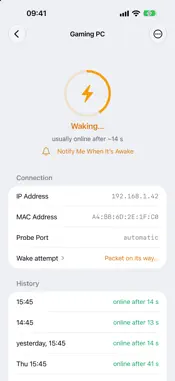
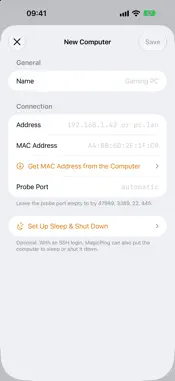
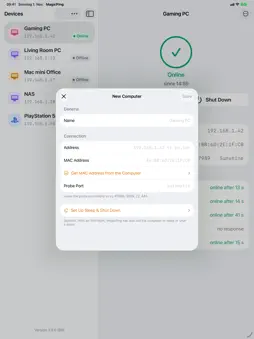
One tap, and your computer wakes up. MagicPing wakes PCs, Macs, NAS boxes, and servers on your home network via Wake-on-LAN — from your iPhone, your Mac, your Apple TV, and your Apple Watch. And when you're done, MagicPing shuts them down again over SSH. BUILT FOR THE LIVING ROOM The Apple TV launcher starts your gaming PC right from your television — before you stream via Moonlight/Sunshine or Steam Link. MagicPing even shows you when the streaming service is ready to accept connections. YOUR COMPUTERS, EVERYWHERE Enter a computer once and it appears on all your devices: the list syncs through iCloud — no account, no sign-up, no server run by us. WHAT MAGICPING DOES • Wake computers with a magic packet (Wake-on-LAN) • Live status: see who is online — and since when • Shut down over SSH (Linux, macOS, and Windows with OpenSSH) • Apple Watch: wake machines right from your wrist • Apple TV: the fastest way from couch to running gaming PC • Probe port selectable or automatic (Sunshine, RDP, SSH, SMB) • Type MAC addresses without colons — MagicPing formats as you type PRIVATE BY DESIGN MagicPing collects no data. Your computer list lives in your private iCloud; SSH passwords are stored only in the keychain. No ads, no tracking, no accounts. GOOD TO KNOW Wake-on-LAN must be enabled on the target machine (BIOS/UEFI and network adapter). Shutting down requires SSH access to the target. iCloud sync requires a signed-in iCloud account.
What's New
Version 2.5.0 2026-11-01
MagicPing now wakes your PlayStation 5, too, and makes use of the unfolded iPhone Duo. • iPhone Duo: unfolded, your device list and the selected device sit sid... Technical Analysis
Package Overview Basic metadata
Bundle ID
de.frankweigand.MagicPing Current Version 2.5.0
Minimum iOS 17.0
Package Size App Store Size
Package Metadata 0 / 0 version records
Detailed binary, privacy manifest, framework, and Info.plist results have not been indexed for this package yet. The verified App Store and archive metadata above remains available.
Developer Information
Known Version Records
0 version records with stored package metadata
Stored metadata does not guarantee a package is currently available to download.
| Details | Version / IDs | Version date | Action |
|---|