Preview




Description
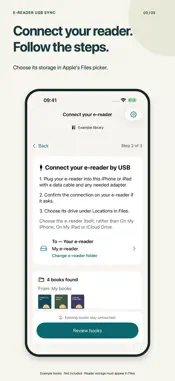
Get the books you downloaded on your iPhone or iPad onto your e-reader, without a computer or a Wi-Fi transfer setup. CHECK COMPATIBILITY BEFORE BUYING Only e-readers that appear under Browse > Locations in Apple's Files app when connected to your iPhone or iPad by USB are supported. You must be able to save files to that reader location. Before buying, connect your reader and check this in Files. If the reader does not appear there, or you cannot save files to it, this app cannot transfer books to it. A USB port alone is not enough. E-reader USB Sync helps you send DRM-free EPUB and PDF files from your iPhone or iPad to a compatible reader over a USB cable. Choose your folders, pick the books you want, and tap Send. Spend less time moving files and more time reading. A SHORT PATH FROM DOWNLOAD TO BOOKSHELF 1. Choose the folder containing your books in Apple's Files picker. 2. Connect your reader by USB, confirm the connection on its screen, and choose its folder. 3. Review the new books and tap Send. Keep the cable connected until writes finish, then follow your reader's disconnect and import instructions. ONLY THE BOOKS YOU NEED TO SEND Send one book or a selected batch. Filenames already on your reader are skipped without reading existing books. Files with different names are treated as new, even if their contents match. YOUR EXISTING BOOKS STAY PUT The app adds new files. It never replaces or deletes an existing reader file. Existing filenames are skipped even when contents differ. Any new filename collision is left untouched. Deleting a source download does not delete its reader copy. LESS REPEATED SETUP The app remembers folder access where iOS allows. A connection confirmation or folder reselection may still be needed after reconnecting. Follow copying progress, cancel outstanding work, and check recent completed transfers. YOUR FILES, YOUR CONNECTION No app account or ebook-upload service is needed. Download cloud-backed books in Files before sending. The app transfers files; it does not include a book catalog, remove DRM, convert formats or synchronize reading position. BEFORE YOU CONNECT Requires iOS/iPadOS 17 or later, DRM-free EPUB/PDF files, a data-capable cable or adapter, and an e-reader that appears under Browse > Locations in Apple's Files app and allows you to save files there. A USB port alone does not establish compatibility. MTP readers are outside the current implementation. READER COMPATIBILITY Compatibility depends on your reader, iPhone or iPad, and cable or adapter. Check that you can save files to your reader in Apple's Files app before buying. Readers that do not appear as a writable Files location are not supported.
Technical Analysis
Package Overview Basic metadata
Bundle ID
dev.whiskerworks.EReaderSync Current Version 1.0
Minimum iOS 17.0
Package Size App Store Size
Package Metadata 0 / 0 version records
Detailed binary, privacy manifest, framework, and Info.plist results have not been indexed for this package yet. The verified App Store and archive metadata above remains available.
Known Version Records
0 version records with stored package metadata
Stored metadata does not guarantee a package is currently available to download.
| Details | Version / IDs | Version date | Action |
|---|