
Preview




Description
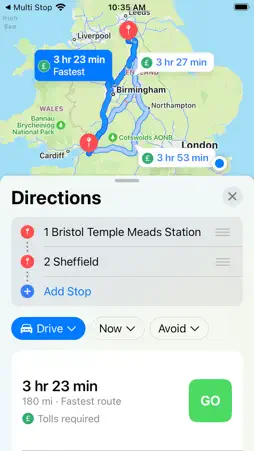
7 day free trial. All features of Multi Stop are available during the 7 day free trial period and then are only available if you are subscribed. Construct, save and share a Journey with others, as many stops as you want. You can add or remove stops. You can rearrange your stops, review stops or review parts of your Journey in Apple Maps and save your journey to come back to later or share with others. You can even share a Journey to collaborate with others. You can create and work on your Journeys on iPhone, iPad and Mac. So you could create a Journey on your Mac or iPad and then use it from your iPhone. When you are ready to go you can open your stops directly in Apple Maps or Google Maps. In Apple Maps you can load one stop at a time or a few stops at a time. You can copy or duplicate Journeys and then rearrange the copies. 1. Use the Search Box at the top to find an address. 2. Select the address that you want from the list which appears. 3. Tap the button "Add Stop'. 4. Repeat for as many stops as you want. 5. Use 'Apple Maps' or 'G Maps' button to see your whole Journey (pending any limitations from the map providers). 6. Or select a number of stops (selected Stops will be red) and use the 'map icon' at the top to see a Journey with just the selected stops. 7. You can rearrange stops by dragging them. 8. You can delete stops by swiping or by selecting any number of stops and tapping the 'Trash Can' at the top. 9. You can save, share, rename, duplicate or collaborate using iCloud for any Journeys. 10. If you save Journeys in iCloud you can access them on your other devices. Terms of Use (EULA) https://www.apple.com/legal/internet-services/itunes/dev/stdeula/
Technical Analysis
Package Overview Basic metadata
Bundle ID
com.pdfpaginate.MultiStop Current Version 1.0
Minimum iOS 16.4
Package Size App Store Size
Package Metadata 1 / 1 version records
Detailed binary, privacy manifest, framework, and Info.plist results have not been indexed for this package yet. The verified App Store and archive metadata above remains available.
Developer Information
Known Version Records
1 version record with stored package metadata
Stored metadata does not guarantee a package is currently available to download.
| Details | Version / IDs | Version date | Action |
|---|---|---|---|
| 993.0 KB | v1.0 App Store ID: 858042146Build: 1.0 | 2023-07-12 13:38:11 | Get Version |