
Preview






Description
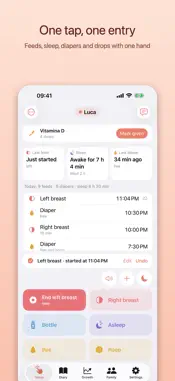
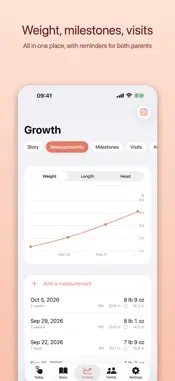
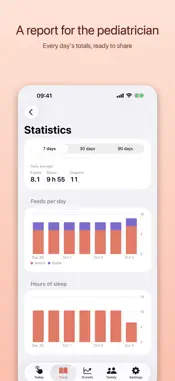
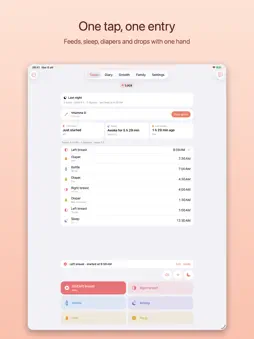
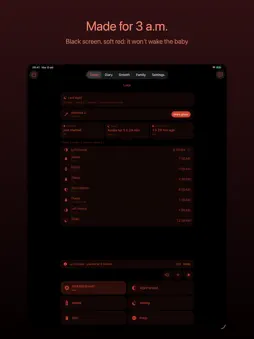
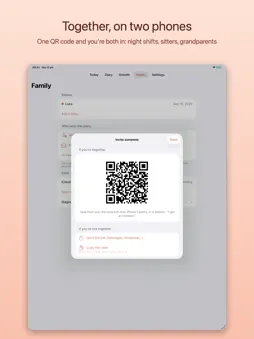
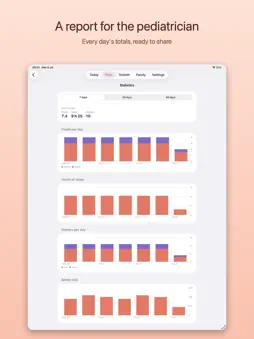
Bebora is your baby's diary, designed for the moment you really need it: 3 a.m., in the dark, with a newborn in your arms and one free hand. Breast, pumped milk or formula: every feed takes a single tap. And as your baby grows, the diary becomes their story. ONE TAP, ONE ENTRY • Left or right breast, bottle, sleep, pee and poop: big buttons at the bottom, right under your thumb. • Feeding and sleep timers, also on the Lock Screen and in the Dynamic Island: stop them without unlocking. • Undo and edit in a second. MADE FOR THE NIGHT • Night mode with a black screen and soft red: it doesn't light up the room or wake the baby. • Turns on by itself in the evening, with the Sleep Focus, or with a tap on the moon. • Sleep sounds: white noise, shush, heartbeat, rain, waves and music-box lullabies, even with the screen off. TOGETHER, ON TWO PHONES • Invite the other parent with a QR code, a link or a code: mom, dad or co-parent, you both see and write the same diary, in real time. • Night shifts: whoever is resting gets a silent phone and finds a summary of the night in the morning. • Babysitters and grandparents: simple access, with your instructions, that can end on its own. • Your data stays on your devices and in your iCloud. It never goes through our servers. THE EVERYDAY STUFF • Vitamin drops and supplements: one tap marks them as given, and you both know it. • Pumping? Keep your milk stock in the fridge and freezer in order: oldest bag first, with the expiry date you choose. • Handover: a summary of the last few hours in one message. THEIR STORY • A month-by-month timeline: milestones, photos, baby teeth, measurements, appointments and firsts (first solids, first bath), which Bebora finds in the diary on its own. • Weight, length and head circumference: follow their growth in a chart of your own data. • Visits with your family doctor or pediatrician, with reminders for both of you and the questions to ask. • Twins and siblings: a colour for each. A KEEPSAKE ALBUM TO PRINT • Choose the months, a style (Classic, Pastel, Polaroid, Notebook, Night) and the format: Bebora lays out the cover and the months. • Then make every page your own: photos, layout, backgrounds, frames, text and stickers to drag and rotate. • The PDF looks exactly like what you see: print it at home or turn it into a photo book. PRINT AND SHARE • The diary, the report for your doctor or pediatrician, or their story with photos, for any period you like, in one PDF. • From the preview, print it, send it or save it to Files. WITHOUT OPENING THE APP • "Hey Siri, log left feed in Bebora", or "When did the baby eat?". • Control Centre and Action button: one tap in the dark. • Diary, Drops and Night widgets, even in StandBy on your bedside table. FREE, NO LIMITS Unlimited entries and children, sharing with the other parent, babysitters and grandparents, timers, night mode, night shifts, drops, milk stock, baby teeth, their story, printing the last 7 days of the diary and creating the album are all free. BEBORA PLUS (one-time purchase, no subscription) Apple Watch, widgets with buttons, notification actions, PDFs for any period, the printable album PDF, 30- and 90-day statistics, full history, unlimited photos, all sleep sounds, themes, CSV export and no ads. With Apple's Family Sharing, one purchase covers the whole family. Bebora records what you enter: it gives no medical assessment and doesn't replace advice from your doctor or pediatrician.
What's New
Version 1.1.0 2026-10-25
- bug fix Technical Analysis
Package Overview Basic metadata
Bundle ID
it.swiftios.bebora Current Version 1.1.0
Minimum iOS 18.6
Package Size App Store Size
Package Metadata 0 / 0 version records
Detailed binary, privacy manifest, framework, and Info.plist results have not been indexed for this package yet. The verified App Store and archive metadata above remains available.
Developer Information
Known Version Records
0 version records with stored package metadata
Stored metadata does not guarantee a package is currently available to download.
| Details | Version / IDs | Version date | Action |
|---|