
Preview





Description
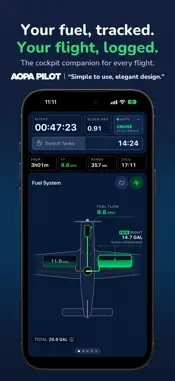
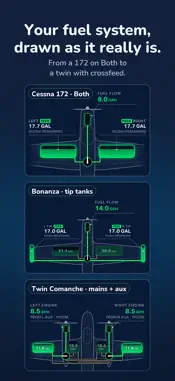
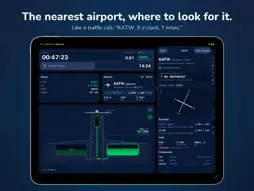
SkyTimer is the cockpit companion that tracks your fuel and logs your flight. It draws your aircraft's fuel system as it really is, tells you when to switch tanks, and records takeoffs, landings, and times on its own. On iPhone, iPad, and Apple Watch. *** YOUR FUEL, TRACKED *** SkyTimer estimates fuel used and remaining in every tank, live, from time on each tank and your aircraft's fuel burns. Change fuel flow mid-flight as conditions change, or pick a burn you've set up, like Rich of Peak, Lean of Peak, or Economy Cruise. - Your fuel system, drawn as it really is: from a 172 on Both to a twin with crossfeed, with up to 7 tanks and 4 engines. - Fuel Management Plans set the tanks each flight starts on and when to switch: by time on tank, fuel used, or fuel transferred. Smart Balance keeps your tanks even. - Works with a wide range of fuel selectors, transfer pumps, and crossfeeds. - Start from a catalog of common aircraft, or set up your own. Fuel quantities are estimates. Always confirm fuel with your gauges and a visual check. *** YOUR FLIGHT, LOGGED *** Smart Track uses GPS ground speed and your aircraft's Vso to detect takeoffs and landings, day and night. SkyTimer logs block and flight times, out/off/on/in times, and every airport, including stops, from a built-in worldwide airport database that works without Internet. Automatic detection needs a device with built-in GPS. Every flight goes into your logbook with fuel used, time on tanks, and Hobbs and Tach. Add notes, edit a trip, and export to CSV or LogTen. *** THE NEAREST AIRPORT, WHERE TO LOOK FOR IT *** Nearest gives you the closest airport like a traffic call, "KATW, 9 o'clock, 7 miles," with its runways, frequency, and elevation. *** ON iPHONE, iPAD, AND APPLE WATCH *** On iPad, run SkyTimer full screen or beside your EFB in Split View, Slide Over, or a window. On iPhone, the Live Activity and Dynamic Island keep fuel and times in view while you fly with your EFB. On iPhone Duo, open it up to see fuel, Nearest, and your trip side by side. On Apple Watch, every feature is on your wrist, and the watch keeps tracking on its own if your phone stays behind. Your aircraft and flights sync across your devices with iCloud. *** FREE TO START *** SkyTimer is free to download and logs block and flight times at no charge. SkyTimer Plus unlocks: - Fuel tracking and Fuel Management Plans - Automatic takeoff and landing detection - Unlimited flight storage - Multiple aircraft - Trip editing and export - iCloud sync, and in-flight sync between iPhone, iPad, and Apple Watch One subscription unlocks Plus on all your devices. --------------------- Payment is charged to your Apple Account at confirmation of purchase. Subscriptions renew automatically unless cancelled at least 24 hours before the end of the current period. Manage or cancel your subscription in your App Store account settings. Prices may vary by location. --------------------- Privacy Policy: https://skytimer.app/privacy/ Terms of Use: https://skytimer.app/terms/
What's New
Version 3.0 2026-11-07
SkyTimer 3.0 is a whole new SkyTimer, redesigned around the information you need in flight, readable at a glance on iPhone, iPad and Apple Watch. • A redesigne... Technical Analysis
Package Overview Basic metadata
Bundle ID
com.framework.SkyTimer Current Version 3.0
Minimum iOS 17.0
Package Size App Store Size
Package Metadata 1 / 44 version records
4.1 / 5.0 (20 ratings)
Detailed binary, privacy manifest, framework, and Info.plist results have not been indexed for this package yet. The verified App Store and archive metadata above remains available.
Developer Information
Known Version Records
1 version record with stored package metadata • 44 known version records
Stored metadata does not guarantee a package is currently available to download.
| Details | Version / IDs | Version date | Action |
|---|---|---|---|
| 143.39 MB | v2.5.11 App Store ID: 887165308Build: 2.5.11 | 2026-09-05 00:02:13 | Get Version |
| Not archived | App Store ID: 887112680 | Unknown | Request Version |
| Not archived | App Store ID: 886508461 | Unknown | Request Version |
| Not archived | App Store ID: 886166475 | Unknown | Request Version |
| Not archived | App Store ID: 884038697 | Unknown | Request Version |
| Not archived | App Store ID: 883767668 | Unknown | Request Version |
| Not archived | App Store ID: 883402695 | Unknown | Request Version |
| Not archived | App Store ID: 882758359 | Unknown | Request Version |
| Not archived | App Store ID: 882491195 | Unknown | Request Version |
| Not archived | App Store ID: 878375975 | Unknown | Request Version |
| Not archived | App Store ID: 878113631 | Unknown | Request Version |
| Not archived | App Store ID: 872573445 | Unknown | Request Version |
| Not archived | App Store ID: 872482642 | Unknown | Request Version |
| Not archived | App Store ID: 869851326 | Unknown | Request Version |
| Not archived | App Store ID: 869676872 | Unknown | Request Version |
| Not archived | App Store ID: 868397959 | Unknown | Request Version |
| Not archived | App Store ID: 868111204 | Unknown | Request Version |
| Not archived | App Store ID: 867973832 | Unknown | Request Version |
| Not archived | App Store ID: 867887297 | Unknown | Request Version |
| Not archived | App Store ID: 867800864 | Unknown | Request Version |
| Not archived | App Store ID: 861923721 | Unknown | Request Version |
| Not archived | App Store ID: 861419609 | Unknown | Request Version |
| Not archived | App Store ID: 861314680 | Unknown | Request Version |
| Not archived | App Store ID: 861291097 | Unknown | Request Version |
| Not archived | App Store ID: 861248951 | Unknown | Request Version |
| Not archived | App Store ID: 861209501 | Unknown | Request Version |
| Not archived | App Store ID: 860981008 | Unknown | Request Version |
| Not archived | App Store ID: 860682720 | Unknown | Request Version |
| Not archived | App Store ID: 860021472 | Unknown | Request Version |
| Not archived | App Store ID: 855049765 | Unknown | Request Version |
| Not archived | App Store ID: 854912625 | Unknown | Request Version |
| Not archived | App Store ID: 853690990 | Unknown | Request Version |
| Not archived | App Store ID: 848616785 | Unknown | Request Version |
| Not archived | App Store ID: 847252756 | Unknown | Request Version |
| Not archived | App Store ID: 844699981 | Unknown | Request Version |
| Not archived | App Store ID: 844694398 | Unknown | Request Version |
| Not archived | App Store ID: 842631560 | Unknown | Request Version |
| Not archived | App Store ID: 841100221 | Unknown | Request Version |
| Not archived | App Store ID: 840768945 | Unknown | Request Version |
| Not archived | App Store ID: 839543292 | Unknown | Request Version |