Preview







Description
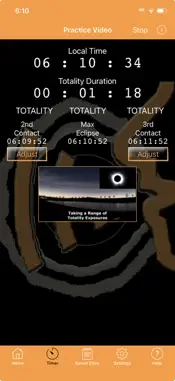
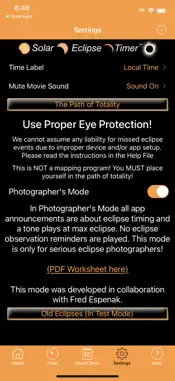
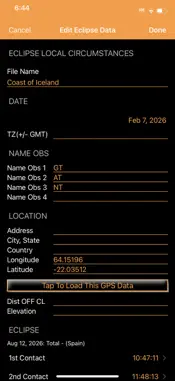
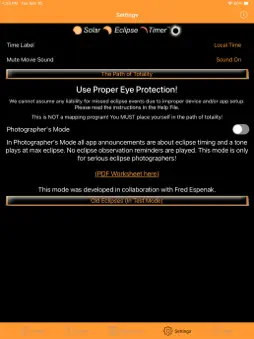
The Solar Eclipse Timer app is marking its 6th eclipse since 2017, which speaks volumes about its reliability and the trust it has built within the eclipse-chasing community. Helping tens of thousands of people enjoy the eclipse more by being reminded to observe all the fascinating eclipse phenomena. Photographers are aided by down-to-the-second precision and countdowns. Since the 2026 path covers some remote areas as well as high-traffic spots in Spain where cell service could be overwhelmed on eclipse day, the app works offline once unlocked. So, geolocation and contact time calculation are all done within the app. This makes it a true "field tool." The app is free to try, and for only a $1.99 in-app purchase to unlock the 2026 eclipse, it's an easy "yes" for anyone who has invested time and travel to be in the path of totality. In-App Video Tutorial: The first button on the Home Screen provides a comprehensive tutorial that explains all the app's functions and how to use them effectively. Audio and Notification Tests: The second button lets users run a "device sound check" to confirm that audio cues, spoken timings, and notifications are audible, which is critical since the app is designed to talk to you. Practice Session Video: The third button launches a 4-minute-45-second video of my actual eclipse-day observation site in 2024, synchronized with the app's real-time announcements. This allows both observers and photographers to practice their routines repeatedly, such as observing for shadow bands, adjusting shutter speeds, and knowing when to remove solar filters. Additionally, dialogue boxes appear as functions are selected, giving you more guidance. On eclipse day, after you get into the path, you can be timing the eclipse in 3 easy steps: 1. Tap to geolocate. 2. Tap to have the app calculate the precise contact times. 3. Tap to load the times into the timer. That's it! You are timing the eclipse. A major convenience feature of the app is the automatic calculation of the clock times needed to capture a perfect set of partial-phase images before and after totality. It is the only app in the world with this function. Collaborating with the late Fred Espenak (Mr. Eclipse) on Photographers Mode before the 2024 eclipse gives the app an incredible pedigree. For pros who need to stay "in the zone" and only care about timing and countdowns from C1 through C4, this mode is a game-changer. You can manually enter coordinates and save the site as a file. This helps compare multiple potential viewing locations. The app includes a hyperlink to the Solar Eclipse Timer website, which gives access to downloadable worksheets to record your partial-phase image times or the chores you want to do in Photographers mode, as well as my Master Stop Chart to count full and partial camera stops. I have observed and photographed six total solar eclipses and one annular eclipse. The concept of an eclipse “talking” timer was developed by me in 2002. I have been helping people time eclipses for almost 25 years. When you use the app, you will appreciate that it was designed by an eclipse chaser. There is also a link to learn more about my comprehensive eclipse observation and photography book, now in its second edition, titled “Eclipse Day.” The app also has a partial eclipse timing mode. This app is ad-free and does not track any user data. ALWAYS USE EYE PROTECTION DURING THE PARTIAL PHASES OF A SOLAR ECLIPSE! OR EVEN WHEN IT IS BRIGHT! NOT DOING SO CAN CAUSE EYE DAMAGE! We are NOT liable for misuse of the app, causing inaccurate timing, or the lack of eye safety precautions during the observation of a solar eclipse. The "glasses off" and "glasses on" statements are guides based on the calculated contact times. The timing can be affected by your phone's clock and the shape of the shadow due to the edge of the lunar limb. Use the Adjust buttons for Lunar Limb variation time adjustments. Glasses should be ON if it's bright!
What's New
Version 5.0.14 2026-08-05
GPS coordinate validation improvements Technical Analysis
Package Overview Basic metadata
Bundle ID
com.solareclipsetimer.foxwoodastronomy Current Version 5.0.14
Minimum iOS 12.0
Package Size App Store Size
Package Metadata 0 / 23 version records
3.8 / 5.0 (557 ratings)
Detailed binary, privacy manifest, framework, and Info.plist results have not been indexed for this package yet. The verified App Store and archive metadata above remains available.
Developer Information
Known Version Records
0 version records with stored package metadata • 23 known version records
Stored metadata does not guarantee a package is currently available to download.
| Details | Version / IDs | Version date | Action |
|---|---|---|---|
| Not archived | App Store ID: 885756406 | Unknown | Request Version |
| Not archived | App Store ID: 884518573 | Unknown | Request Version |
| Not archived | App Store ID: 883474167 | Unknown | Request Version |
| Not archived | App Store ID: 864667951 | Unknown | Request Version |
| Not archived | App Store ID: 864211534 | Unknown | Request Version |
| Not archived | App Store ID: 863163884 | Unknown | Request Version |
| Not archived | App Store ID: 860389555 | Unknown | Request Version |
| Not archived | App Store ID: 857811266 | Unknown | Request Version |
| Not archived | App Store ID: 856577622 | Unknown | Request Version |
| Not archived | App Store ID: 833830432 | Unknown | Request Version |
| Not archived | App Store ID: 831204942 | Unknown | Request Version |
| Not archived | App Store ID: 830102826 | Unknown | Request Version |
| Not archived | App Store ID: 823109944 | Unknown | Request Version |
| Not archived | App Store ID: 823001756 | Unknown | Request Version |
| Not archived | App Store ID: 822810412 | Unknown | Request Version |
| Not archived | App Store ID: 822716428 | Unknown | Request Version |
| Not archived | App Store ID: 822544309 | Unknown | Request Version |
| Not archived | App Store ID: 822419751 | Unknown | Request Version |
| Not archived | App Store ID: 822360392 | Unknown | Request Version |
| Not archived | App Store ID: 822347500 | Unknown | Request Version |
| Not archived | App Store ID: 822241633 | Unknown | Request Version |
| Not archived | App Store ID: 821966017 | Unknown | Request Version |
| Not archived | App Store ID: 820847058 | Unknown | Request Version |