
Preview






Description
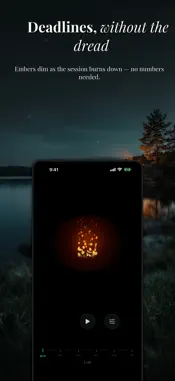
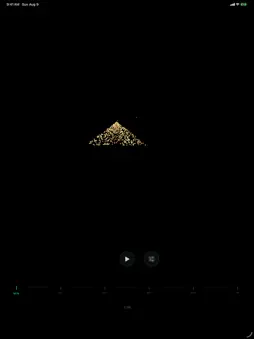
If you have ever looked up and lost an hour, you do not need another number counting down. You need to see time move. Tempo turns time into something you can watch. A dandelion loses its seeds. An eclipse closes over. A snowman gives in to the sun. Glance at your phone from across the room and you know how much is left — no reading, no math. BUILT FOR TIME BLINDNESS Numbers are abstract. If your brain does not track elapsed time on its own, "20 minutes" means nothing until it is already gone. Tempo makes time spatial instead, so you feel it draining rather than having to calculate it. FROM ONE MINUTE TO ONE YEAR Most timers stop at an hour. Tempo has six scales: • MINUTE — a focus sprint or a short break • HOUR — the meeting, the work block • DAY — how much of today is actually left • MONTH — the deadline that still feels far away • SEASON (Pro) — the three months you keep meaning to use • YEAR — the one nobody shows you The longer scales run live against the real calendar. Open Tempo in October and the year is already most of the way gone. That is not a gimmick — for anyone who loses whole weeks, seeing it is the point. SEVEN VISUALIZATIONS Dandelion, Dots, Eclipse, Ember, Sand, Snowman, and Thunderstorm. Pick the one your brain actually reads, and set it as your default. ON YOUR WRIST AND LOCK SCREEN An Apple Watch app and Lock Screen and Home Screen widgets keep your current scale in view without opening anything — so checking the time stops being the distraction. BUILT TO STAY QUIET • No account, no sign-up, no email • Works entirely offline • No streaks, no badges, no guilt mechanics • No ads, ever Tempo will not fix your relationship with time. It just makes time visible, so the hours stop disappearing without warning. Free: the Dots visualization and five of the six scales — MINUTE, HOUR, DAY, MONTH, and YEAR. A one-time Pro purchase adds Dandelion, Eclipse, Ember, Sand, Snowman, Thunderstorm, and the SEASON scale. No subscription.
What's New
Version 2.0.2 2026-10-08
When Tempo asks how it's going and you say you're enjoying it, it now takes you straight to the App Store to leave a rating or a review. It used to ask iOS for ... Technical Analysis
Package Overview Basic metadata
Bundle ID
com.buildscalelabs.tempo Current Version 2.0.2
Minimum iOS 17.0
Package Size App Store Size
Package Metadata 0 / 4 version records
Detailed binary, privacy manifest, framework, and Info.plist results have not been indexed for this package yet. The verified App Store and archive metadata above remains available.
Developer Information
Known Version Records
0 version records with stored package metadata • 4 known version records
Stored metadata does not guarantee a package is currently available to download.
| Details | Version / IDs | Version date | Action |
|---|---|---|---|
| Not archived | App Store ID: 885162064 | Unknown | Request Version |
| Not archived | App Store ID: 884467962 | Unknown | Request Version |
| Not archived | App Store ID: 881789894 | Unknown | Request Version |
| Not archived | App Store ID: 881260289 | Unknown | Request Version |