Preview




Description
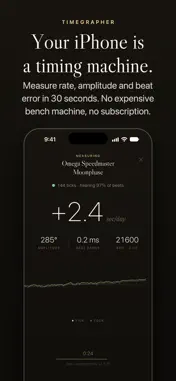
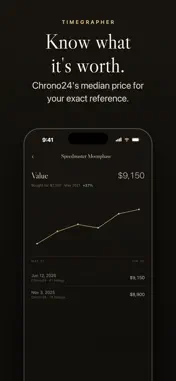
Timegrapher measures your mechanical watch's rate, amplitude and beat error with your iPhone's microphone, in 30 seconds. It reads through room noise and works out amplitude from your calibre's lift angle. Your first watch is free, and Pro is a single purchase with no subscription. WHAT IT MEASURES • Rate: seconds gained or lost per day, the figure a chronometer certificate is based on • Amplitude: how far the balance swings, the first thing a watchmaker checks • Beat error: the difference between tick and tock, which shows when the escapement needs adjusting • Beat rate: detected automatically, from 18,000 bph vintage movements to 36,000 bph hi-beats STEADY READINGS Phone timing apps are known for jumpy numbers and unreliable amplitude. Timegrapher handles both. It tracks the room's noise floor and ignores stray sounds, so it stays locked onto a quiet movement even with a dog barking nearby. It also calculates amplitude from the lift angle you set for each calibre, to a tenth of a degree. A wrong lift angle is the most common reason phone apps get amplitude wrong. MEASURE IN POSITIONS A watch runs differently lying flat and standing on its side. Measure in Positions guides you through all six positions, or four for a quicker check, and shows a table of the results with the average rate and the spread between positions. IS IT MAGNETIZED? A magnetized hairspring is the most common reason a watch suddenly gains time, often by minutes a day. Timegrapher reads the room's magnetic field first. Then you move the watch slowly around the back of the iPhone, and the magnetometer shows whether the watch needs demagnetizing. RATE OVER A DAY OF WEAR Take a photo of the dial, then another one a day later. Timegrapher compares the hands with the time each photo was taken and shows how the watch ran on your wrist. YOUR COLLECTION Add each watch with up to 13 photos, the reference and serial number, year, calibre, movement type and lift angle. On iOS 27, Identify from Photo suggests the brand and model. Every measurement is saved, and charts show how the rate drifts over months and years, so you can spot a movement going off early. Reminders tell you when to measure again. After each reading you get a verdict from Excellent to Service needed, with the reasons. The Guide tab explains every number. TIMING REPORT Share a one-page report on a watch as a PDF or an image, with the latest reading, the positions and the rate over time. The serial number is left out, so you can post the report or add it to a sale listing. You can also export your measurements as a CSV file. ATOMIC CLOCK The Clock tab shows the exact time from Apple's time server and how far your iPhone's clock is off. Countdown tones before each minute help you set your watch to the second. WHAT IT'S WORTH One tap fetches current Chrono24 asking prices for your exact reference and saves the median, worked out on your iPhone in your own currency. Enter what you paid, and Timegrapher charts each watch's value over time, its gain since purchase and your collection's total. PRIVACY Audio is analysed on the device and is never recorded, stored or uploaded. There is no account, no advertising and no tracking. The app goes online only for features you use: the price check searches Chrono24 for your reference, the Clock tab asks Apple's time server for the time, and Identify from Photo sends that one photo to Apple's Private Cloud Compute. PRICING Your first watch is free for good. Timegrapher Pro adds unlimited watches for one payment, with no subscription. Purchases restore on any device signed in to the same Apple Account. LIMITS A quiet room and firm contact between the phone and the watch give the best readings. Treat the results as a guide: for service decisions, a bench machine and a watchmaker's judgement come first.
What's New
Version 2.8 2026-11-01
Two changes you asked for: • Lift angle to a tenth of a degree. The slider now moves in steps of 0.5°, and the − and + buttons beside it change the lift angle ... Technical Analysis
Package Overview Basic metadata
Bundle ID
com.wmr.Timegrapher Current Version 2.8
Minimum iOS 17.0
Package Size App Store Size
Package Metadata 0 / 0 version records
Detailed binary, privacy manifest, framework, and Info.plist results have not been indexed for this package yet. The verified App Store and archive metadata above remains available.
Developer Information
Known Version Records
0 version records with stored package metadata
Stored metadata does not guarantee a package is currently available to download.
| Details | Version / IDs | Version date | Action |
|---|