
Preview




Description
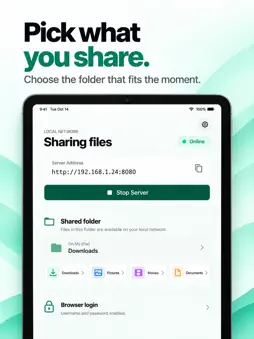
Your files. Between your devices. BlinkHop connects your iPhone or iPad to your computer over the same Wi-Fi network. Start sharing on your device, open the displayed address in your computer's browser, and move files in either direction. No companion computer app or developer cloud account is required. SEND FILES BOTH WAYS Download files from your device to your Mac, Windows or Linux computer. Send files back by dropping them into the browser or choosing them with the upload button. Select multiple files to queue individual browser downloads. CHOOSE YOUR SHARED FOLDER Use BlinkHop's app-owned Shared folder, or authorize an available folder through the iOS Files picker. You control which folder is shared and when the server is running. To share photos or videos from your photo library, save copies to an accessible folder in Files first. BROWSE AND ORGANIZE Navigate folders and sort files by name, size or modification date. Paginated lists keep browsing manageable. Delete individual files or selected items from your computer after confirmation. Deletion permanently removes the selected files or folders from the shared storage location. STREAM, DON'T ZIP Downloads stream from storage without creating ZIP archives on your device. Uploads are written progressively, with progress and cancellation controls in the browser. Existing filenames are preserved by adding a numbered suffix. ACCESS YOU CONTROL Set a username and password before starting the server. Stop sharing with one tap when you are finished. Choose light, dark or system appearance. GET CONNECTED 1. Connect your device and computer to the same private, trusted Wi-Fi network. 2. Allow Local Network access if iOS asks. 3. Choose your shared folder and set the browser login. 4. Tap Start Server and open the displayed address on your computer. 5. Keep BlinkHop open in the foreground during transfers. Tap Stop Server when finished. GOOD TO KNOW BlinkHop cannot access arbitrary system folders, other apps' private storage or your photo library directly. Folder availability and write access depend on iOS and the selected file provider. Download cloud-backed files in Files first when necessary. Choose an external folder again after restarting the app. Uploads need sufficient free storage, and your browser may ask you to allow multiple downloads. The local connection uses HTTP with password authentication, not HTTPS encryption. Files, directory information and login credentials are not encrypted in transit. Use only a trusted network and a password you do not use elsewhere. Anyone with your login and network access can access the shared folder while the server is running.
Technical Analysis
Package Overview Basic metadata
Bundle ID
com.smbfiletransfer.blinktwice Current Version 1.0
Minimum iOS 14.0
Package Size App Store Size
Package Metadata 0 / 0 version records
Detailed binary, privacy manifest, framework, and Info.plist results have not been indexed for this package yet. The verified App Store and archive metadata above remains available.
Developer Information
Known Version Records
0 version records with stored package metadata
Stored metadata does not guarantee a package is currently available to download.
| Details | Version / IDs | Version date | Action |
|---|