
Preview



Description
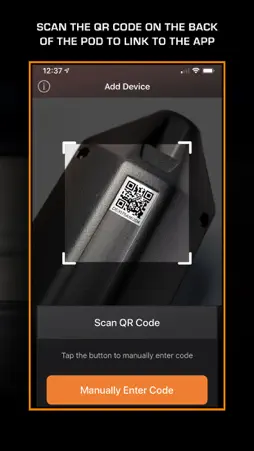
FluidLogic VMR Control App Engineered for precision. Built for performance. The FluidLogic VMR Control App puts you in command of your FluidLogic VMR System—our hands-free hydration platform trusted by elite race teams worldwide. Built for vehicle-mounted systems, the app lets you fine-tune your hydration strategy straight from your phone. Your VMR System works out of the box with default settings. But to unlock full control, connect to the app and customize your hydration plan. Key Features - Bluetooth control of your FluidLogic VMR System - Custom hydration profiles for individual drivers or cars - Two modes: Manual and Semi-Auto, tailored to your race pace - Adjustable Volume (dose size) and Strength (flow rate) - LED alert customization for hydration reminders and visibility Modes of Operation Manual Mode - Precision control when you need it. - Set Volume (1–10 ml) per tap - Set Strength (Low–Med–High) for delivery force - Tap the Microbutton for a measured dose, or hold for continuous flow - Adjust Idle LED brightness in Advanced Configuration Semi-Auto Mode - Timed prompts, manual delivery. - Volume and Strength settings remain active - Enable Reminder System for timed LED prompts - Set Interval (e.g., every 30 sec) for reminder frequency - LED blinks, then stays on until pressed—resetting the cycle - Adjust Idle and Alert LED brightness in Advanced Configuration To Connect Your VMR System: 1. ) Open the app and tap Add New Device 2.) Hit the + icon to scan the QR code on the included card or the back of the POD—or enter the code manually 3.) Name your device, add a profile image, and begin setup 4.) Use the Device Setup screen to tailor hydration to your race
What's New
Version 1.1.2 2025-09-08
Same fundamental functionality with some design refresh. Technical Analysis
Package Overview Basic metadata
Bundle ID
com.rainmakersolutions.volans-ios Current Version 1.1.2
Minimum iOS 13.0
Package Size App Store Size
Package Metadata 0 / 4 version records
Detailed binary, privacy manifest, framework, and Info.plist results have not been indexed for this package yet. The verified App Store and archive metadata above remains available.
Known Version Records
0 version records with stored package metadata • 4 known version records
Stored metadata does not guarantee a package is currently available to download.
| Details | Version / IDs | Version date | Action |
|---|---|---|---|
| Not archived | App Store ID: 876350630 | Unknown | Request Version |
| Not archived | App Store ID: 846914196 | Unknown | Request Version |
| Not archived | App Store ID: 840498852 | Unknown | Request Version |
| Not archived | App Store ID: 834352032 | Unknown | Request Version |