
Preview




Description
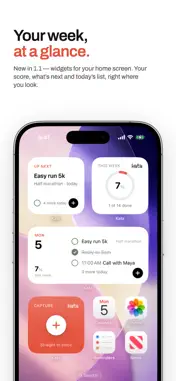
Kata is a weekly planner with real projects underneath. Your whole week sits on one page, the way a paper planner does: seven days, each with a ruled line to write on. Underneath it, every project, area and heading keeps its own list. It is the same task in both places, so ticking it off on the week ticks it off in its project. AN HONEST WEEK • Unfinished work carries forward to today, and remembers the day it came from. • A task can be done, still open, or decided against, and deciding against something never counts as failing it. • The week's meter says how much of what you planned you actually did: "24% of plan done". REAL STRUCTURE • Inbox, areas, projects, headings and Someday. • Project deadlines, drawn on the week when they arrive. • Repeating tasks you can move, skip, pause and stop without losing their history. • A list or a Kanban board for every project. QUIET BY DESIGN • One accent colour, and it means today. • No badges, no confetti, nothing asking for your attention. • Your calendar's events beside your plan, read-only. • Reminders when you ask for them, and a morning note of the day if you want one. • Widgets for your home screen and lock screen, and tasks you can tick off from your home screen. YOURS • No account and no tracking. Your tasks sync through your own iCloud. • Export everything as one file whenever you like. • If you stop subscribing, everything stays readable and exportable. Kata is free to download and comes with a free two-week trial of its monthly subscription. After the trial the subscription renews monthly at the price shown before you subscribe, unless you cancel at least 24 hours before the end of the current period. Manage or cancel it in your Apple ID's subscription settings. Terms of Use: https://www.apple.com/legal/internet-services/itunes/dev/stdeula/ Privacy Policy: https://kata.flow-craft.in/privacy
What's New
Version 1.1.1 2026-10-10
The places on the Projects page have icons now: Inbox, Someday, Log, Insights, Trash and Settings. Two new rows in Settings › About: request a feature or send ...The places on the Projects page have icons now: Inbox, Someday, Log, Insights, Trash and Settings. Two new rows in Settings › About: request a feature or send us feedback by email, or rate Kata on the App Store. Technical Analysis
Package Overview Basic metadata
Bundle ID
in.flow-craft.kata Current Version 1.1.1
Minimum iOS 18.0
Package Size App Store Size
Package Metadata 0 / 0 version records
Detailed binary, privacy manifest, framework, and Info.plist results have not been indexed for this package yet. The verified App Store and archive metadata above remains available.
Developer Information
Known Version Records
0 version records with stored package metadata
Stored metadata does not guarantee a package is currently available to download.
| Details | Version / IDs | Version date | Action |
|---|