
Preview











Description
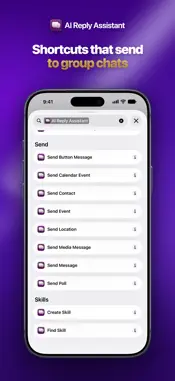
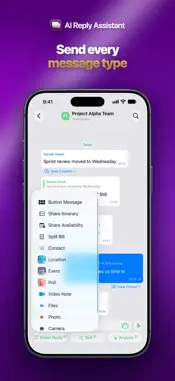
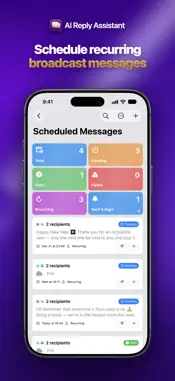
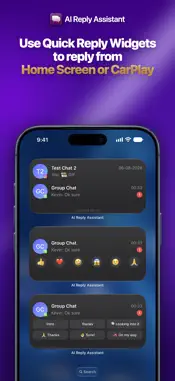
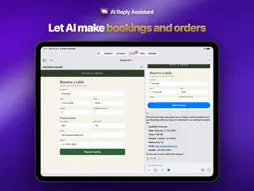
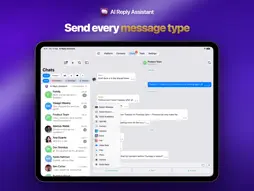
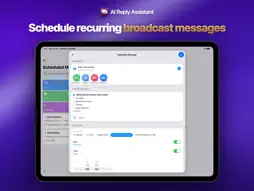
ONE UNIFIED INBOX • All connections are on-device, so your messages stay private • Cross-platform stickers — use your Telegram stickers in WhatsApp chats too • Support all outgoing message types, including polls, events and interactive button messages • Use custom lists to keep your chats organized AI ASSISTANT • Integrated with your messages, so AI can use message context to get tasks done • Choose from five AI models: Apple Intelligence on-device & Private Cloud Compute, plus Claude Opus, Sonnet, & Haiku via your API key or pay-as-you-go AI credits • Generates action cards—a draft message, calendar event, or reminder—so you can review everything and stay in control • Conversation scoping lets the AI search only the chats you choose, keeping the rest of your inbox private & the context focused • Feature Discovery (Tools tab) lists everything the app does AGENT & SKILLS • Save reusable Skills instead of retyping prompts; import from the Skills Marketplace or Claude skill files ENHANCE AI CAPABILITIES WITH AI TOOLS • Web Browser: Claude fills in forms and makes bookings on websites in the app, asks before it submits, and hands over to you for sign-in & payment • Information retrieval: Web Search, Calendar, Reminders, Contacts, Location, Files, Knowledge Base • Conversation context: Messages, Conversations • Generation: Draft Replies, Image Generation, Code Execution (documents, charts, HTML files, data analysis) • Autonomy: Memory, Task Tracking, Sub-Agent Research MORE AI FEATURES • Smart Reply — context-aware reply suggestions, editable before you send • Unread Summary — catch up and prioritize unread chats • Chatbot — ask about a chat and choose takeaways, unanswered questions, events, reminders, replies or a table • Writing Tools — fix mistakes, change the tone, or translate drafts • Image Playground — for image generation DRAFT DYNAMIC MESSAGES • From Message — the AI reads your chat and fills in a poll or event for you • Poll from Photo — photograph a menu, flyer or list for ready-to-send polls • Split Bill — scan receipts, add tip or charges, & send who owes what • Share Itinerary/Availability — pick days or events from your calendar & instantly draft a message • Share Reminders — send lists as a message, poll or Telegram checklist EDIT & SHARE • Edit Video — trim, crop, rotate, speed, filters, draw & more before you send • Saved Places — bookmark and reuse places • Share to the app from Wallet, Contacts, Maps and Voice Memos AUTOMATE WITH APPLE SHORTCUTS • Eight send actions: text, files, media, poll, event, button, location, contact • They accept a conversation or a contact, so an automation can reach a WhatsApp group, a Telegram channel or an Instagram DM • Group chats into a list, then use Get Conversations in List to message everyone in it SIRI & SPOTLIGHT • Your chats are indexed on device, so Siri & Spotlight can answer questions from them • Locked chats behind Face ID are never indexed QUICK REPLY • Save any message as a Quick Reply, even a photo, video or button message • Use variables such as {RecipientFirstName} to greet people by name automatically • Send from Home Screen and CarPlay widgets on the go SCHEDULED MESSAGES • Send recurring or one-off messages to many chats or contacts across platforms TRANSLATION & TRANSCRIPTION • Translate text, captions, templates, menus, orders & shared reels • Transcribe voice messages and videos, then translate the transcript BIRTHDAYS & PROFILE PICTURES • Sync birthdays from Contacts, Telegram and WhatsApp; a banner on the day inserts your greeting in one tap • Sync WhatsApp or Telegram profile pictures to recognize people in Contacts PLEASE NOTE • Calls are not supported • Don't send unsolicited bulk messages (risks account restriction) • WhatsApp, Telegram, Instagram, Messenger are trademarks of their respective owners; AI Reply Assistant is independent Terms of Use (EULA): https://flowbie.sg/terms/ Privacy Policy: https://flowbie.sg/privacy-policy/
What's New
Version 4.14 2026-11-06
• New: Ask Siri to send a message in your WhatsApp or Telegram chats, including groups. • New: Ask Siri about your chats, such as what the last message in a gro... Technical Analysis
Package Overview Basic metadata
Bundle ID
Flowbie.AI-Reply-Assistant Current Version 4.14
Minimum iOS 26.0
Package Size App Store Size
Package Metadata 0 / 0 version records
Detailed binary, privacy manifest, framework, and Info.plist results have not been indexed for this package yet. The verified App Store and archive metadata above remains available.
Developer Information
Known Version Records
0 version records with stored package metadata
Stored metadata does not guarantee a package is currently available to download.
| Details | Version / IDs | Version date | Action |
|---|