Preview




Description
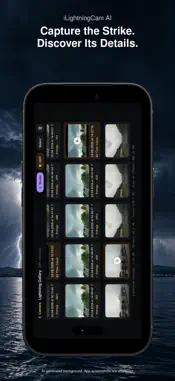
iLightningCam AI – photograph lightning without pressing the shutter. Set up your iPhone and point it at the storm. The app watches the camera image and takes the shot automatically at every strike. Each detected strike appears as a card with all images of that moment and a combined image that brings all phases together. Save the images you choose to the Photos app. iLightningCam AI is the successor to iLightningCam 2 and to iLightningCam, the first lightning app for iOS, available on the App Store since 2011. Existing owners of iLightningCam 2 receive iLightningCam AI as an update. Why “AI”: the parameters for lightning detection and for post-processing in the Studio were determined with artificial intelligence, using thousands of real lightning images from iLightningCam 2 and iLightningCam AI. iLightningCam AI is a genuine photo app. It uses no generative AI to create images. The Studio, too, only optimizes and enhances your own shots and never creates artificial lightning. WHAT THE APP DOES • Real-time lightning detection, day and night, with images at photo resolution • More phases per strike: high temporal resolution captures how a strike develops across several individual images • Much improved detection, especially in daylight against a bright sky, with few false triggers • Higher image quality thanks to the new engine and the HEIC format • Automatic exposure, frame rate and capture mode, tuned for lightning and for your iPhone • Modes for every storm: Auto, Normal, Near Lightning, Distant Lightning, Sheet Lightning and Manual, with your own ISO range • Horizon line: nothing below it is analyzed, so cars and streetlights don’t interfere • Focus calibration for every lens, optimized for storm photography • Detailed in-app manual in eight languages, including the basics of lightning photography iLightningCam Studio (in-app purchase) The optional add-on brings editing tools to the app: • Choose the best phases of a strike and combine them into an image of your own • Lightning Repair: bring out the bolt, remove dark edges along it, soften the bright horizontal band the camera can produce. Many image defects can be reduced considerably this way, but not all. • Crop and fine-tune light and color • Save as an image, Live Photo or video clip • Time-lapse of the entire storm, with separate speed settings for the strikes and the storm One-time purchase, Family Sharing included, no subscription. Your originals stay untouched. The Studio only works with strikes captured with iLightningCam AI. Images from iLightningCam 2, from other apps or from the Photos app cannot be imported. APPLE WATCH (EXPERIMENTAL) • A paired Apple Watch shows every strike with its image and starts or stops detection. • Complements the app on the paired iPhone – it cannot be used on its own or with an iPad (an Apple rule). • Alert even when the display is dark, if iCloud is turned on. Requires watchOS 10 or later; reliable only with newer models. REQUIREMENTS iPhone with iOS 17 or later, iPad with iPadOS 17 or later. For good results, use a tripod or steady support and make sure you have a clear view of the storm. SAFETY Thunderstorms are life-threatening. Seek shelter immediately as soon as a storm can be seen or heard, and never stay outdoors. Only take photos from inside an enclosed building, through a window. You are responsible for your own actions and for any resulting damage. The app is not intended for children or for people who cannot protect themselves from thunderstorms. The full safety information is in chapter 1 of the in-app manual.
What's New
Version 5.6 2026-11-19
• iLightningCam Studio: You can now combine several strikes from one storm into a single image. In the Lightning Gallery, tap “Select”, mark the strikes, then t...• iLightningCam Studio: You can now combine several strikes from one storm into a single image. In the Lightning Gallery, tap “Select”, mark the strikes, then tap “Combine”. • iLightningCam Studio: Advanced processing of 10-bit data. Strikes captured with the “Experimental” image quality are edited and saved in 10 bit in the Studio, for smoother gradients in the sky. A “10 BIT” badge marks these strikes in the gallery. • More reliable when many strikes come in quick succession. • The manual describes the new features. Technical Analysis
Package Overview Basic metadata
Bundle ID
com.florianstiassny.iLightningCam Current Version 5.6
Minimum iOS 17.0
Package Size App Store Size
Package Metadata 1 / 13 version records
4.0 / 5.0 (86 ratings)
Detailed binary, privacy manifest, framework, and Info.plist results have not been indexed for this package yet. The verified App Store and archive metadata above remains available.
Developer Information
Known Version Records
1 version record with stored package metadata • 13 known version records
Stored metadata does not guarantee a package is currently available to download.
| Details | Version / IDs | Version date | Action |
|---|---|---|---|
| 15.84 MB | v4.0 App Store ID: 843806900Build: 4.0 | 2021-08-27 13:18:47 | Paid / Arcade |
| Not archived | App Store ID: 832425361 | Unknown | Paid / Arcade |
| Not archived | App Store ID: 831925649 | Unknown | Paid / Arcade |
| Not archived | App Store ID: 829175478 | Unknown | Paid / Arcade |
| Not archived | App Store ID: 827808198 | Unknown | Paid / Arcade |
| Not archived | App Store ID: 826094374 | Unknown | Paid / Arcade |
| Not archived | App Store ID: 821738135 | Unknown | Paid / Arcade |
| Not archived | App Store ID: 821276463 | Unknown | Paid / Arcade |
| Not archived | App Store ID: 818091448 | Unknown | Paid / Arcade |
| Not archived | App Store ID: 817618057 | Unknown | Paid / Arcade |
| Not archived | App Store ID: 816723568 | Unknown | Paid / Arcade |
| Not archived | App Store ID: 812933433 | Unknown | Paid / Arcade |
| Not archived | App Store ID: 812796192 | Unknown | Paid / Arcade |