
Preview





Description
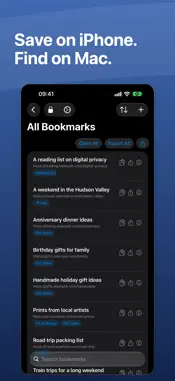
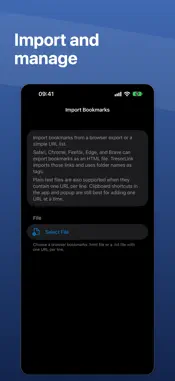
Private bookmarks for Safari. Save a link. Close the tab. Find it later behind Face ID, Touch ID, or your device passcode. Keep gift ideas, personal research, travel plans, and the links you want after a private browsing session in your own encrypted vault. SAVE, LOCK, FIND IT LATER • Save from Safari, or use the Share Sheet on iPhone and iPad • Paste or drop a link into the Mac app • Unlock with your device authentication • Search your collection and organize it with encrypted tags and notes • Sync across iPhone, iPad, and Mac through iCloud • Import browser bookmarks and export whenever you choose On iPhone and iPad, switch Safari to Private Browsing before reopening links when private opening is enabled. On Mac, TresorLink can open a private Safari window for you. PRIVATE BY DESIGN URLs, titles, notes, and tags are encrypted on your device with AES-256-GCM before storage or iCloud sync. There is no separate TresorLink account or master password. Vault keys stay in Keychain and can sync through iCloud Keychain when enabled. TresorLink cannot recover encrypted bookmarks without their keys. The Safari extension reads a page's title and URL when you choose to save it. It does not collect your browsing history. Saved bookmarks are kept outside ordinary Safari bookmarks. 10 BOOKMARKS FREE Encryption, iCloud sync, tags, notes, and Safari access are included free. Plus unlocks unlimited bookmarks: choose monthly, yearly, or a one-time lifetime purchase. Existing bookmarks remain available to view, open, edit, export, and delete if Plus expires. Local prices appear before purchase. Exported bookmark files contain plaintext for compatibility with other apps and browsers. Privacy Policy: https://tresorlink.com/privacy Terms of Use / EULA: https://www.apple.com/legal/internet-services/itunes/dev/stdeula/
What's New
Version 1.3.2 2026-11-02
Added screenshots showing the app on the iPhone Duo inner display. Technical Analysis
Package Overview Basic metadata
Bundle ID
com.flaviothomi.TresorLink Current Version 1.3.2
Minimum iOS 18.0
Package Size App Store Size
Package Metadata 0 / 2 version records
Detailed binary, privacy manifest, framework, and Info.plist results have not been indexed for this package yet. The verified App Store and archive metadata above remains available.
Developer Information
Known Version Records
0 version records with stored package metadata • 2 known version records
Stored metadata does not guarantee a package is currently available to download.
| Details | Version / IDs | Version date | Action |
|---|---|---|---|
| Not archived | App Store ID: 888510546 | Unknown | Request Version |
| Not archived | App Store ID: 886294266 | Unknown | Request Version |