
Preview






Description
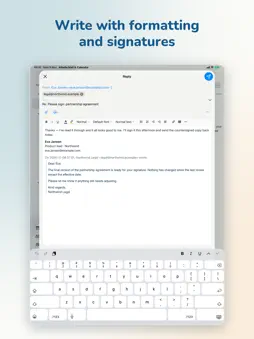
Allodia Mail & Calendar is a sovereign, secure email and calendar app for people and organisations who want to stay in control of their own data. Unlike the big cloud suites, Allodia Mail & Calendar doesn't ask you to move your mailbox onto someone else's servers. It's a client you own, connecting over open standards (JMAP, IMAP, SMTP and CalDAV) to the mail and calendar infrastructure you already run or trust: your own server, or any provider, anywhere. Your mail stays where you put it. We don't host it, and none of your mail routes through Allodia. Built in the EU, with privacy by design: • Your messages sync straight between your device and your provider: nothing passes through us. • Credentials are stored securely on your device. • Incoming HTML is sanitised before it's shown, and remote tracking images are blocked by default. • Product analytics is opt-in and off by default, and can't carry your mail, your addresses or your search terms. • A rotating, size-capped diagnostic log that never records your mail, addresses or passwords: safe to attach to a support request. Everything you expect from a modern mail and calendar app: • Multiple accounts in one unified inbox, with a per-account folder sidebar and quick switching. • Conversations grouped into threads: the whole thread, including your own replies in other folders. • Message bodies download after every sync (every size on a computer, up to a size you set on a phone), so opens are instant and the mail you have synced reads offline. • A rich HTML composer: new messages, replies, reply-all and forwards, with attachments and a From-account picker. • Write a signature once (formatting, links and your logo) and reuse it on any account, with a separate one for replies. Embedded images arrive visible, even in Outlook. • All your contacts in one list from every connected account, with address suggestions as you type a recipient. (Read-only for now.) • An optional Allodia account carries your list of mail accounts to your next device: never your mail, never a password. • Read/unread, flag, archive, delete, trash and mark-as-spam, plus reply, forward and archive-conversation from the message. • Configurable swipe actions, with an undo toast. • A full calendar: agenda, day / 3-day / work-week / week and month grids, with pinch-to-zoom, week numbers, a now line and jump-to-today. • Per-calendar visibility and colours; read-only calendars are respected: never an edit that can't be saved. • Meeting invitations arrive as a card above the message: who's asking, when and where, how everyone answered, and your calendar at that time. Accept, Maybe or Decline without leaving the email. • Fast search across all your accounts, including from: and to: filters. • Per-account sync depth, with real-time push (IMAP IDLE) or scheduled polling and clear progress. • Background mail delivery, so new mail keeps arriving when the app isn't in front. • In English, Dutch, German, French, Spanish, Italian and Portuguese, and time-zone-aware throughout. Allodia Mail & Calendar is part of the Allodia suite: European software built so you can adopt modern tools without giving up ownership of your data or your jurisdiction. Terms of Use (EULA): https://www.apple.com/legal/internet-services/itunes/dev/stdeula/
What's New
Version 0.18.0 2026-11-17
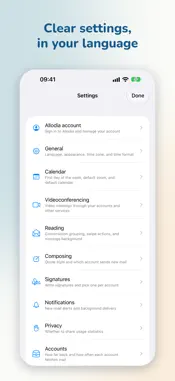
Attached pictures show a small preview, long file names keep their ending, and the number of files and their total size are shown above them. The files attache...Attached pictures show a small preview, long file names keep their ending, and the number of files and their total size are shown above them. The files attached to a message are listed above it with their size, and the whole composer scrolls as one page, so every file stays in reach however many you add. Choose which calendar a new event goes in, under Settings → Calendar. Choose a default video meeting for each account under Settings → Videoconferencing: a new event gets it as soon as you invite someone. Add a Google Meet meeting to an event on any calendar through your Google account, once Video meetings is on for it in Settings. An account's settings now show which account its calendar and address book come from, and you can stop linking two accounts from the one that provides them. Calendars shared with an account, such as a team's, can be switched on from the account's page together with the team's mailbox, and appear as an account of their own. On iPhone and iPad the formatting toolbar sits on the keyboard, and the message runs the full width of the screen. Signing an account in again through your browser now shows that it is working, can be cancelled, and can be started again if you left the browser. Settings no longer stops responding while an account reconnects. While remote images are blocked, a message now leaves an empty space where each one goes, rather than a broken-image icon. A calendar or address book that stops answering now says so after two refreshes, and takes no changes until it answers again. On iPhone and iPad you can now attach photos and videos from your photo library. Sharing a photo or file to the app on iPhone and iPad now opens it with a new message. Changing how an account is synced with your other devices now shows that it is working and says when it didn’t take. A reply or forward now gives the date the original message was sent, rather than the date it reached your mailbox. Signing a separate calendar server in through your browser now shows that it is working, can be cancelled, and can be started again if you left the browser. The plain-text version of a signature or quote from a draft written in another app no longer picks up stray line breaks and spaces. Changing your subscription in Settings now shows that it is working, and the subscription is brought up to date when you return to the app. Technical Analysis
Package Overview Basic metadata
Bundle ID
eu.allodia.mailcal Current Version 0.18.0
Minimum iOS 18.0
Package Size App Store Size
Package Metadata 0 / 0 version records
Detailed binary, privacy manifest, framework, and Info.plist results have not been indexed for this package yet. The verified App Store and archive metadata above remains available.
Developer Information
Known Version Records
0 version records with stored package metadata
Stored metadata does not guarantee a package is currently available to download.
| Details | Version / IDs | Version date | Action |
|---|