
Preview
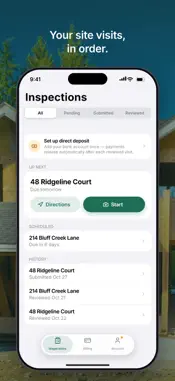


Description
Drawserv is the field app for construction draws. Inspectors verify progress on site, and borrowers and builders keep their projects moving — approving draws, signing lien waivers, and seeing exactly where the money stands — all from one sign-in. FOR INSPECTORS ASSIGNMENTS AT A GLANCE • Every inspection assigned to you, split into Pending, Submitted, and Reviewed. • Each visit is organized by property address, with the builder, borrower, and lender listed. • See your fee and when each visit is due, and get directions to the site in one tap. • Pull to refresh as new work is scheduled. A CAMERA BUILT FOR THE JOB SITE • A purpose-built viewfinder with a rule-of-thirds grid for straight, consistent shots. • One-tap 0.5x, 1x, and 2x lens switching, plus pinch or slide to zoom. • Controls that stay put when you turn the phone. • Add photos from your library too, without opening the camera. • Every photo saves to the inspection as you shoot. Review the set, then submit when the visit is done. WORKS WITHOUT A SIGNAL • No service on site? Keep shooting. Photos are saved on your phone and upload on their own once you're back online, even with the app in the background. • The app opens offline with the work from your last sync. STAY IN TOUCH • Message the review team from the visit itself. • Get a notification when a visit is assigned to you. TRACK YOUR PAY • Submitting an inspection creates a bill automatically. • See paid and pending totals and review every bill. • Set up direct deposit and your W-9 from the Account tab. • Set your home base on the map. FOR BORROWERS AND BUILDERS YOUR PROJECTS • See each project's budget, funded to date, and construction progress. • Follow every draw from request to funding on a step-by-step timeline. • Keep project documents and every draw's attachments in one Files tab. • See reviewed inspections and the photos shared with you. DRAWS AND SIGNATURES • Request a draw against the budget lines you choose, and add supporting files afterward. • Approve draws and sign lien waivers by drawing your signature or typing your name. • The To Do tab collects everything waiting on you, and a push notification tells you the moment a signature is needed. SITE PHOTOS • When the team asks you for site photos, the request appears on your To Do tab. • Or start a photo inspection yourself, from a project or a draw. • Take the photos with the same job-site camera, or add them from your library, and submit in a few taps. BUILT FOR THE FIELD • Clean, focused design that's easy to use on site, in any light. • Two-factor authentication: if it's on for your account, the app asks for your code when you sign in. Borrowers and builders can turn it on in the app. • Works hand in hand with the Drawserv platform your lender uses to manage the loan. Drawserv was formerly Findlan Inspection. Same team, same accounts, new name. NOTE: Drawserv is for invited users only. Accounts are created by the lender or inspection-management team running the project — there is no public sign-up. If you should have access, contact your administrator. Lender and staff accounts sign in on the web. Permissions we request: • Camera — to take inspection photos. • Location — to tag inspections with where they were performed. • Photo Library — to attach existing photos and save inspection photos to your library. • Notifications — to tell you when a visit is assigned or a signature is needed.
What's New
Version 2.3.0 2026-11-02
Photos now carry where they were taken and which way the camera was facing, so the review team can place every shot on the job site. The first time you open the... Technical Analysis
Package Overview Basic metadata
Bundle ID
com.cameronstrong.inspectionappv1 Current Version 2.3.0
Minimum iOS 15.1
Package Size App Store Size
Package Metadata 0 / 0 version records
Detailed binary, privacy manifest, framework, and Info.plist results have not been indexed for this package yet. The verified App Store and archive metadata above remains available.
Developer Information
Known Version Records
0 version records with stored package metadata
Stored metadata does not guarantee a package is currently available to download.
| Details | Version / IDs | Version date | Action |
|---|