
Preview




Description
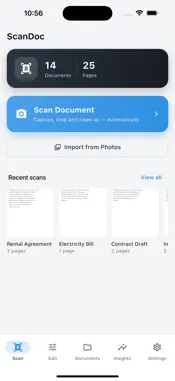
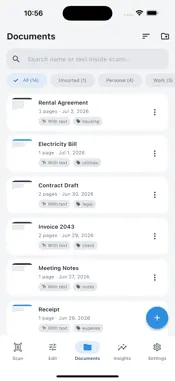
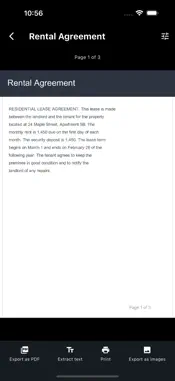
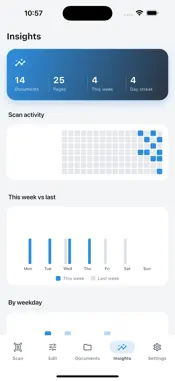
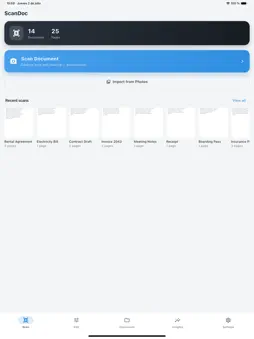
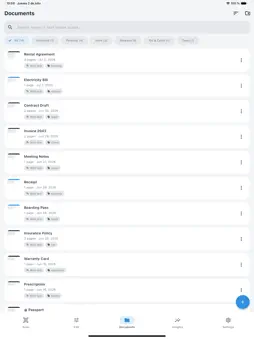
ScanDoc turns your iPhone into a fast, private document scanner that creates clean, professional PDFs in seconds. Scan documents to PDF offline, with no uploads, no account and absolutely no watermark on your files. Every page is processed entirely on your device, so your private papers never leave your phone. Whether you need to scan a contract, a receipt, a tax form, a school handout, an ID card or an old paper photo, ScanDoc detects the page edges automatically, straightens the perspective and produces a crisp, sharp scan you can share anywhere. Stop emailing blurry photos of documents and keep every page sharp, straight and easy to read. ScanDoc is a free document scanner with OCR that is simple, powerful and built to respect your privacy. SMART SCANNING & EDGE DETECTION - Automatic edge detection finds the document and crops it for you in real time - Perspective correction straightens angled or skewed photos into a flat, even page - Capture many pages in a row and combine them into one organized multi-page PDF - Manual crop, rotate and re-capture tools give you full control over every scan PROFESSIONAL SCAN FILTERS - Crisp black & white mode makes text documents look clean and print-ready - Grayscale mode creates light, ink-friendly copies that are perfect for archiving - Color enhance brings out detail in photos, receipts, drawings and graphics - Fine-tune brightness and contrast to rescue faded, dark or low-light originals ON-DEVICE OCR TEXT RECOGNITION - Recognize printed text inside your scans with fast on-device OCR - Search for any word across all of your scanned documents in an instant - Copy and extract text from a scan to paste into notes, messages or email - Everything runs offline, with no cloud processing and no data leaving your phone ORGANIZE, SIGN & MANAGE - Reorder, add, insert or delete pages inside any document with a single tap - Sort scans into folders and label them with tags for fast, easy retrieval - Add a handwritten signature to sign agreements and forms right on the spot - Rename, duplicate and share any PDF straight to email, chat or your cloud drive PRIVATE & OFFLINE BY DESIGN - 100% on-device scanning: nothing is ever uploaded to a remote server - No account and no sign-up: every feature is available from the first launch - No watermark, ever, on the PDFs you create, export and share - Lock sensitive documents behind Face ID or Touch ID biometric protection PERFECT FOR - Students scanning lecture notes, handouts and textbook pages into searchable PDFs - Freelancers and small business owners digitizing invoices, receipts and contracts - Travelers saving passports, tickets, bookings and reservations for offline access - Home offices archiving bills, warranties, tax forms and important paperwork - Real estate, legal and finance pros who need clean scans with a signature - Anyone who wants a free PDF scanner with no watermark and complete privacy YOUR DOCUMENTS STAY YOURS - ScanDoc is a private document scanner with OCR built entirely around your data - There are no hidden cloud uploads and no tracking of what you scan - Your scans live only on your device and in the backups you choose to make - Export clean, high-quality PDFs that are ready for email, print or signing Download ScanDoc today and turn every photo into a clean, searchable, professional PDF. It is the simple, private way to scan documents to PDF and keep them perfectly organized on your phone.
Technical Analysis
Package Overview Basic metadata
Bundle ID
espunya.corporation.scandoc Current Version 1.0
Minimum iOS 15.5
Package Size App Store Size
Package Metadata 0 / 0 version records
Detailed binary, privacy manifest, framework, and Info.plist results have not been indexed for this package yet. The verified App Store and archive metadata above remains available.
Developer Information
Known Version Records
0 version records with stored package metadata
Stored metadata does not guarantee a package is currently available to download.
| Details | Version / IDs | Version date | Action |
|---|