Preview






Description
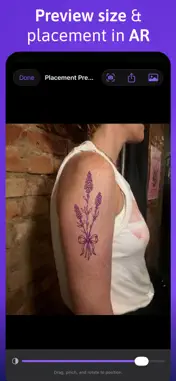
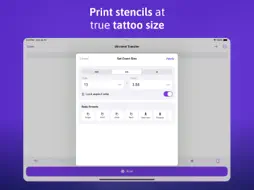
Welcome to Tattoo Printer & Stencil Maker — the fastest way to turn any design into a print‑ready tattoo stencil at the exact size. Getting a clean stencil at the right size shouldn't be hard. Import a photo or drawing, convert it to crisp line art, set the exact millimetre size, mirror it, and print — on any AirPrint printer or thermal stencil paper. Every day, tattoo artists and enthusiasts use Tattoo Printer to prepare better stencils and stop wasting paper on prints that come out the wrong size. Never off by a quarter inch again. CONVERT ANY IMAGE TO A STENCIL - Turn photos, sketches, and artwork into clean black‑line stencils. - Threshold, outline, and line‑art modes with fine control. - Brightness, contrast, clean‑up, and smoothing sliders. - Erase stray marks by hand and remove the background automatically. - Import from Photos, Files, or share straight from Procreate. PRINT AT THE EXACT SIZE - Set millimetre‑ or inch‑perfect dimensions — what you measure is what prints. - Printer calibration wizard corrects any scaling so sizes are spot on. - Body‑part size presets: forearm, wrist, ribcage, full back, and more. MIRROR & TRANSFER - Flip the stencil so it transfers the right way round on skin. - Print to any AirPrint printer or thermal / stencil transfer paper. PLACEMENT PREVIEW & AR TRY‑ON - Preview the stencil on a photo of the body part before you print. - Try the design on the body live in AR, then save or share the result. TILE LARGE STENCILS - Split back pieces and sleeves across multiple sheets with overlap and crop marks, then tape them together. PAPER SIZES FOR EVERY PRINTER - A4, A3, Letter, Legal, Tabloid, and stencil‑paper presets. - Add your own custom paper size. SAVE, ORGANISE & SHARE - Save every project and reopen it anytime. - Your work saves automatically — nothing gets lost. - Place multiple designs on one sheet, with crop and layout. - Export placement previews to Photos or share them. WORKS OFFLINE - Import, convert, size, and mirror without a printer connected. You only need a printer at the final print step. TATTOO PRINTER PRO Unlock everything with a one‑time purchase — no subscription. - Unlimited projects and prints. - Advanced stencil modes (outline & line art). - All paper sizes, custom sizes, and multi‑page tiling. - Body‑part presets, printer calibration, and AR try‑on. Your art. Your size. Printed perfectly. Terms of Use: https://www.apple.com/legal/internet-services/itunes/dev/stdeula/
Technical Analysis
Package Overview Basic metadata
Bundle ID
com.jungspree.Tattoo-Printer Current Version 1.0
Minimum iOS 17.0
Package Size App Store Size
Package Metadata 0 / 0 version records
Detailed binary, privacy manifest, framework, and Info.plist results have not been indexed for this package yet. The verified App Store and archive metadata above remains available.
Developer Information
Known Version Records
0 version records with stored package metadata
Stored metadata does not guarantee a package is currently available to download.
| Details | Version / IDs | Version date | Action |
|---|