Preview



Description
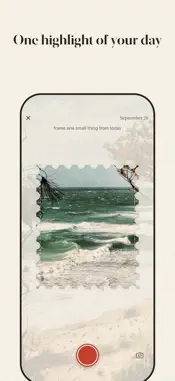
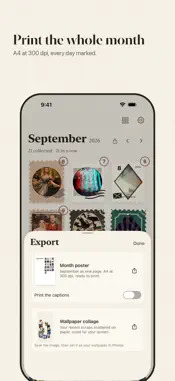
One highlight from your day, punched out like a postage stamp. Open the app and the stamp cutter is already in the camera. Hold it up to something from today, snap, punch it out and paste it into your book. Until you paste it, you can retake as often as you like. The idea comes from paper. On TikTok, lots of people punch a small piece out of their day, a receipt, a ticket, a leaf, and glue it into a notebook. The art teacher @artteacherny started it in 2025. I watched it for a long time and never started, because the punch, the glue and the notebook were never with me at the same time. My phone always was. With the camera you can also punch out things paper never could: the sea, a dog, the light on a wall. Your scrap • There is room for one line under each scrap, if one comes to mind. • Every scrap carries its date. • You can give it a stamp design, with a frame, colors and a postmark. Or let shuffle pick one. Your month album Every scrap lands on its day, on a paper page. You never arrange anything. A day without a scrap simply does not show up, so there are no empty boxes. Camera only There is no import from your photo library, and you cannot fill in a missed day later. That way every scrap really was made on its day. What you can take out • Any month as an A4 poster at 300 dpi, ready to print • A wallpaper collage of your latest scraps • A single scrap as an image to share • A copy of every scrap in a Photos album called "scrape a day" Widget and reminder A home screen widget shows you today and, now and then, a scrap from earlier. If you want, the app reminds you once in the evening. You pick the time, and on days with a scrap it stays quiet. Private No account, no feed, no likes. Your scraps never go to a server of mine. You buy scrapeaday once. There is no subscription and nothing to buy inside the app. I build the app on my own. If something is missing or broken, write to me at [email protected]. I read everything. Felix
What's New
Version 1.0.4 2026-11-03
New in 1.0.4 Pick a photo from your library. Next to the shutter there is now a Choose from Photos button. The photo lands under the stamp stencil, where you p... Technical Analysis
Package Overview Basic metadata
Bundle ID
de.felixbarth.scrapeaday Current Version 1.0.4
Minimum iOS 17.0
Package Size App Store Size
Package Metadata 0 / 0 version records
Detailed binary, privacy manifest, framework, and Info.plist results have not been indexed for this package yet. The verified App Store and archive metadata above remains available.
Developer Information
Known Version Records
0 version records with stored package metadata
Stored metadata does not guarantee a package is currently available to download.
| Details | Version / IDs | Version date | Action |
|---|