
Preview


Description
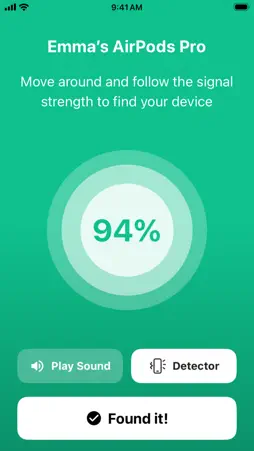
Lost your AirPods? PodSpot helps you find them and any other Bluetooth earbuds or headphones nearby. Give PodSpot a try before you pay for a replacement. If your earbuds are nearby you can follow the signal right to them and skip buying a new pair. People also use it to track down iPhones, iPads, Apple Watches and Bluetooth gear from other brands. Since 2022 PodSpot scans have found more than 100K devices. PodSpot works offline because everything runs on your iPhone over Bluetooth. You don't need Wi-Fi or mobile data. The device doesn't have to be on your Apple Account or even be yours. Non-Apple devices are supported too, as long as they're switched on and close by. Lost just the case? Some charging cases have their own Bluetooth radio. They show up in the scan on their own, so you can look for them too. How it works: - Scan to see the Bluetooth devices around you. - Tap yours to open the radar. - Walk around and follow the signal as it gets stronger until you're right next to it. - Detector makes your iPhone tick and pulse faster the closer you get, so you don't have to watch the screen. - Play Sound plays a sound through supported headphones and speakers. Keep it for next time. Things go missing again and PodSpot is ready whenever they do. Save Location marks the exact spot of each find on a map with a short note so you know where to look next time. If you choose to upgrade, your subscription will be charged to your iTunes account at confirmation of purchase and will automatically renew (at the duration selected) unless auto-renew is turned off at least 24 hours before the end of the current period. You can cancel a free trial or subscription anytime by turning off auto-renewal through your Account settings in the iTunes Store. Any unused portion of a free trial period (if offered) will be forfeited when you purchase a subscription. Privacy Policy: https://podspot-828984049402-eu-west-2-an.s3.eu-west-2.amazonaws.com/legal/privacy-policy-en.html Terms of Use: https://www.apple.com/legal/internet-services/itunes/dev/stdeula/ Support email: [email protected]
What's New
Version 2.2.0 2026-11-05
- Bug fixes, user experience and technical improvements. Technical Analysis
Package Overview Basic metadata
Bundle ID
com.ruvixlabs.PodSpot Current Version 2.2.0
Minimum iOS 17.0
Package Size App Store Size
Package Metadata 0 / 4 version records
4.1 / 5.0 (645 ratings)
Detailed binary, privacy manifest, framework, and Info.plist results have not been indexed for this package yet. The verified App Store and archive metadata above remains available.
Developer Information
Known Version Records
0 version records with stored package metadata • 4 known version records
Stored metadata does not guarantee a package is currently available to download.
| Details | Version / IDs | Version date | Action |
|---|---|---|---|
| Not archived | App Store ID: 862298940 | Unknown | Request Version |
| Not archived | App Store ID: 856671096 | Unknown | Request Version |
| Not archived | App Store ID: 854203320 | Unknown | Request Version |
| Not archived | App Store ID: 847358671 | Unknown | Request Version |