
Preview






Description
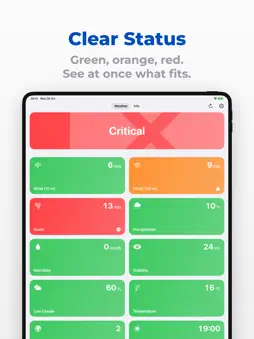
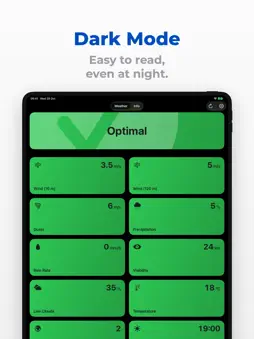
The drone weather app for UAV and FPV pilots: DroneTools checks the current wind, gusts, rain, Kp index and daylight at your location and shows the flight conditions as a clear traffic light. One look and you know whether you can fly. Made for drone pilots in hobby, photography, film, surveying, inspection and emergency services. FLIGHT CONDITIONS AT A GLANCE • Optimal, Limited or Critical for every value and as an overall status • Warning symbols show instantly what's off • Missing or outdated weather data is never shown as green • Updates automatically and reloads as soon as the network is back ALL KEY DRONE WEATHER DATA • Wind speed at 10 m and 120 m altitude, wind gusts • Chance of rain and rain rate (rain, snow), visibility, low clouds, temperature • Kp index (geomagnetic activity) for GPS accuracy • Daylight: next sunrise and sunset, day and night per EU air law, calculated on device and available offline YOUR DRONE, YOUR LIMITS • Set your own wind and weather limits with sliders • Drone profiles for every quadcopter or multicopter, share and import them as a file • Three templates to get started: Cautious, Wind-Resistant Drone and Waterproof Drone • Switch off the critical level or single values, e.g. warn waterproof drones only in heavy rain • Wind in m/s, km/h, kn or mph; °C or °F; km and mm/h or mi and in/h; 12 or 24 hours FOR FIRE BRIGADES, SITE SECURITY AND INDUSTRY WITH FIREDOCK FireDock connects alerting with DJI FlightHub 2 and the DJI Dock: when the alarm comes in, incident marker, route and flight task are ready. Automated, not autonomous: a responsible remote pilot releases the takeoff. • For fire brigades and industrial fire services, site security, security services and critical infrastructure operators • Incident at a glance: keyword, location, drone status and a map with incident site, dock and drone, also as satellite map • Dock, drone and battery readiness at a glance, even between missions • Release takeoff, do not fly, abort and return to home, depending on your role; takeoff, abort and return confirmed with Face ID • Notifications on alarms, flight events and problems, encrypted for your device • Connect via QR code, link or MDM; roles Viewer, Pilot and Lead • Optimized for DJI FlightHub 2, including FlightHub 2 On-Premises on your own server CopterTec is a DJI Enterprise Gold Partner and a certified DJI FlightHub 2 On-Premises partner. FireDock requires a FireDock installation at your organization. FOR ORGANIZATIONS • Set limits, units, time format and time zone centrally via MDM, managed values are locked in the app FOR IPHONE, IPAD AND MAC • Large tiles on iPad and Mac, keyboard shortcuts ⌘R and ⌘, • Dark mode, large text and VoiceOver Data sources: Open-Meteo and GFZ Helmholtz Centre for Geosciences (CC BY 4.0). Your location is only used, rounded, for the weather request, is not stored by the app and is never sent to FireDock. DroneTools and FireDock are made by CopterTec.
What's New
Version 2.1.1 2026-10-28
Improvements for missions. • Status colors now come straight from FireDock • “Not ready for takeoff” shown clearly, also when FlightHub 2 can’t be reached • Sa... Technical Analysis
Package Overview Basic metadata
Bundle ID
com.coptertec.dronetools Current Version 2.1.1
Minimum iOS 18.0
Package Size App Store Size
Package Metadata 2 / 3 version records
Detailed binary, privacy manifest, framework, and Info.plist results have not been indexed for this package yet. The verified App Store and archive metadata above remains available.
Developer Information
Known Version Records
2 version records with stored package metadata • 3 known version records
Stored metadata does not guarantee a package is currently available to download.
| Details | Version / IDs | Version date | Action |
|---|---|---|---|
 1.5 MB | v1.2.1 App Store ID: 878238265Build: 2025091901 | 2025-09-21 16:46:58 | Get Version |
| Not archived | App Store ID: 878184241 | Unknown | Request Version |
 306.97 KB | v1.0.1 App Store ID: 870602628Build: 20241126001 | 2024-11-26 22:41:22 | Get Version |