Preview


Description
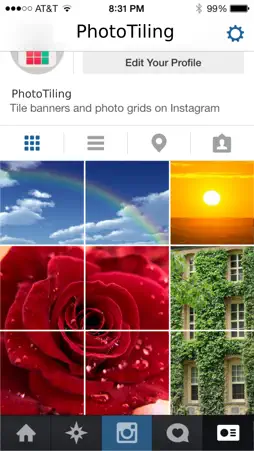
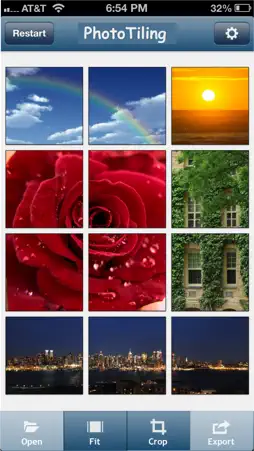
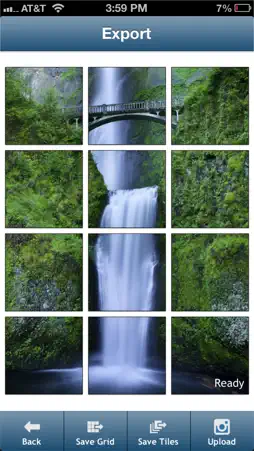
"The well-known InstaTiling app is now PhotoTiling" ** Tile banners and photo grids on your Instagram profile ** New: The app was previously named "InstaTiling". It has been renamed to "PhotoTiling" for meeting Instagram's brand policy. PhotoTiling is an app that enables you to crop your photos into multiple squares (tiles), then arrange them on your Instagram profile page to create Banners and Photo Grids. PhotoTiling not only enables you to easily and quickly make banners, but also provides you the maximum flexibility to tile your photos into any grid pattern you want. Besides uploading to Instagram, you can also save your Banner/PhotoGrid as a single photo. ** Features : 1. Load multiple photos, crop your input photos into multiple squares, then arrange and post them on Instagram as banner or any grid pattern you want. (see Screenshot 1,2,5), 2. Add tags, captions, and comments to the cropped photos within the app, and you can copy the tags to all other cropped photos with just one button tap (see Screenshot 3). 3. The UI is optimized for you to quickly and easily make banners. The "Fit" function can automatically fit your loaded photo into the squares you have selected. 4. Upload the cropped photos to Instagram in the correct order from within the app. The app will track which cropped photos have been uploaded so that you won't forget what should be the next one to upload (see Screenshot 4,5) 5. You can also save the cropped photos to your camera roll, then upload them later in Instagram. 6. You can save the created Banner/PhotoGrid as one single photo to Camera Roll. ** Tips: 1. To make large banners (e.g. 4x3 banner), you can use two-finger tap to quickly select multiple squares. 2. You can use the "Fit" function to quickly fit your loaded photo into the squares that you have selected. 3. Use "Save Grid" function to save the created Banner/PhotoGrid as one single photo to Camera Roll. ** Note: 1. Due to the constraints of Instagram API, currently you can only upload the cropped photos one at a time during "upload". 2. The tags or comments added within the app are only effective when you use the "upload" function. If you use the "save Tiles" function and use Instagram to upload from camera roll, you can only add tags within the Instagram app. ***** Visit @Instatiling on Instagram for featured user profiles (upcoming), update info, and samples etc. Visit #InstaTilingApp to see other users' InstaTilings Visit our website : www.eyetapsoft.com
What's New
Version 1.5.1 2017-09-29
1. The name of the app has changed from "InstaTiling" to "PhotoTiling", for conforming with Instagram's brand policy (Insta now is registered brand name by Inst... Technical Analysis
Package Overview Basic metadata
Bundle ID
EyeTap-Soft.InstaTiling Current Version 1.5.1
Minimum iOS 6.0
Package Size App Store Size
Package Metadata 1 / 6 version records
Detailed binary, privacy manifest, framework, and Info.plist results have not been indexed for this package yet. The verified App Store and archive metadata above remains available.
Developer Information
Known Version Records
1 version record with stored package metadata • 6 known version records
Stored metadata does not guarantee a package is currently available to download.
| Details | Version / IDs | Version date | Action |
|---|---|---|---|
| 2.8 MB | v1.5.1 App Store ID: 841436166Build: 1.5.1 | 2017-09-29 21:07:57 | Paid / Arcade |
| Not archived | App Store ID: 54442639 | Unknown | Paid / Arcade |
| Not archived | App Store ID: 15941466 | Unknown | Paid / Arcade |
| Not archived | App Store ID: 15912191 | Unknown | Paid / Arcade |
| Not archived | App Store ID: 15812443 | Unknown | Paid / Arcade |
| Not archived | App Store ID: 15670842 | Unknown | Paid / Arcade |