
Preview




Description
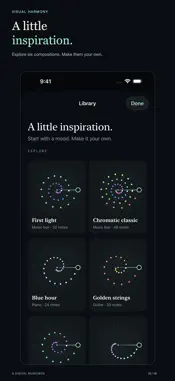
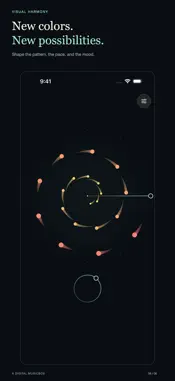
Immerse yourself in the stunning and hypnotic effects of Visual Harmony! In Visual Harmony, each note takes the form of a colorful shape rotating about the center of the screen. When the shape crosses the line, its note is played. Shapes closer to the center move faster than those farther out. These simple rules produce intricate visual patterns and hypnotic melodies. Watch as the shapes form spinning galaxies and winding spirals. See the patterns merge back into a line, only to unfold again into complex geometric shapes. Listen as melodies emerge from the motion. Choose a slow speed and settle into the gentle repetition, or speed things up for a lively swirl of sight and sound! Visual Harmony is an interactive musical/visual experience inspired by Jim Bumgardner’s invention of the digital Whitney Music Box. Explore the original at https://whitneymusicbox.org. At Excelltech Inc., we found Jim’s web app so engaging that we created our own version for iPhone and iPad. While staying true to the original idea, Visual Harmony gives you additional control and customization of the musical experience. Now rebuilt for today’s devices, it lets you reach into the patterns and make them your own. • Change the size, shape, speed, and color palette of the spinning notes. Reverse their direction, add light trails, and experiment with 4 to 88 notes. • Choose from six synthesized instruments: music box, piano, guitar, strings, brass, and organ. Adjust the volume and room ambience to suit your mood. • Explore pentatonic, major, minor, Dorian, whole-tone, and chromatic scales, or create your own sequence of notes and rests. • Move the line that plays the notes. Drag its handle across the shapes to sound them, even while playback is paused. • Explore the music forward or backward with the circular progress control. Grab its thumb and move your finger outward for finer control, or cross the top to move smoothly between the end and beginning. • Start with one of six included compositions, customize it, and save your favorites in your personal library. • Enjoy the visualization in portrait or landscape on iPhone and iPad. Open the floating controls to make changes as the music plays, then dismiss them to enjoy the view. If you are already a fan of the original music box, Visual Harmony gives you more ways to explore its patterns, sounds, and possibilities. If this is your first encounter, open Visual Harmony and let the music take shape! All sounds are generated on your device. No account, internet connection, microphone access, ads, subscriptions, or in-app purchases are needed. Requires iOS or iPadOS 26 or later.
What's New
Version 2.0 2026-10-20
Visual Harmony has been rebuilt for today's iPhone and iPad. • A spacious visualization that adapts to portrait and landscape. • Six newly synthesized instrume... Technical Analysis
Package Overview Basic metadata
Bundle ID
net.excelltech.visualharmony Current Version 2.0
Minimum iOS 26.0
Package Size App Store Size
Package Metadata 0 / 0 version records
Detailed binary, privacy manifest, framework, and Info.plist results have not been indexed for this package yet. The verified App Store and archive metadata above remains available.
Developer Information
Known Version Records
0 version records with stored package metadata
Stored metadata does not guarantee a package is currently available to download.
| Details | Version / IDs | Version date | Action |
|---|