Preview






Description
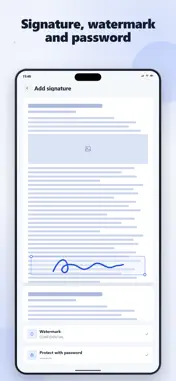
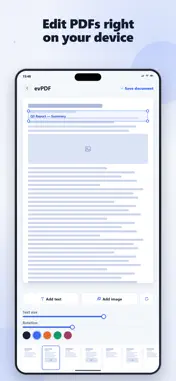
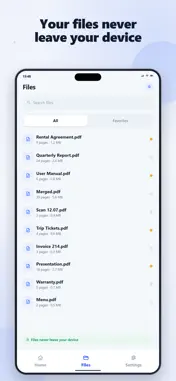
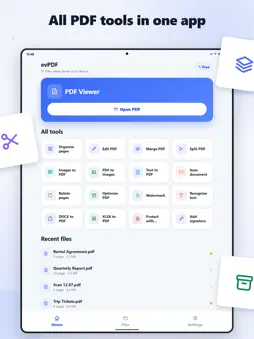
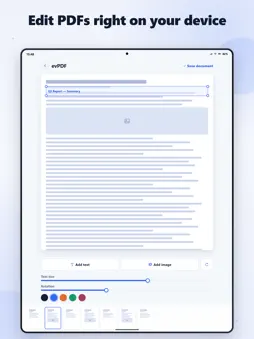
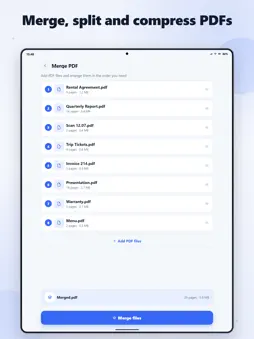
Meet evPDF, a private 16-in-1 PDF toolkit for reading, scanning, creating, organizing, annotating and converting documents on your phone or tablet. Your documents are processed directly on your device. PDF content, OCR text, search queries and passwords are not uploaded to our servers. 16 PDF TOOLS IN ONE APP 1. PDF READER Open and read PDF files with smooth navigation, zoom, page thumbnails and quick page selection. • Search text inside compatible PDF documents • Open password-protected PDF files • Print and share documents • Navigate quickly between pages 2. ORGANIZE PDF • Reorder individual pages • Remove unnecessary pages • Rotate selected pages 3. MERGE PDF Combine multiple PDF documents into one file and arrange them in the order you need. 4. SPLIT PDF Extract selected pages or divide a document into separate PDF files. 5. COMPRESS PDF Reduce PDF file size using selectable quality levels. 6. IMAGES TO PDF Turn photos and images into a PDF document. 7. PDF TO IMAGES Export PDF pages as image files. 8. TEXT TO PDF Create formatted PDF documents with: • Headings and paragraphs • Bold, italic and underlined text • Bulleted and numbered lists • Text alignment • Fonts and colors • Adjustable text size and line spacing • Images 9. DOCUMENT SCANNER Scan multi-page documents with automatic edge detection, cropping and correction. You can also create scanned PDFs from images in your gallery. 10. ROTATE PDF Rotate every page in a PDF by 90, 180 or 270 degrees. 11. ANNOTATE PDF Add new visual elements over PDF pages: • Text • Images • Arrows • Lines • Rectangles • Ellipses Move, resize and rotate added elements directly on the page. Format added text with different fonts, sizes, colors, alignment and backgrounds. Annotations are added as a new visual layer and do not modify the original text inside the source PDF. 12. OCR SCANNER Recognize text from scanned documents and images directly on your device. • Edit recognized text • Copy text to the clipboard • Share extracted text through other apps 13. DOCX TO PDF Convert Word documents to PDF with configurable settings: • A4 or Letter page size • Portrait or landscape orientation • Adjustable margins • Configurable text size • Image scaling options 14. XLSX TO PDF Convert Excel spreadsheets to PDF. • Convert the first sheet or all sheets • Choose page size and orientation • Adjust margins and text size • Fit spreadsheets to page width • Repeat the first row as a header • Preserve supported cell colors, borders and formatting • Use workbook print areas when available 15. SIGN PDF Draw your signature and place it on selected PDF pages. • Move the signature directly on the page • Resize it while preserving proportions • Add it only to the pages you choose 16. WATERMARK AND PROTECT PDF Add a text or image watermark with adjustable: • Position • Size • Rotation angle • Transparency Protect PDF documents with a password to prevent unauthorized opening. FILE MANAGEMENT Keep your documents in the local evPDF library. • Access recent files • Add documents to favorites • Search by file name • Rename documents • Delete documents • Import files from your device • Use saved PDFs in other tools without importing them again PRIVATE ON-DEVICE PROCESSING Your documents are processed directly on your device. evPDF does not upload the following data to our servers: • PDF content • OCR text • File names and paths • Search queries • Document passwords No account or cloud upload is required for document processing. FREE AND PREMIUM PDF reading and file management are unlimited. The free version includes daily access to PDF tools. evPDF Premium removes daily limits across the complete toolkit. Use evPDF for work, study, forms, receipts, contracts, notes, reports and everyday document tasks, all in one private PDF app. Privacy Policy: https://evsi.store/en/app/evpdf/privacy Terms of Use: https://evsi.store/en/app/evpdf/terms
What's New
Version 1.1.0 2026-07-31
Bug fixes and improved stability Technical Analysis
Package Overview Basic metadata
Bundle ID
store.evsi.evpdf Current Version 1.1.0
Minimum iOS 15.5
Package Size App Store Size
Package Metadata 0 / 0 version records
Detailed binary, privacy manifest, framework, and Info.plist results have not been indexed for this package yet. The verified App Store and archive metadata above remains available.
Developer Information
Known Version Records
0 version records with stored package metadata
Stored metadata does not guarantee a package is currently available to download.
| Details | Version / IDs | Version date | Action |
|---|