
Preview





Description
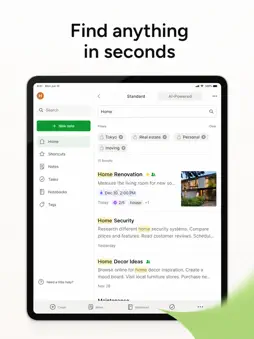
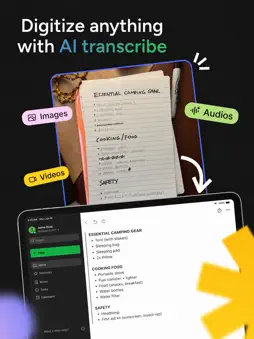
Evernote is your second brain — the place to keep everything that matters and find it again the moment you need it. "…an invaluable tool for organizing a messy digital life." — The New York Times Capture a thought, a to-do, a photo, or a whole project, then let Evernote help you organize it, make sense of it, transcribe a meeting or tidy up a rough draft, and bring it back exactly when it counts. From the first spark of an idea to the finished plan, it all lives in one calm, searchable place — at work, at home, and everywhere in between. CAPTURE ANYTHING Jot a quick note, build a checklist, save a photo, an email or a PDF, or clip an article from the web before it disappears. Type it out, write by hand, snap a picture, or record a voice memo — whatever's fastest in the moment. Your ideas land in one place, ready when you are, so nothing gets lost on a sticky note or buried in your inbox. STAY ORGANIZED, EFFORTLESSLY Sort notes into notebooks and add tags, or just start writing and let structure follow. Group related notes together, pin the ones you reach for most, and keep work, school, and life neatly apart — without spending your day tidying up. Evernote keeps things in order so you can stay focused on the thinking. FIND WHAT YOU NEED, FAST Search across everything you've saved — including the text inside your images and PDFs. Ask in plain language and Semantic Search surfaces the right note, even when you can't remember the exact words or where you put it. The more you save, the more useful it becomes. MEET YOUR AI ASSISTANT Your AI Assistant clears away the busywork so you can stay in the thinking, working quietly alongside you. Record a conversation and Evernote AI transcribes and summarizes it for you; AI Transcription turns audio, images, and video into text; and AI Edit cleans up a rough draft, shortens it, or changes the tone while keeping it in your own voice. PLAN YOUR DAY Add due dates, reminders, and to-dos right inside your notes, so the next step is always clear and nothing slips through the cracks. Check things off as you go and keep momentum without switching apps. WORK EVERYWHERE Your notes sync automatically across iPhone, iPad, Mac, Windows, and the web — start on one device and pick up right where you left off on another. Evernote works offline too, so you're never locked out of your own ideas, even when you're far from a signal. FOR WORK, SCHOOL, AND LIFE - Plan projects, prep meetings, and keep every detail in one place. - Take lecture notes, organize research, and study smarter for exams. - Save recipes, plan trips, track goals, and remember the little things that matter. - Keep a journal, draft your next big idea, and capture inspiration whenever it strikes. "Its magic lies in its flexibility." — PCMag However you think, and whatever you're working on, Evernote helps you remember everything and get it done. Capture today's idea — and find it the moment you need it.
What's New
Version 11.44.5 2026-11-24
New: - Attach Word, Excel and other files to AI Assistant chats, then ask questions or get a summary. Fixes: - Business tag permissions now apply to all tags, ...New: - Attach Word, Excel and other files to AI Assistant chats, then ask questions or get a summary. Fixes: - Business tag permissions now apply to all tags, including Select All. - Tags intro fits iPad landscape. - Find in note opens only sections with a match. - AI edits now show for review where they were missing. - Font and formatting menus stay above the toolbar and readable in dark mode. - AI Prompts lists every prompt type. Version 11.43.7 2026-11-23
New features: - The AI Assistant can read and update a recording's own notes. - Collaborators can follow a live transcript while a meeting is recorded. Bug fix...New features: - The AI Assistant can read and update a recording's own notes. - Collaborators can follow a live transcript while a meeting is recorded. Bug fixes: - Colour and style menus now open right above the toolbar, level with the AI prompts row. - Shared note links now open in the app when installed. - Improved translation quality for new strings. - The AI Assistant can now recolour and nest tags. Version 11.43.4 2026-11-18
New: - Refreshed editor: more space, bigger text, cleaner bullets, smoother toggles. - Recordings get a Notes tab in the summary, and collaborators can follow t...New: - Refreshed editor: more space, bigger text, cleaner bullets, smoother toggles. - Recordings get a Notes tab in the summary, and collaborators can follow the live transcript. Use the gear to pick a model and enable auto transcription. - Table of contents: pick background, text color, bullets. - Freeze table columns. Fixes: - Numbered checklists keep counting across pages. - YouTube sharing no longer errors on iOS. Version 11.42.4 2026-11-10
New features: - Reactions are here: select any text, pick an emoji from the inline toolbar, and everyone with access to the note can react. Bug fixes: - Transc...New features: - Reactions are here: select any text, pick an emoji from the inline toolbar, and everyone with access to the note can react. Bug fixes: - Transcribing an image immediately after adding it no longer fails with a generic error. - Fixed a crash when downloading audio recordings. - Business accounts see unavailable tag actions greyed out, with an explanation. - Fixed tag pickers taking seconds to open on large accounts. Version 11.41.3 2026-11-03
New features: - New audio player: a waveform you can scrub through, speaker avatars and pins, a playback speed selector, and a live transcript that stays on the...New features: - New audio player: a waveform you can scrub through, speaker avatars and pins, a playback speed selector, and a live transcript that stays on the note when you reopen it. Bug fixes: - Pinned notes stay on top of every notebook. - Typing no longer hides behind the toolbar. - Find in note no longer opens automatically from search suggestions. - Fixed a bug where Live transcription could stop unexpectedly. - The toolbar stays above the keyboard without duplicating. Version 11.40.3 2026-10-28
Bug fixes: - Predictive text suggestions insert correctly when tapped on iOS 27. - Your next audio summary uses the prompt you picked last. - The cursor no long...Bug fixes: - Predictive text suggestions insert correctly when tapped on iOS 27. - Your next audio summary uses the prompt you picked last. - The cursor no longer hides behind the toolbar on iOS 27. - The toolbar stays clear of the text you type. - What's New articles now appear in your language. Version 11.39.3 2026-10-23
:sparkles: New features: - Text color and highlighting for mentions. - New search bar in Settings jumps to any option. - Recover transcripts saved on the backen...:sparkles: New features: - Text color and highlighting for mentions. - New search bar in Settings jumps to any option. - Recover transcripts saved on the backend after an interrupted run. - Clean up audio recordings stuck capturing. :hammer_and_wrench: Bug fixes: - iOS 27 cursor and predictive text work. - What's New shows the right language and transcription ETAs are accurate. - Recording notes go to the default notebook. Version 11.38.7 2026-10-13
New features: - Redesigned note header on mobile: undo and redo sit away from the back button. - Tags on a note are easier to see and manage. Bug fixes: - A n...New features: - Redesigned note header on mobile: undo and redo sit away from the back button. - Tags on a note are easier to see and manage. Bug fixes: - A note is marked updated only when its content changes. - Scrolling the tags list no longer dismisses the keyboard. - Fixed the in app camera shutter on some devices. Version 11.37.4 2026-10-07
New features: - Date mentions can now be formatted like the rest of the text. Bug fixes: - Note "updated": moving a note, or adding/removing tags, no longer up...New features: - Date mentions can now be formatted like the rest of the text. Bug fixes: - Note "updated": moving a note, or adding/removing tags, no longer updates the note timestamp. - Fixed an issue where template import could fail. - Made transcription more reliable. - Fixed the in app camera shutter button sometimes failing to take a photo. - The device disconnect list now scrolls, so you can confirm. - On iOS, settings toggles no longer overlap their description text. Version 11.36.3 2026-09-29
New features: - AI Assistant Edit mode is now available on mobile. - Tables are now more powerful: sort and filter rows by column values, toggle a header row, c...New features: - AI Assistant Edit mode is now available on mobile. - Tables are now more powerful: sort and filter rows by column values, toggle a header row, customize borders, and distribute columns evenly (rolling out gradually). - Opening a note link in the app now lets you request access if needed. - A new Hide keyboard button quickly dismisses the keyboard while editing. Bug fixes: - Numerous fixes to improve export and print. - Fixed an iOS launch crash related to in app purchases. App Store User Reviews
watsontcbc 2025-05-16
Used to be an Awesome app
My original review: Best app ever for note taking across multiple platforms. I use it all the time. My next update review: Ever since Bending Spoons took over, ...My original review: Best app ever for note taking across multiple platforms. I use it all the time. My next update review: Ever since Bending Spoons took over, this app has gotten worse. In the past, each major update had significant issues, but they dealt with them sufficiently that I did not find it necessary to make this sort of update. I was willing to put up with a few changes to usability that I didn’t like because the overall benefit was still largely there. However, Bending spoons is constantly pushing popups about their little fixes, interrupting the flow of use that used to make this app great. My current review update: Although I still don't appreciate Bending Spoons interruptions with trivial update popups when I open the app, usability has i proved, and Evernote remains my favorite note-taking app. Partly because I can’t bring myself to dive back into the lacking MS OneNote app, but mostly the features Evernote provides and the great usability. I just wish they’d quit messing around with it imposing new “features” that open up template notes that really don’t want that embed themselves in my notebooks and have go back and remove them. Its nuisance since I have long established my own way of using the app that works great for me. But as long as it remains usable I’ll put up with these unwanted interjections written in by programmers who don’t seem to have enough to do.
EamonBoban 2022-09-15
It’s a bit unreliable lately.
Granted, the last update fixed issues where images would not properly attach to a document, note saving would miss the last changes you made, the app would keep...Granted, the last update fixed issues where images would not properly attach to a document, note saving would miss the last changes you made, the app would keep interrupting your writing by closing the keyboard and scrolling off the place you were typing in, and occasionally not allowing you to exit a note when these two other bugs occurred, which meant I could only close the app and sadly lose my work. The issue that still concerns me though is that you can type into a note, and quickly swipe away to see your notebook, and while that note has a little green icon that indicates there are changes to be saved, accessing it doesn’t show you them! You can exit the note again, wait for the saving to be done and see the changes only after that, and as a general experience, it makes me feel like I can only write content on Evernote’s iOS app if I’m slow and careful about how I flip between views. The green note edits icon I talk about also used to come with a spinning wheel on the top of your note list, which at least gave you a visual clue that the changes *were* being sent to save, but because it’s gone, I either let it sit there and hope it saves (it takes a lot longer than I remember, for simple text notes too, on decent Wifi!), or pull down the notes list to cause that list refresh, which makes things save quicker. Evernote, please have a look at these issues—the app used to feel simple and reliable when it came to this and now it gives me apprehension.
Danny888 2021-07-28
Fantastic update
I just don’t understand some of negative reviews of Evernote’s latest update, which is fantastic. I have been using the app for years and am thrilled to see th...I just don’t understand some of negative reviews of Evernote’s latest update, which is fantastic. I have been using the app for years and am thrilled to see the innovation that the new leadership team is bringing about a year in. It looks like it took about a year to stabilize, and now new features are a’comin’. Tasks is game changing, and Gmail and Google calendar sync has boosted my productivity tremendously. I have been mainly using the web app but earlier this week updated my iPhone to this version. Immediately following the update I was having all sorts of issues getting my notes to load in the app. So I sent a support ticket to Evernote, called it a day, and accidentally left the app running overnight on my iPhone. To my delight I awakened to see a notification in the app that I had been successfully upgraded to then latest personal version. All of my notes suddenly appeared, and I have had a phenomenal experience with the app ever since. IMO nothing comes close to Evernote. I love Google, but Drive is where notes go to die. Evernote is where they flourish. I cannot say enough good things about this app and what I’m seeing from the company. It is extremely difficult to satisfy all existing customers while innovating and expanding the base. As a longtime user, however, I personally feel that the team is doing a tremendous job. Kudos!
FreezerBoys 2024-06-15
Evernote is better than ever!
I've been a paid Evernote user since 2010 and have used it personally and for business throughout the past 14 years. I've never been as excited to use Evernote ...I've been a paid Evernote user since 2010 and have used it personally and for business throughout the past 14 years. I've never been as excited to use Evernote as I have been in the past few months. After a lot of rumors about their history with other products and assumptions about what they would do with Evernote, Federico Simionato and the new developers at Bending Spoons have delivered feature after feature after feature in 2024. So now, as a result of it's traditional standout note features such as PDF management and web clipper/note creation I have eliminated my need for Notion due to features like collapsible sections, calendar integration, and slash commands. The recent task updates have also eliminated my need to use to Todoist to track my immediate tasks and have also allowed me to create a robust backlog of tasks that I can easily navigate. It's easily paying for itself in terms of improved functionality, efficiency, and workflow centralization. I still dream of some additional options like inline images, colored background formatting, a more robust tag management system, better searching, more intuitive and integrated AI, better home page customization, and especially block level transclusion, but overall I'm loving Evernote better than ever and can't wait for the next updates from the team.
AppLover1971 2022-07-24
Premium Subscription Buyer Beware
I’m giving this review because over the past 5 years, I’ve been a loyal, power user of the Evernote tool. Short of some ‘buggy issues’ in the latest updates (wh...I’m giving this review because over the past 5 years, I’ve been a loyal, power user of the Evernote tool. Short of some ‘buggy issues’ in the latest updates (which is normal), the Evernote tool is hands down one of the most effective, well designed, and intentionally planned tools for business. Because of the treatment is subscription upgrades across devices, I ended up with two accounts being billed on separate devices on 3 separate occasions. To stop the duplicate billing, I cancel one or more subscriptions to fix the issue. It has cost me upwards of $35/month for a $7.99 monthly subscription. I just cancelled again and am a Premium subscriber through August. Because I cancelled, however, the pop ups for upgrade have made the app unusable. I have a paid subscription through August and can’t use it because I hit a payment gateway every time use the app I have a premium subscription to through August. The app is amazing. If you plan to be a Premium subscriber to sync to multiple devices however, Buyer Beware. $35/month for a one seat license for a $7.99/month subscription you can’t use is steep by anyone’s standards. When I quit the app 4 different times to try to connect with someone to help with the issue, I discovered there’s no customer service connection offered to fix the issue.
Orozcoms 2024-09-18
Long time user
I’ve been using Evernote for many years. The updates are definitely good. However over the years, I wonder if I’ve lost information because of the reformatting....I’ve been using Evernote for many years. The updates are definitely good. However over the years, I wonder if I’ve lost information because of the reformatting. I have too much information to keep track but sometimes I can’t find things I really thought I saved. My most recent discovery is the task list with recurring reminder once a task is complete. No need to make your list for next month or week. I’ve never understood web clipper. I don’t like when I save things and it’s basically a link to a web page that is only available through the link and only when you have an internet connection Also, I’d like to be able be to be in a note book and add notes without having to manually change the notebook name each entry. So I have to spend some time filing from default “Evernote” notebook into the right notebook every once in a while. I recently noticed the transcribe feature when photos are taken of a screen with writing. I will likely be using this more as i generally take pictures to avoid transcribing so much data. It seemed to work quite well. I have so much invested in this app so I will continue with the subscription. It is what in the medical field we call a pee brain. I refer to it often and find it invaluable resource for me. Sometimes, the app gets bogged down and synching is not instant from phone to iPad also. Just something to take note of when you don’t see a note in another device, it might take a while. Probably internet related not sure. But I do like being able to access from Mac to iPad to phone very easily.
Capture thoughts 7 2024-06-17
Great app but the font size default needs to be fixed
I have been using Evernote since 2011. This is the best app that I know of for filing away your notes which you would like access to quickly and effortlessly. T...I have been using Evernote since 2011. This is the best app that I know of for filing away your notes which you would like access to quickly and effortlessly. The reason that I didn’t give it five stars is because of a simple adjustment that needs to be made that hasn’t been made for 13 years for some unknown reason. I am 53 years old and I write notes in Evernote every day multiple times a day. The challenge that I have is that the default font size is very tiny and is very difficult to read for someone my age. I’m sure that many people have the same problem every time I write a note I need to increase the font size to 24 because Evernote has not enabled way to permanently set the font to the size that each person can easily read it. this is very, very tedious, even when you are writing within the same note if you hit the return button to go to the next paragraph, you have to resize the font every time. I sent an email to Evernote telling them about this issue and I received a very generic response which had nothing to do with my request. Apparently no one even read my request. I sent them another email letting them know that their response had nothing to do with my request, then I received an actual response from someone who read my request, and they said unfortunately, they are not able to permanently set the font at a particular size. This is very surprising to me because the main objective of Evernote is note taking and they’re not able to set the font at a default size where people who are over 50 years old can read it. this is a very primitive way of doing things. Jason
notetakerchris 2024-11-09
evernote step up your game
I have used evernote for a number of years. I have requested more than once that a essential tool for evernote is a tool that indicates the sizes of files and ...I have used evernote for a number of years. I have requested more than once that a essential tool for evernote is a tool that indicates the sizes of files and folders stored on Evernote -both in the cloud and on the hard drive. and a tool that gives the age of folders and their last use and the age of files and their last use. a “file notebook thinning tool “ so that it’s possible to delete outdated and unused files and folders “thin “ I have abandoned using evernote with a file on the hard drive because of “evernote bloat” evernote does not have an archiving feature . the evernote files on the hard drive got so bloated that i deleted them I just use the cloud . I could not shrink or “thin” notebooks or files on the hard drive because there is not a thinning tool for cleaning out files and notebooks. It is an embarrassing and arrogant on the part of evernote management to think that these files can be bloated forever and then I will run out and buy a new computer so I can store my Evernote files and folders. It is a pita to just use the cloud storage without hard drive storage I had also asked for a way to store the hard drive versions of Evernote on an external drive that’s cheaper and faster but somehow management cant prioritize and figure out how to do that. its an embarrassment.
Skippinder 2021-03-03
They broke it!
Ok, so I’ve been a premium user with thousands of notes, and have been for years, and have recommended Evernote to everyone I know (to the extent that everyone ...Ok, so I’ve been a premium user with thousands of notes, and have been for years, and have recommended Evernote to everyone I know (to the extent that everyone at my last two workplaces is convinced that they pay me for marketing—or should, at any rate). But the iPhone app really has become quite unusable since the update a few months ago. Not only does it take eons to sync across devices (which it somehow suddenly can’t seem to be able to do anymore, despite having been able to for years), my biggest problem is the scanning. I used to use it extensively for scanning physical copies of documents i was working on. But not only have I not been able to do that (whatever they have done to tweak that, i now have to take ten photographs of a page to get something that is not blurred beyond legibility), what is infinitely worse is that there is only a 50% chance that any pictures you might have scanned will make it to Evernote. I.e. you can spend 30 minutes trying to take unblurred pictures of a few physical documents you are working with, Press ok, and half the time, find that the pictures have simply disappeared. I have stopped using the app on my iPhone altogether (because it is literally unusable), and am waiting for the day that developers decide to break the desktop app too.
WilliamC 2024-10-07
A Stunningly Useful Tool for Living!
Fifteen years after I began using it in 2009, Evernote is still a game-changer! I've now added over 30,000 notes of interesting items I've come across during t...Fifteen years after I began using it in 2009, Evernote is still a game-changer! I've now added over 30,000 notes of interesting items I've come across during those years, a massive digital Scrapbox that's completely searchable and organized by dozens of tags I've created. The ability to quickly email items into Evernote with preassigned tags in the subject line (using #hashtags) is the critical tool I use the most. Anything with a Share button on iOS or laptop that can be emailed, can get quickly filed away in Evernote (use Safari "reader view" to include the text and photos of webpages). I find this email adding of items to be quicker than sharing with the Evernote app. So my suggestions would be to make the multiple-tags process faster when sharing with the native app. And second, to add a much more broad, Visual Overview perspective that shows many more saved items in a single view than is currently possible-- this requires shrinking down the visual icon size in order to see 100 or more note icons on a single screen, with mouse-over pop-ups that show the text title of each note (and other "data visualization" techniques that are available). This would make it much easier to SEE broad patterns and timescales across large quantities of notes, and get a much clearer understanding of all the info stored in a personal library. It would be like a "Global View" of the data, like "zooming out" from Google Earth or other mapping apps. Thanks Evernote, just keep innovating and this will remain an essential and long-enduring app for millions of people!
Technical Analysis
Package Overview Package analysis available
Bundle ID
com.evernote.iPhone.Evernote Current Version 11.44.5
Minimum iOS 15.1
Package Size App Store Size
Package Metadata 44 / 530 version records
AppLovinQualityService
com.applovin.AppLovinQualityService v7.10.3iOS 9.0+3.5 MB
AppLovinSDK
com.applovin.sdk v13.3.1iOS 100.0+5.7 MB
hermes
dev.hermesengine.iphoneos v0.12.0iOS 15.1+4.56 MB
Exempt (No Export Compliance Needed)
PhotoLibrary Location AlwaysAnd When In Use Location When In Use Camera PhotoLibraryAdd Microphone FaceID Contacts
evernote:// com.googleusercontent.apps.447407681759-dveu3ltd5ef4rd8elm9ropb6158gsskn:// com.googleusercontent.apps.817879567953-r5qaus76hc7teu2jo0fn1230ugddtd3f:// com.googleusercontent.apps.948963561089-76jnocsamt5i91ml2fb5rsnrin2qtsp0:// com.googleusercontent.apps.948963561089-dsapc641nma1prnicductsldd8nk7go8:// com.googleusercontent.apps.781002931567-8ie9q9q9bg2mjn1417p50eeb1j7qta8h://
arm64
Related Apps


More by Evernote Corporation


Developer Information
Known Version Records
44 version records with stored package metadata • 530 known version records
Stored metadata does not guarantee a package is currently available to download.
| Details | Version / IDs | Version date | Action |
|---|---|---|---|
 Not archived | App Store ID: 883516777 | Unknown | Request Version |
 123.76 MB | v11.8.1 App Store ID: 883338893Build: 1246519 | 2026-03-13 01:03:08 | Get Version |
| Not archived | App Store ID: 882793386 | Unknown | Request Version |
| Not archived | App Store ID: 882609929 | Unknown | Request Version |
| Not archived | App Store ID: 882367330 | Unknown | Request Version |
| Not archived | App Store ID: 882310066 | Unknown | Request Version |
| Not archived | App Store ID: 881880335 | Unknown | Request Version |
| Not archived | App Store ID: 881639032 | Unknown | Request Version |
| Not archived | App Store ID: 881464409 | Unknown | Request Version |
| Not archived | App Store ID: 880799175 | Unknown | Request Version |
 110.61 MB | v10.167.1 App Store ID: 880476387Build: 1244885 | 2025-12-12 00:59:10 | Get Version |
| Not archived | App Store ID: 880300771 | Unknown | Request Version |
| Not archived | App Store ID: 880070347 | Unknown | Request Version |
| Not archived | App Store ID: 880018834 | Unknown | Request Version |
| Not archived | App Store ID: 879876878 | Unknown | Request Version |
| Not archived | App Store ID: 879676715 | Unknown | Request Version |
| Not archived | App Store ID: 879493021 | Unknown | Request Version |
| Not archived | App Store ID: 879339786 | Unknown | Request Version |
| Not archived | App Store ID: 879168090 | Unknown | Request Version |
| Not archived | App Store ID: 879140781 | Unknown | Request Version |
| Not archived | App Store ID: 878897658 | Unknown | Request Version |
| Not archived | App Store ID: 878710563 | Unknown | Request Version |
| Not archived | App Store ID: 878401921 | Unknown | Request Version |
| Not archived | App Store ID: 878132313 | Unknown | Request Version |
| Not archived | App Store ID: 877945809 | Unknown | Request Version |
| Not archived | App Store ID: 877748379 | Unknown | Request Version |
| Not archived | App Store ID: 877547872 | Unknown | Request Version |
| Not archived | App Store ID: 877479001 | Unknown | Request Version |
| Not archived | App Store ID: 877351855 | Unknown | Request Version |
| Not archived | App Store ID: 877190810 | Unknown | Request Version |
| Not archived | App Store ID: 877021572 | Unknown | Request Version |
| Not archived | App Store ID: 876808923 | Unknown | Request Version |
| Not archived | App Store ID: 876764977 | Unknown | Request Version |
| Not archived | App Store ID: 876577645 | Unknown | Request Version |
| Not archived | App Store ID: 876383889 | Unknown | Request Version |
| Not archived | App Store ID: 876250356 | Unknown | Request Version |
| Not archived | App Store ID: 876112387 | Unknown | Request Version |
| Not archived | App Store ID: 876035898 | Unknown | Request Version |
| Not archived | App Store ID: 876005700 | Unknown | Request Version |
| Not archived | App Store ID: 875818263 | Unknown | Request Version |