
Preview



Description
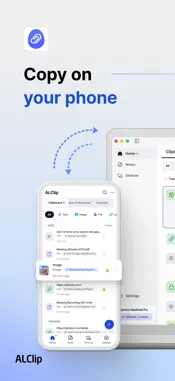
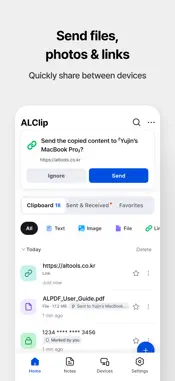
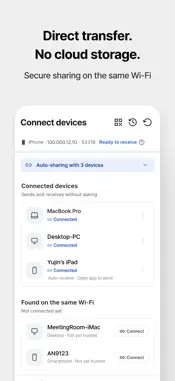
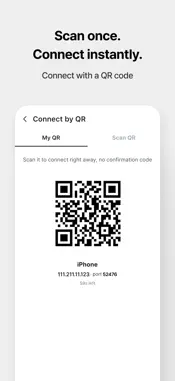
Copy on your iPhone, paste on your PC. Copy on your PC, paste on your iPhone! ALClip is a cross-device clipboard manager that connects your iPhone and other devices, letting you continue your clipboard across devices and transfer photos, files, and links with ease. Connect iPhone, Windows, Mac, and Android in any combination. [RECOMMENDED FOR] ● iPhone users who also use a Windows PC ● iPhone users who want to connect their phone to a Mac ● Anyone who wants to continue copied content from iPhone to PC ● Anyone who wants to quickly send links from PC to iPhone ● Anyone looking for an easy way to transfer iPhone photos to PC ● Anyone who frequently transfers files between multiple devices - [FEATURES] ● PC & Mobile Clipboard Copy on one device and continue on another with ALClip. - Send copied text and links from PC or Mac to connected devices automatically or manually - On iPhone, open ALClip after copying or use the Share menu to send copied content to your PC - Copy received text and paste it directly into any app ● Photo, File & Link Transfer Send photos, files, and links directly between devices. - Transfer photos from iPhone to PC - Send documents and files to Windows or Mac - Share links from your PC to iPhone - Send content directly to ALClip from the Share menu in Photos, browsers, and other apps ● Connect iPhone, Windows, Mac & Android Connect devices on the same Wi-Fi or with a QR code. - iPhone ↔ Windows - iPhone ↔ Mac - iPhone ↔ Android - Windows ↔ Mac - Connect phone to phone or PC to PC ● Manage Your Clipboard History Manage copied, sent, and received items in one place. - Clipboard: View copied, sent, and received items together - Sent & Received: See which device each item was sent to or received from - Favorites: Keep frequently used clips for easy access - Search and filter text, images, files, links, and more ● Organize Clips with Notes Save useful clips as notes for quick access later. - Create notes with text and photos - Send clips directly to Notes - Send your notes to another device - Find notes quickly with favorites and search ● Direct Transfer Without the Cloud Transfer clipboard content and files directly between connected devices on the same Wi-Fi. - No clipboard content or transferred files are uploaded to external cloud servers - Direct device-to-device transfer over the same Wi-Fi - Receive data only from connected devices - Encrypted device-to-device transfers - [REQUIREMENTS] · iPhone with iOS 17 or later [DEVICES YOU CAN CONNECT TO] ALClip connects to other devices running ALClip - iPhone with iOS 17 or later, macOS 14 or later, Windows 10 or later, and Android 11 or later. ※ Device-to-device transfers work only when devices are connected to the same Wi-Fi network. [CUSTOMER SUPPORT] · Phone: +82-1544-8209 · Email: [email protected] Terms of Use: https://www.apple.com/legal/internet-services/itunes/dev/stdeula
Technical Analysis
Package Overview Basic metadata
Bundle ID
com.estsoft.alclip Current Version 2.0.0
Minimum iOS 17.0
Package Size App Store Size
Package Metadata 0 / 0 version records
Detailed binary, privacy manifest, framework, and Info.plist results have not been indexed for this package yet. The verified App Store and archive metadata above remains available.
Developer Information
Known Version Records
0 version records with stored package metadata
Stored metadata does not guarantee a package is currently available to download.
| Details | Version / IDs | Version date | Action |
|---|