Preview



Description
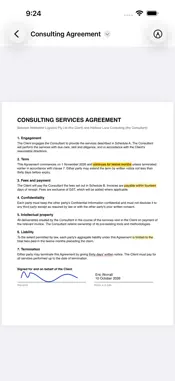
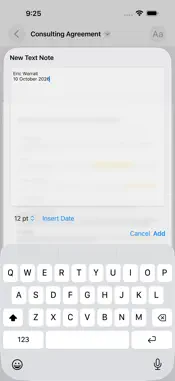
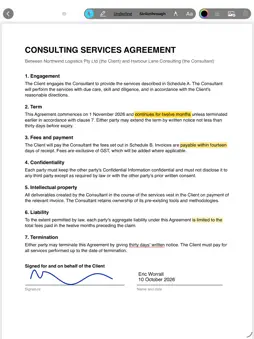
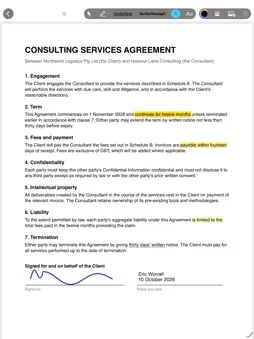
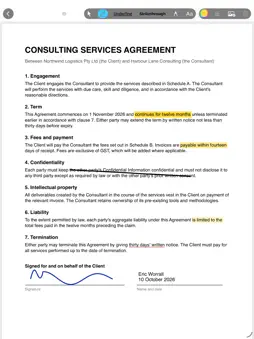
PDF Annotate exists because I needed to sign a contract. All I wanted was to open a PDF, draw my signature, add the date and send it back. Every app I tried wanted a subscription, or was a free download with the one feature I needed locked behind an in-app purchase. So I built the app I was looking for. PDF Annotate is a one-time purchase. What you see is what you get: every feature is included. There are no subscriptions, no in-app purchases, no accounts and no ads. Buy it once and use it on your Mac, iPhone and iPad. WHAT IT DOES • Sign documents by hand with your finger, Apple Pencil or trackpad, in any colour and line weight • Add typed notes such as your name and the date, in clean text with no boxes or borders • Highlight with feel: sweep quickly for a light wash, slow down for a heavy mark • Underline and strike through text with a drag • Place images from your photos, files or the clipboard, then move and resize them on the page • Undo and redo everything MADE FOR CONTRACTS AND EVERYDAY PAPERWORK Everything you add is a standard PDF annotation, so your marks show up correctly in Preview, Adobe Acrobat, email attachments and anywhere else the document goes. Open a file from Files, iCloud Drive, Mail or Finder, annotate it and save it in place. ONE PURCHASE, THREE DEVICES Buy PDF Annotate once and it is yours on Mac, iPhone and iPad. On the Mac you get full menus and keyboard shortcuts. On iPad, touch and Apple Pencil. On iPhone, a compact palette that stays out of the way. PRIVATE BY DESIGN PDF Annotate has no accounts and no analytics, and it never connects to the internet. Your documents stay on your devices and in the cloud storage you already use. LARGE DOCUMENTS Very large PDFs, such as long scanned documents of hundreds of megabytes, need a device with plenty of memory. Older iPhones and iPads with less memory may not be able to open them. NO SURPRISES No subscription. No in-app purchases. No upgrade nag. The price you pay on the store is the whole price.
What's New
Version 1.1 2026-10-30
Sharper annotations on the Mac: notes, signatures, highlights and stamps are now drawn at full screen resolution at every zoom level, matching the document's ow... Technical Analysis
Package Overview Basic metadata
Bundle ID
com.desirableapps.PDFAnnotate Current Version 1.1
Minimum iOS 26.0
Package Size App Store Size
Package Metadata 0 / 0 version records
Detailed binary, privacy manifest, framework, and Info.plist results have not been indexed for this package yet. The verified App Store and archive metadata above remains available.
Known Version Records
0 version records with stored package metadata
Stored metadata does not guarantee a package is currently available to download.
| Details | Version / IDs | Version date | Action |
|---|