Preview







Description
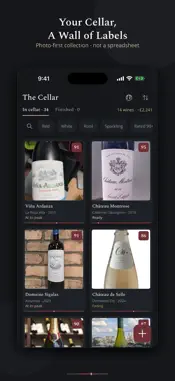
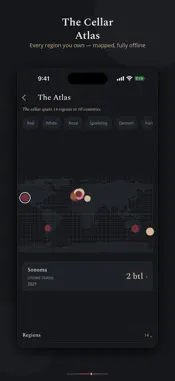
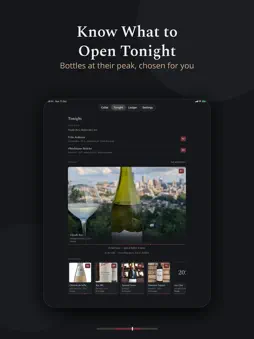
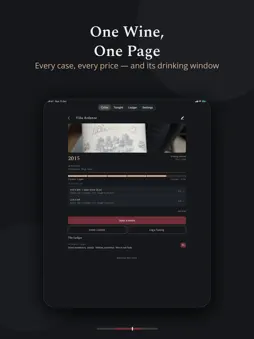
Cellar Book is a quiet, private book for your wine. No account. No server. No feed. Your cellar lives on your phone, and its backups in your own iCloud Drive, nowhere else. Everything works offline: in the cellar, at the table, at the shop. KNOW WHAT TO OPEN TONIGHT Every wine carries a drink window, the years it tastes best. Tonight gathers the wines that are ready now and puts the fading ones first, so nothing is forgotten at the back of the rack. Cooking? Pair with a dish narrows Tonight to the wines that suit it. SCAN THE LABEL Point the camera at a label and the vineyard, the wine, the region, the grape and the vintage are offered as chips. Tap the ones that are right. Nothing is written until you do, and the reading happens on your phone. A WALL OF LABELS, NOT A SPREADSHEET Photograph your labels and your wine collection becomes something worth looking at. Vineyard, vintage and drink window sit quietly beneath each label. Sort the wall by rack to see where every bottle actually is. TASTE LIKE A SOMMELIER Record nose, palate and finish, and score on the 100-point scale sommeliers use. Every note stays with the wine, so the next time you see that producer you know exactly what you thought. The wine page says how to serve it: decant, temperature, glass. THE CELLAR ATLAS Your collection as a map. The Atlas plots every region you own on an offline world map. Pinch, drag, tap a region to see what rests there. FIND ANY BOTTLE Search by vineyard, region, grape, vintage and your own tasting notes. Filter by colour, by score, or by what is drinking well now. Twelve bottles in a wine fridge or several hundred in a cellar, the right one is a few taps away. YOUR DATA IS YOURS Turn on Backups and the whole cellar, label photos included, is copied to your own iCloud Drive after your changes, in a folder only Cellar Book can see. Each device keeps its three newest. Set up a new iPhone and the backup is found and offered on first launch. You can also save the cellar to a single file at any time, free, and keep it where you like. Export your cellar and your tasting notes as a spreadsheet, or bring a spreadsheet in, including a CellarTracker export. BUILT FOR EVENINGS A dark, calm design for a candlelit table rather than a bright office. THE FULL CELLAR The free shelf holds ten wines, however many bottles of each. One purchase for good, or a monthly subscription, opens the full cellar: unlimited wines, restore from iCloud Drive or a backup file whenever you like, spreadsheets, and no ads. Questions or suggestions: [email protected] Terms of Use: https://www.apple.com/legal/internet-services/itunes/dev/stdeula/
What's New
Version 1.1.45 2026-11-06
BACKUPS Turn on Backups in Settings and the cellar, label photos included, is copied to your own iCloud Drive after your changes, in a folder only Cellar Book c...BACKUPS Turn on Backups in Settings and the cellar, label photos included, is copied to your own iCloud Drive after your changes, in a folder only Cellar Book can see. Each device keeps its three newest. A new iPhone finds the backup and offers it on first launch. SCAN THE LABEL Point the camera at a label. The vineyard, the wine, the region, the grape and the vintage are offered as chips under the form; tap the ones that are right. Nothing is written until you do, and nothing leaves your phone. YOUR CELLAR, IN A SPREADSHEET Export the cellar and the Ledger as spreadsheets from Settings. Bring one in the same way, including a CellarTracker export: the app reads the columns, shows you what it found, and adds it to the cellar without touching what is there. PAIR WITH A DISH Tonight now has a line for what you are cooking. Choose a dish and Tonight narrows to the wines that suit it. It never changes the order: the bottle running out of time still comes first. THE WALL, BY RACK Sort the wall by rack and the cards gather under the racks and shelves you typed, each with its bottle count. Fold a rack away with a tap. HOW TO SERVE IT The wine page now says how to serve the wine: decant, temperature, glass. AND ON THE WALL Cards are cut to the label. A Large view shows one wine at a time with its window, its stock and its last note. The wine page shows the bottles sealed, open and drunk as a band, and the free shelf's extra wines are asleep rather than gone. Technical Analysis
Package Overview Basic metadata
Bundle ID
com.eritech.cellarbook Current Version 1.1.45
Minimum iOS 17.0
Package Size App Store Size
Package Metadata 0 / 5 version records
Detailed binary, privacy manifest, framework, and Info.plist results have not been indexed for this package yet. The verified App Store and archive metadata above remains available.
Developer Information
Known Version Records
0 version records with stored package metadata • 5 known version records
Stored metadata does not guarantee a package is currently available to download.
| Details | Version / IDs | Version date | Action |
|---|---|---|---|
| Not archived | App Store ID: 891685104 | Unknown | Request Version |
| Not archived | App Store ID: 890221317 | Unknown | Request Version |
| Not archived | App Store ID: 890160896 | Unknown | Request Version |
| Not archived | App Store ID: 890078663 | Unknown | Request Version |
| Not archived | App Store ID: 889081177 | Unknown | Request Version |