
Preview





Description
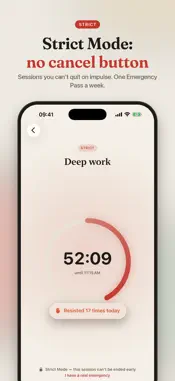
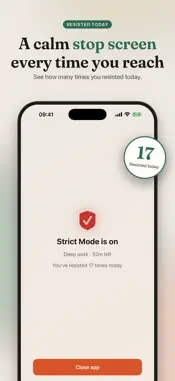
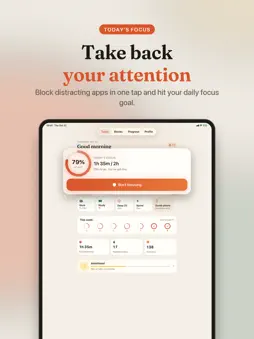
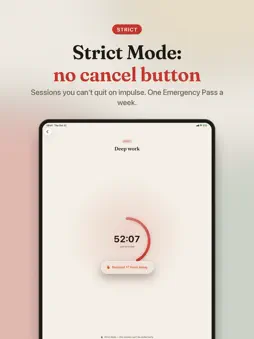
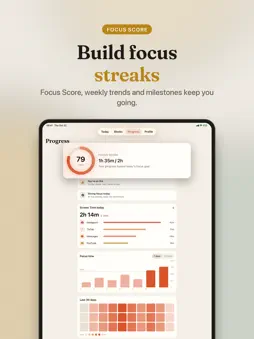
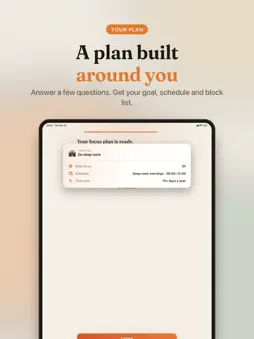
Take back your time. FocusGuard blocks the apps that pull you in, and makes sure the block holds when your willpower doesn't. THE PROBLEM Most of us unlock our phones dozens of times a day, usually without deciding to. The apps are built to keep you scrolling, and a simple time limit is one tap away from "Ignore". Blocking only works if it's hard to undo. THE SOLUTION FocusGuard is built on Apple's Screen Time, so blocks are enforced by iOS itself. You choose how strict to be, from a gentle pause to a session that can't be cancelled. HOW IT WORKS 1. Tell us your goal. A short setup builds your plan: a daily focus goal, a starter schedule and the apps that distract you most. 2. Block in one tap. Start a focus session from a quick preset or with Siri. 3. Pick your strictness. Flexible allows a mindful pause, Focus asks for a 30-second challenge to quit, Strict can't be ended early. 4. Watch your streak grow. Every focused day counts toward your streak, gems and milestones. WAYS TO BLOCK • Focus Sessions: block the apps and sites you choose for a set time • Schedules: block automatically on the days and hours you pick, including overnight • Daily App Limits: give social apps a daily budget. When it's spent, they lock until midnight • Always On: keep apps blocked until you turn it off • Dumb Phone Mode: allow only the few apps you truly need. Everything else locks • Sleep Mode: distractions lock automatically at bedtime HARD TO BACK OUT OF • Strict Mode: no cancel button. One Emergency Pass per week for real emergencies • Mindful Pause: one slow breath and a reason before a short, timed unlock. Apps lock again on their own • See how many times you resisted today, right on the block screen • PIN and uninstall protection against impulse decisions STAY MOTIVATED • Focus Score: your progress toward today's focus goal • Weekly focus charts, streaks, evolving gems and milestones • Home Screen and Lock Screen widgets, plus a Live Activity while you focus • Siri and Shortcuts: start focusing or lock apps hands-free • Focus sounds: white, pink and brown noise WHY FOCUSGUARD IS DIFFERENT • Blocks are enforced by iOS Screen Time, not a reminder you can swipe away • No VPN profile, no account, no ads • FocusGuard never sees which apps you use. Apple keeps that private, and your data stays on your iPhone FREE • Unlimited Flexible focus sessions with Mindful Pause • 1 schedule plus Sleep Mode, and 1 daily app limit • Streaks, Focus Score, widgets and 7-day stats FOCUSGUARD PRO • Focus and Strict difficulty • Dumb Phone Mode • Unlimited schedules and app limits • PIN and uninstall protection • 30-day history and focus heatmap Pro is available as a weekly, monthly or yearly auto-renewable subscription. Payment is charged to your Apple ID at confirmation of purchase. The subscription renews automatically unless cancelled at least 24 hours before the end of the current period. Manage or cancel anytime in Settings → your name → Subscriptions. Terms of Use: https://www.apple.com/legal/internet-services/itunes/dev/stdeula/
What's New
Version 1.5 2026-10-24
A big redesign of FocusGuard: • All-new design, calmer and easier to use • New onboarding that builds a focus plan around your goals • Dumb Phone Mode: allow o... Technical Analysis
Package Overview Basic metadata
Bundle ID
com.erdemcaygor.FocusGuard Current Version 1.5
Minimum iOS 17.6
Package Size App Store Size
Package Metadata 1 / 3 version records
Detailed binary, privacy manifest, framework, and Info.plist results have not been indexed for this package yet. The verified App Store and archive metadata above remains available.
Developer Information
Known Version Records
1 version record with stored package metadata • 3 known version records
Stored metadata does not guarantee a package is currently available to download.
| Details | Version / IDs | Version date | Action |
|---|---|---|---|
| Not archived | App Store ID: 890301746 | Unknown | Request Version |
| 25.89 MB | v1.2 App Store ID: 885736200Build: 1.2 | 2026-08-28 16:43:49 | Get Version |
| Not archived | App Store ID: 885140110 | Unknown | Request Version |