
Preview


Description
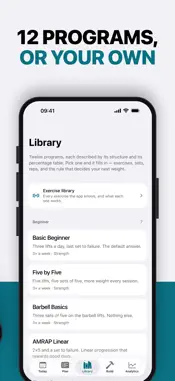
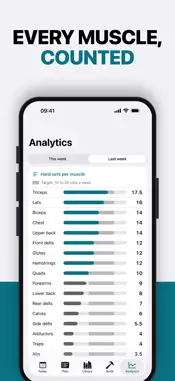
Trackload is a strength training app built to work with the LLM you already use. Ask for a new program, a different schedule or a fix for a stalled lift, and the LLM writes the plan in a language Trackload reads. You see every change before anything applies, and between changes the progression engine decides every next weight. BUILT FOR YOUR LLM On iPhone, Copy for LLM gives your chat assistant everything it needs: your plan, the rules for writing it, your current weights and your last four weeks of training. Paste the reply back and Trackload lists every change in plain words. On a Mac, with iCloud backup on, your plan is a text file in a Trackload folder in iCloud Drive, with your history beside it as CSV. An assistant that can open files reads your progress and edits the plan itself, and the app shows the edit for review. Create programs from scratch, change the one you run, or override the progression: a lighter session, a weight held until a date, a new training max, a deload. THE PROGRAMS, WHOLE Twelve programs: linear progressions, upper/lower and push/pull/legs splits, and percentage-driven waves. Each one carries its own percentage table rather than an approximation of it. Where a structure could not be represented faithfully, it was left out instead of guessed at. YOUR OWN PROGRAMS Or edit by hand: copy one of the twelve and change anything, from days and exercises to the progression rule and the schedule. Editing in the app is free, and your logged sessions are never touched. THE NEXT WEIGHT, ALREADY DECIDED Open the app and the session is laid out: every lift, every set, every weight, rounded to plates you can load. Six progression schemes run underneath, from straight linear to AMRAP-driven to double progression to percentage waves. When a lift stalls, the app tells you the weight held and why. It does not console you. LOGGING THAT GETS OUT OF THE WAY A set is one tap. Add RPE if you want it, or leave it off. A rest timer runs on the Lock Screen and in the Dynamic Island, so the phone can go back in your pocket between sets. WHAT THE NUMBERS SAY - Hard sets per muscle each week, against a 10 to 20 set target - Intensity distribution, so you can see whether your heavy days are actually heavy - Push to pull and quad to hamstring balance - Estimated one-rep max per lift, Epley or Brzycki - Progressive load charts for every exercise WHERE YOUR TRAINING LIVES On your phone, in one file. No account. No sign-up. No analytics, no crash reporting, no third-party SDKs, no advertising. Trackload never sends your plan anywhere: you choose what to paste into an assistant. Optional iCloud backup keeps a copy in your own iCloud so your history survives deleting the app, and writes your history as CSV to a Trackload folder in iCloud Drive. Optional Health export writes finished sessions as strength training workouts. Both are off until you turn them on, and the app is complete without either. Light and dark, following your phone. BUILT FOR ONE THING Barbell strength. No cardio scoring, no recovery index, no readiness number. Trackload shows you the number and the rule that produced it, then gets out of the way. Trackload is a training log, not a medical device, and it gives no medical advice. Seek a doctor's advice in addition to using this app, and before making any medical decisions, including starting a new training program. Requires iPhone with iOS 18 or later. Free to download. Five LLM changes are free; a one-time in-app purchase unlocks unlimited LLM changes. Editing in the app is always free.
What's New
Version 2.0 2026-11-13
Trackload now works with the LLM you already use. It can create programs, change the one you run, and tune your progression, and you approve every change. A ne...Trackload now works with the LLM you already use. It can create programs, change the one you run, and tune your progression, and you approve every change. A new Build tab. Make a program from scratch, or copy one of the twelve and make it yours: days, exercises, sets, reps, the progression rule, starting weights and the schedule. Editing in the app is free and unlimited. Change a plan with the LLM you already use. Copy for LLM puts your plan, your recent training and the rules for writing it on the clipboard. Paste the reply back and Trackload shows every change in plain words before anything is applied. Weight overrides work too: one session lighter, hold a weight until a date, or reset a training max. Your logged sessions are never touched. On a Mac, with iCloud backup on, a Trackload folder in iCloud Drive holds your plan as a text file and your history as CSV. Edit the plan there and the app offers the change for review. Five LLM changes are free. One purchase unlocks them for good. Edits in the app never count; applying a program.txt change from a Mac counts as an LLM change. A new look, at home beside the Health app, in light and dark. Trackload follows your phone's appearance; Settings > Appearance can keep it dark. Analytics shows hard sets per muscle each week against a 10 to 20 set target, in place of the body map. The two leg days in Push Pull Legs are now Legs A and Legs B. Your history keeps the names it was logged under. The optional Bluetooth heart rate strap has been removed. Trackload no longer connects to any hardware. Technical Analysis
Package Overview Basic metadata
Bundle ID
com.eam.rack Current Version 2.0
Minimum iOS 18.0
Package Size App Store Size
Package Metadata 0 / 0 version records
Detailed binary, privacy manifest, framework, and Info.plist results have not been indexed for this package yet. The verified App Store and archive metadata above remains available.
Developer Information
Known Version Records
0 version records with stored package metadata
Stored metadata does not guarantee a package is currently available to download.
| Details | Version / IDs | Version date | Action |
|---|