Preview






Description
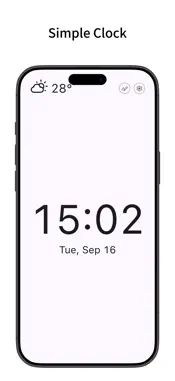
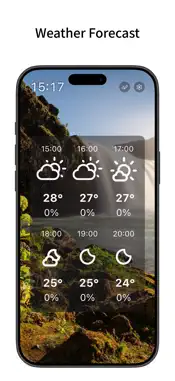
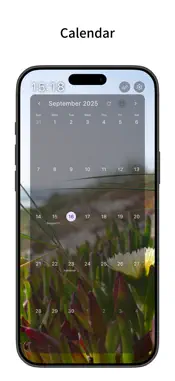
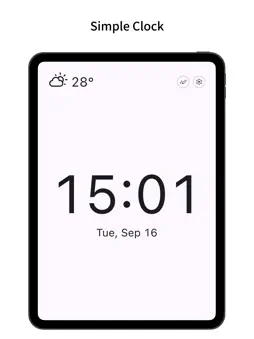
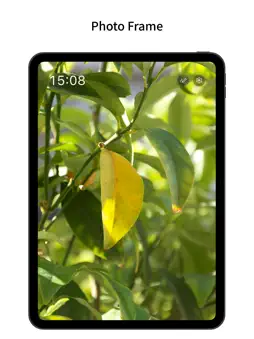
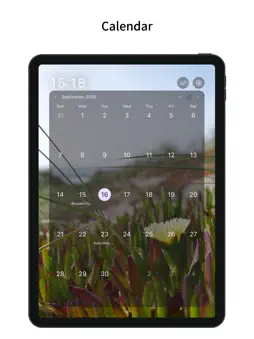
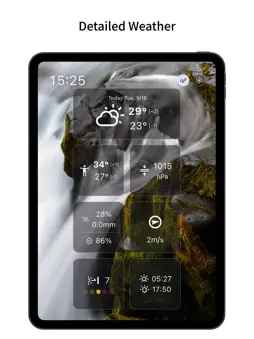
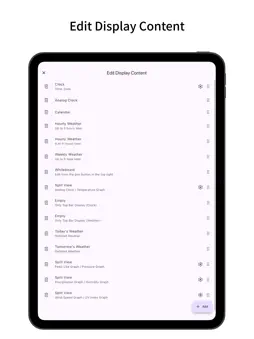
A simple clock app with a smart display feel. It also supports weather forecasts, calendars, and background images and videos. You can also use it as a digital photo frame. Simple Clock - Displays the time and date. - You can change the 12/24-hour display, seconds display, and text size from the settings. - Can display an analog clock. - Can display the time in the top bar. - Auto-scrolls like a smart display. - You can change the interval for automatic screen switching. - Supports changing screen transition animations and swiping up, down, left, and right to switch screens. Photo Frame - You can display images and videos saved on your device as the background. - You can select an album and display media from it randomly. - You can change the background display mode (fit whole, crop fill, etc.) and alignment position. - You can sync background media switching with screen switching. - You can change the automatic switching interval. - By displaying only the time or weather on the top bar, you can use it like a digital photo frame with images and videos as the main focus. Weather Forecast - Can display the current weather and temperature in the top bar. - Can display hourly and daily weather forecasts. - You can specify the forecast location by getting your current location or directly entering the latitude and longitude. - You can change the units for temperature, wind speed, and precipitation. - Weather forecast data is retrieved from Open-Meteo.com. Calendar - Can display a calendar. - Can display calendar events from your device. - You can select which device calendars to display events from. Whiteboard - You can draw on the whiteboard by pressing the pen button on the top bar. - Once you draw on the whiteboard, it will be displayed on the screen. - You can change color options and toggle pinch-to-zoom from the settings. - You can hide the pen button on the top bar by removing the whiteboard from the display content. Edit Display Content - You can add, remove, and reorder the content displayed on the screen from the settings. - Supports split view. You can select the content to display on the top, bottom, left, or right. Customization - Supports Dark Mode. - You can change the theme color. - You can change the text and icon colors. - You can toggle the display of shadows. - Features a simple design compliant with Material Design. Sleep Mode - A mode that displays only the time and date without updating the weather or displaying images. - By setting a schedule, you can automatically enter Sleep Mode during specified times. - The screen is black by default, but you can change it to a white screen by turning on "White screen in Sleep Mode". This is recommended when using the app as a room light. - The time and date sizes in this mode are linked to the clock settings. Pro Version - By purchasing the Pro version (in-app purchase), you can use all features, including removing ads, detailed weather displays, shorter weather update intervals (every 3 or 6 hours), screen transition animation changes, and video background settings. - The Pro version is a one-time purchase (not a subscription). - When you turn on Detailed Weather in the settings, you can display Today's Weather, Tomorrow's Weather, and various graphs in the display content. - For Today's Weather and Tomorrow's Weather, you can view the detailed weather for that day all at once. Tapping each item will show the graph for that day. - For detailed weather graphs (Temperature, Feels Like, Pressure, Precipitation, Humidity, Wind Speed, UV Index), you can view a detailed line graph that allows multi-day comparison. For Temperature, Feels Like, and Pressure graphs, the difference between the current value and the graph from 24 hours ago is displayed.
What's New
Version 4.2.0 2026-10-19
- Fixed an issue where the rain icon would appear even when the chance of precipitation was low. - Added support for 11 new languages. - Fixed translation error...- Fixed an issue where the rain icon would appear even when the chance of precipitation was low. - Added support for 11 new languages. - Fixed translation errors across multiple languages. Technical Analysis
Package Overview Basic metadata
Bundle ID
com.enoiu.roomscreen Current Version 4.2.0
Minimum iOS 15.0
Package Size App Store Size
Package Metadata 1 / 7 version records
Detailed binary, privacy manifest, framework, and Info.plist results have not been indexed for this package yet. The verified App Store and archive metadata above remains available.
Developer Information
Known Version Records
1 version record with stored package metadata • 7 known version records
Stored metadata does not guarantee a package is currently available to download.
| Details | Version / IDs | Version date | Action |
|---|---|---|---|
| Not archived | App Store ID: 893252179 | Unknown | Request Version |
| Not archived | App Store ID: 891900839 | Unknown | Request Version |
| Not archived | App Store ID: 889578915 | Unknown | Request Version |
| Not archived | App Store ID: 889426011 | Unknown | Request Version |
| 41.28 MB | v4.0.3 App Store ID: 878180556Build: 4.0.3 | 2026-08-11 15:35:58 | Get Version |
| Not archived | App Store ID: 874465634 | Unknown | Request Version |
| Not archived | App Store ID: 870445251 | Unknown | Request Version |