
Preview




Description
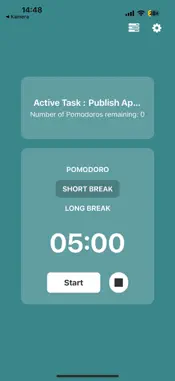
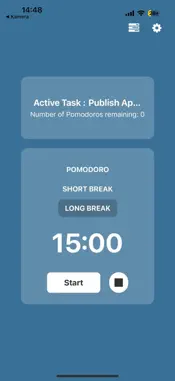
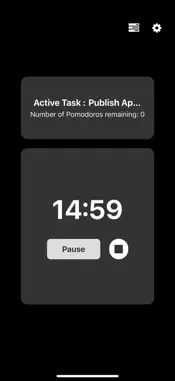
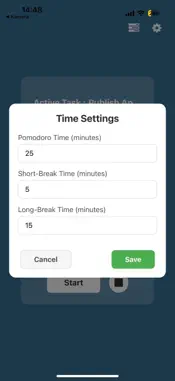
In today’s fast-paced world, staying focused and productive can be challenging. Whether you're working, studying, or working on personal projects, maintaining productivity while managing distractions can be difficult. The Pomodoro Technique is a proven method that helps improve focus, reduce burnout, and enhance overall productivity. With Pomodoro Timer, this technique becomes easy to implement in your daily routine, helping you stay on track and accomplish your goals more efficiently. What is the Pomodoro Technique? The Pomodoro Technique is a time management method that breaks work into intervals, traditionally 25 minutes in length, separated by short breaks. After four Pomodoros (work intervals), you take a longer break to recharge. This method encourages sustained concentration and mental freshness, making it easier to stay productive over long periods. How Does Pomodoro Timer Work? Pomodoro Timer is designed to make the Pomodoro Technique accessible and easy to use for everyone. The app provides a timer that you can customize to fit your personal workflow. You can adjust the work and break intervals based on your preference and start working with just a click. Here’s how it works: Work Intervals: The default work interval is set to 25 minutes, but you can easily customize this duration to suit your needs. This ensures that you can adjust the app to match your concentration and focus level for any task. Break Intervals: After each work session, take a break! The app offers both short and long break options, allowing you to take a 5-minute break after each Pomodoro and a 15-30 minute break after four Pomodoros. Notifications: You’ll receive reminders when it’s time to work, take a short break, or take a long break, ensuring that you stay on schedule. Progress Tracker: Pomodoro Timer allows you to track your progress, so you can see how much time you’ve spent working and how many Pomodoros you’ve completed. This feature provides a visual representation of your work patterns, helping you understand your productivity over time. Key Features of Pomodoro Timer: Customizable Timers: Adjust work and break times to match your personal preferences. Progress Tracking: View a log of completed Pomodoros and track your overall productivity. Simple and Clean Design: The user interface is designed to be easy to use, helping you focus on your tasks rather than the app itself. Focus Mode: Block out distractions by enabling the Focus Mode, which minimizes notifications and prevents other apps from disturbing you. Sound Alerts: Choose between subtle sound cues or silent mode to notify you when it’s time to work or take a break. Multiple Timer Presets: Create different timer presets for different tasks, such as "Work," "Study," or "Project." Why Choose Pomodoro Timer? Pomodoro Timer is more than just a timer app; it’s a productivity companion that helps you manage your time more effectively. Whether you're a student looking to improve study habits, a professional working on multiple projects, or anyone trying to improve focus and reduce distractions, Pomodoro Timer is the perfect tool. Benefits of Using Pomodoro Timer: Increased Productivity: By working in focused intervals, you can accomplish more in less time. The Pomodoro technique minimizes the temptation to procrastinate, helping you stay on task. Reduced Mental Fatigue: Frequent breaks ensure that your mind stays fresh, making it easier to maintain concentration throughout the day. Enhanced Focus: The app helps you develop a focused work routine, minimizing distractions and enhancing the quality of your work. Motivation Boost: Seeing your progress and completing Pomodoros provides a sense of accomplishment, motivating you to keep going. Flexibility: The app allows you to adjust the intervals, making it perfect for anyone who wants to tailor the Pomodoro technique to their unique workflow.
What's New
Version 1.01 2025-03-10
New Feature: Task Management System We’re excited to introduce a brand-new Task Management System to help you stay organized and productive! Here’s what’s new: ...New Feature: Task Management System We’re excited to introduce a brand-new Task Management System to help you stay organized and productive! Here’s what’s new: Create & Manage Tasks: Easily add, edit, and delete tasks to keep track of your work. Task Categories: Organize your tasks with custom categories for better workflow. Reminders & Deadlines: Set due dates and receive notifications so you never miss an important task. Improved UI/UX: A cleaner, more intuitive interface for a smoother experience. Bug Fixes & Performance Improvements: We've squashed some bugs and optimized performance for a faster, more reliable app. Technical Analysis
Package Overview Basic metadata
Bundle ID
com.anonymous.PomodoroMobileApp Current Version 1.01
Minimum iOS 15.1
Package Size App Store Size
Package Metadata 0 / 2 version records
Detailed binary, privacy manifest, framework, and Info.plist results have not been indexed for this package yet. The verified App Store and archive metadata above remains available.
Known Version Records
0 version records with stored package metadata • 2 known version records
Stored metadata does not guarantee a package is currently available to download.
| Details | Version / IDs | Version date | Action |
|---|---|---|---|
| Not archived | App Store ID: 873036440 | Unknown | Paid / Arcade |
| Not archived | App Store ID: 872914626 | Unknown | Paid / Arcade |