
Preview







Description
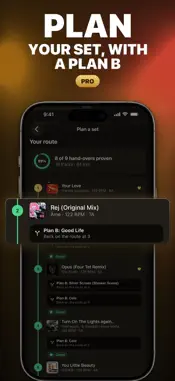
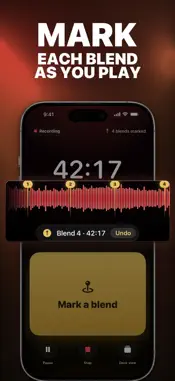
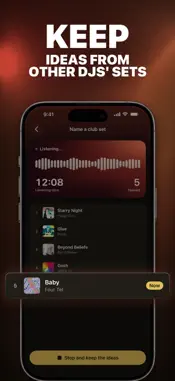
Record your practice and Mixnote finds the blends. It names the tracks, plays each blend back as a clip, and you rate it with a swipe: Great, Works, Retry or Avoid. No typing. Save, and the next time you reach for a track, you know what works after it. Pick any track and see what you've already mixed out of it, best first, and how you did each one. Follow a next track to see what comes after it. When a path holds up, save it as a combo: two to five tracks proven to work in order. PLAN A SET Give a length and a start and end tempo, and Mixnote plans a set through your own blends. It says how many hand-overs are proven and suggests a Plan B that leads back onto the route. Save it as a gig sheet, then play it from a Live Activity on your Lock Screen. HEAR HOW IT SOUNDED Record a practice or a gig with your iPhone, or through an audio interface plugged into it, and mark each blend with a tap, Siri or the Action button. While you record, Deck view names what's playing and shows what has worked after it. Each saved blend keeps its clip, so you can hear how the mix really sounded. At a club or in front of a stream, open Name a club set: Mixnote names what it hears and keeps what came next as ideas to try, apart from your own blends. Nothing is recorded. LEARN TO MIX Cue Academy is a DJ school in its own tab: 51 lessons in eight modules, from finding the beat to playing out. Each lesson ends in a drill with a pass mark, and each module in an exam. Your teacher is Cue, a strict and funny fox. BRING YOUR MUSIC IN Pick your music folder or a USB stick, and each track comes in with the title, artist, BPM and key in its tags. Or paste a track list, or import your rekordbox collection and the sets you played in rekordbox or Serato, then rate each set blend by blend. POST IT Mixnote makes the post: pictures styled from your tracks' artwork, blend videos, ID reply cards, gig posters and set recaps, with a caption drafted on your iPhone for you to edit. This week's combo is there too, ready to post. AFTER PRACTICE Rather write it down? Save a whole practice session in one go, or one transition in two taps. Save the ones that didn't work too. "Goes muddy in the breakdown" is worth more than a blank. WHAT'S IN IT • What's next: the tracks you've mixed out of any track, best first • Find the blends in a recording, rated with a swipe • Plan a set, with Plan B and a Live Activity • Deck view and Name a club set • Cue Academy: 51 lessons, drills and exams • Combos of 2 to 5 tracks, and gig sheets with tracklist export • Gig and practice reminders • BPM and Camelot key on your tracks • Search and filter by outcome, energy, technique, key or BPM • Track details from Apple Music, or typed in yourself • Export the lot as JSON or CSV • iCloud sync across your iPhones • Available in 15 languages YOUR LIBRARY, YOUR PHONE No account, no sign-in. Your library and recordings live on your iPhone. With Pro, iCloud sync keeps a copy in your own private iCloud and the same library on each iPhone where you turn it on. Turning sync off leaves the library on your phone as it is. A recording's sound is never shared or exported, and naming tracks sends Apple only Shazam signatures, never the sound. FREE AND PRO Saving transitions is free, with no limit. So are Find the blends, Deck view, Name a club set, practice sessions, gig sheets, posts, reminders, importing a music folder or a pasted list, your first import from DJ software, up to 3 recordings, the first lesson of every Academy module, the first 3 steps of a planned set, and 2 combos. Pro adds unlimited combos, imports and recordings, the rest of the Academy, the whole planned set with Plan B and its Live Activity, gig sheet export and iCloud sync. Monthly or annual, or buy it once and keep it. ToS: https://www.ebyapps.com/terms Privacy Policy: https://www.ebyapps.com/privacy
What's New
Version 1.16.0 2026-11-22
Thank you for mixing with Mixnote! Here's what's new: • The first lesson now shows you the beat: four lights count along, and the big one is the 1. Tap it once...Thank you for mixing with Mixnote! Here's what's new: • The first lesson now shows you the beat: four lights count along, and the big one is the 1. Tap it once per bar. • Easier to pass: a first star now means you tried and roughly got it. The second and third stars are for getting it tight. • Never stuck: miss a drill twice and Cue lets you through on the third try. Come back any time for more stars. • Every drill now says what to do in one line, right where you play it. • Less reading: each lesson opens with one short idea. The rest waits behind "Read more". • The free lessons no longer ask for a recording or your own tracks. You can pass them on your phone alone. We'd love to hear from you. What should Mixnote do next? Tell us in Settings › Help & feedback › Request a feature. We read every message. Technical Analysis
Package Overview Basic metadata
Bundle ID
com.bugrayndny.djmemory Current Version 1.16.0
Minimum iOS 26.0
Package Size App Store Size
Package Metadata 0 / 0 version records
Detailed binary, privacy manifest, framework, and Info.plist results have not been indexed for this package yet. The verified App Store and archive metadata above remains available.
Developer Information
Known Version Records
0 version records with stored package metadata
Stored metadata does not guarantee a package is currently available to download.
| Details | Version / IDs | Version date | Action |
|---|