
Preview






Description
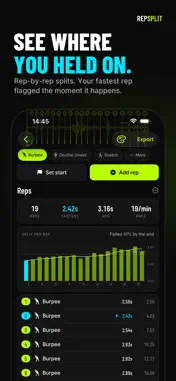
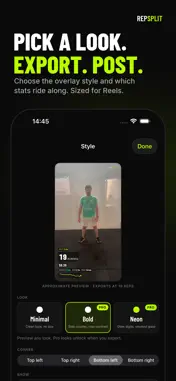
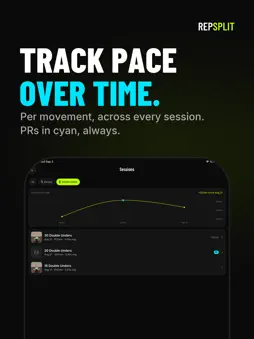
You did the work. Now show it. Import any workout video — double unders, burpees, wall balls, pull-ups — and RepSplit overlays your rep count, splits and pace directly on the footage. Pick a style, export, post. Your PR, with receipts. NEW: YOUR LOGO. MADE FOR IPHONE DUO. Put your gym's logo or your own on every video you export, in place of ours (Pro). On iPhone Duo, open it and your clip sits on one page, the timeline and Add rep on the other. Stand it up like a laptop and tap reps on the flat half. HOW IT WORKS 1. Import a clip from Photos or Files. 2. Tap along. Scrub the filmstrip and tap + on every rep, or slow the clip to 0.25× and tap in rhythm while it plays. 3. Style it. Choose an overlay look and which stats ride along. 4. Export. RepSplit burns the live counter, the running clock, your last split and the pace trend into the video, sized for Reels, TikTok and Stories. WHAT YOU GET • Live rep counter overlay, in multiple styles • Rep-by-rep splits: fastest, slowest and average pace • Your fastest rep flagged on the video the moment it happens • A pace trend line that shows where you held on and where you faded • Race videos: two reps side by side, two clocks, one verdict • Your own logo on the clip, in place of the wordmark • Made for iPhone Duo: the clip on one page, Add rep on the other • Every session saved automatically, with a chart and full rep list • Compare each set with your previous one and your best • Track pace over time, per movement • Custom movements for anything not in the list • Fast 1080p export, ready to post BUILT FOR FUNCTIONAL FITNESS Double unders, burpees, wall balls, thrusters, pull-ups, toes-to-bar, box jumps, snatches, clean & jerks, deadlifts, push-ups, muscle-ups, handstand push-ups, kettlebell swings, air squats, sled pushes and more. One movement per set, every split counted. FREE, WITH A PRO FINISH Import, marking, every movement, all stats, history, PRs, comparisons and a real 1080p export are free. So is your first race video. RepSplit Pro is a one-time purchase that unlocks unlimited race videos, the Bold and Neon overlay looks (and every look added in the future), the rep list on the video, no wordmark, your own logo, and original-quality export. PRIVATE BY DESIGN Your videos never leave your phone. No account, no upload, no cloud. Everything is rendered on device. Every rep. Every split. On film.
What's New
Version 1.2 2026-11-02
Your logo on the clip. Put your gym's logo or your own on every video you export, in place of the RepSplit wordmark. Pick it once in Style, from Photos or Files... Technical Analysis
Package Overview Basic metadata
Bundle ID
com.endcode.Repsplit Current Version 1.2
Minimum iOS 26.0
Package Size App Store Size
Package Metadata 0 / 0 version records
Detailed binary, privacy manifest, framework, and Info.plist results have not been indexed for this package yet. The verified App Store and archive metadata above remains available.
Developer Information
Known Version Records
0 version records with stored package metadata
Stored metadata does not guarantee a package is currently available to download.
| Details | Version / IDs | Version date | Action |
|---|