
Preview







Description
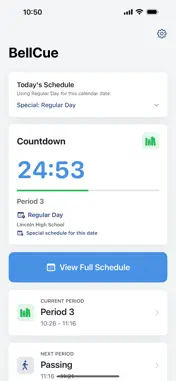
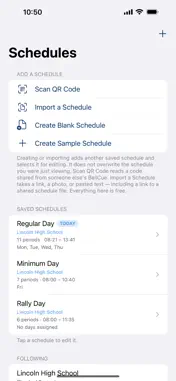
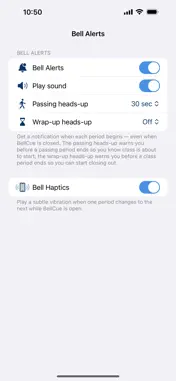
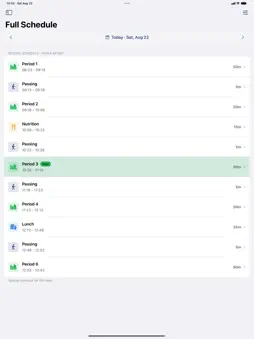
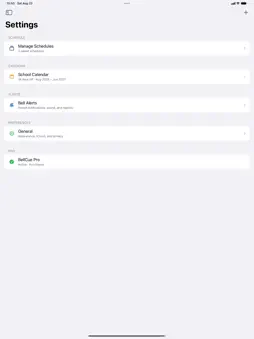
BellCue — Never Miss a Bell BellCue turns your school's bell schedule into a live, always-accurate countdown. See exactly how long is left in this period, what's coming next, and when the day ends — right on your iPhone, Apple Watch, and home or lock screen. Whether you're teaching the class or sitting in it, BellCue keeps you on the same clock as the bell. It works for any school with a fixed bell schedule — bring in yours by scanning a code, importing it from a school website or PDF, snapping a photo of a printed copy, or entering it by hand. FOLLOW YOUR SCHOOL'S SCHEDULE • Scan one QR code and BellCue keeps that schedule current — when the school moves a bell time, adds a minimum day, or announces a break, your phone follows • Every update arrives with a plain-language summary of what changed, and an Undo if you'd rather keep what you had • A published schedule can bring the school calendar with it: year start and end, days off, breaks, and special days • Check for updates whenever you like, or just open the app — it checks for you • Following is free, and it only ever changes what it published — stop any time and everything you have stays FREE • Live countdown to the next bell, passing period, nutrition, or lunch • Local bell alerts so you're never caught off guard • Browse your full daily schedule at a glance • Build multiple schedules and assign them to weekdays • School calendar: days off, special days, and a countdown to the next break • Import any schedule automatically — pull it from a school website or PDF, paste text, scan a printed copy with your camera, or choose a photo, and BellCue reads the periods and times for you • Receive a schedule someone sends you — scan a QR code, open a shared .bellcue file, or tap an import link • Shared schedules can suggest which weekdays they run on, so setting up a whole week is one tap (you decide whether to accept) • Share your schedule with anyone — generate a QR code they can scan, or export a .bellcue file • iCloud sync keeps your schedules current across your devices BELLCUE PRO Unlock everything with BellCue Pro — a one-time purchase, not a subscription: • Remove ads • Apple Watch app + complication — your countdown on your wrist • Home-screen and lock-screen widgets • Share several schedules at once — hand a colleague a whole school's bell schedules as one file, or as a single QR code that holds about ten FOR TEACHERS AND SCHOOL OFFICES Build your school's bell schedules once at eibrainiac.com/bellcue/create — free, in a browser, no account — and publish them. You get a link and a QR code to print, post, or put on the board. Students scan it once and stay current all year: change a bell time and their phones pick it up. You can also share a schedule straight from the app, as a QR code or a file. SMART SCHEDULING • Special schedules (rallies, finals, minimum days) you can apply to one date or many at once • Per-date overrides and a quick "today only" switch when plans change • Multi-schedule documents import as separate, correctly-named schedules • Name each schedule by school so everything stays organized PRIVATE BY DESIGN Your schedules live on your device and in your private iCloud. Importing a document fetches directly from the source and reads photos, scans, and text on-device — nothing is sent to us. Following a published schedule downloads only that schedule's file. There is no account and nothing to sign in to. BellCue Pro is a one-time in-app purchase. Payment is charged to your Apple Account at confirmation of purchase — you're charged once, nothing renews, and nothing expires. It's tied to your Apple Account, so it works on your other Apple devices; use Restore Purchases if you reinstall. Terms of Use (EULA): https://www.eibrainiac.com/bellcue/terms Privacy Policy: https://www.eibrainiac.com/bellcue/privacy
What's New
Version 1.1 2026-08-26
Follow your school's schedule — and stop retyping it. FOLLOWING • Scan one QR code, or open a link, and BellCue keeps that schedule up to date on its own. When...Follow your school's schedule — and stop retyping it. FOLLOWING • Scan one QR code, or open a link, and BellCue keeps that schedule up to date on its own. When the school moves a bell time, adds a minimum day, or announces a break, your phone follows. • Every update comes with a plain summary of what changed — and an Undo if you'd rather keep what you had. • A published schedule can bring the school calendar with it: year start and end, days off, breaks, and special days. • Check for Updates is in Settings, under Manage Schedules — or just pull the list down. • Following is free, and it only ever changes what it published. Stop following and everything you have stays. NOW FREE FOR EVERYONE • Import a Schedule — from a school website, a PDF, a photo, pasted text, or your camera — used to be part of BellCue Pro. It is now free, along with every other way of getting a schedule into the app. BELLCUE PRO IS NOW A ONE-TIME PURCHASE • Pro is no longer a subscription: buy it once and keep it. Nothing renews and nothing expires. • If you ever subscribed, you keep Pro permanently at no further charge — including if your subscription has already lapsed. There is nothing to do. ALSO IN THIS UPDATE • A countdown to the next break, and to the last day of school. • Set your school year's start and end dates, so summer stops looking like a broken schedule. • Share several schedules at once as one file or one QR code (Pro) — enough for a whole school's timetables. • Open a link to a shared schedule file, not just a QR code. • A shared schedule can suggest which weekdays it runs on, so a whole week is one tap. You decide whether to accept. • Schedule lists show the day's span and mark the one running today. • Deleting your schedules no longer deletes your school calendar. Technical Analysis
Package Overview Basic metadata
Bundle ID
com.eibrainiac.apps.bellcue Current Version 1.1
Minimum iOS 18.0
Package Size App Store Size
Package Metadata 0 / 0 version records
Detailed binary, privacy manifest, framework, and Info.plist results have not been indexed for this package yet. The verified App Store and archive metadata above remains available.
Developer Information
Known Version Records
0 version records with stored package metadata
Stored metadata does not guarantee a package is currently available to download.
| Details | Version / IDs | Version date | Action |
|---|