
Preview










Description
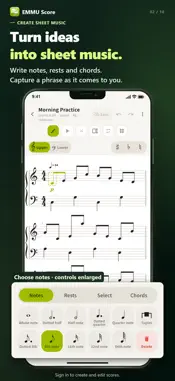
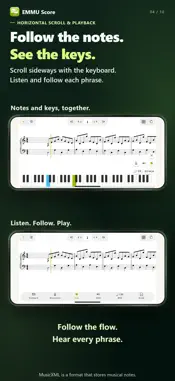
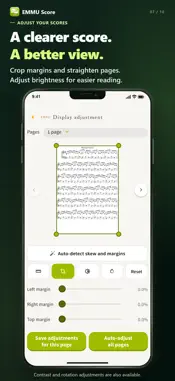
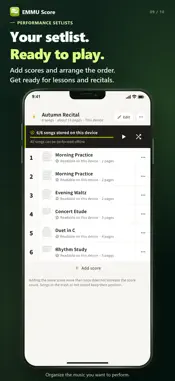
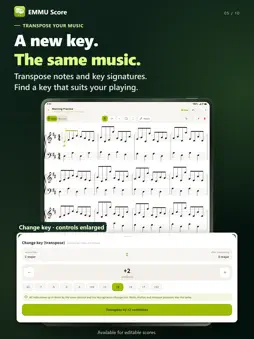
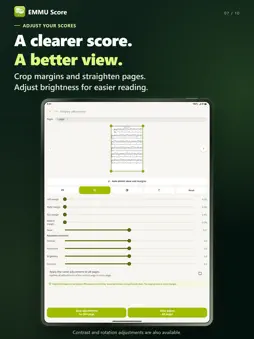
Create sheet music. Add notes. Hear your music. EMMU Score brings score creation, organization and practice together on your iPhone or iPad. Import PDFs, photos and MusicXML, or create your own score. View and create tablature (TAB), play music with brass and woodwind sounds, use a metronome and record your playing. 【Create and edit scores】 Enter notes, rests, chords, lyrics and chord symbols. Set the time signature, key and tempo, add or copy measures, and play back your music to check it. Create scores for multiple instruments or voices, including piano scores with separate staves for each hand. You can also transpose a whole score to change its key. View and create TAB, which uses numbers to show string and fret positions for stringed instruments. Score creation and editing require a free account and sign-in. 【Play MusicXML】 MusicXML is a notation file format used by music software. Play MusicXML scores while following the notation, including with brass and woodwind sounds. Unpitched percussion, such as drums, is silent during playback. Edit imported MusicXML scores when permitted, or edit a copy to keep the original. Imported scores use EMMU Score's standard layout when edited. 【Annotate and export】 Add handwriting, text, musical symbols and stamps to record fingerings and lesson notes. Use different annotation sets for practice and performance, or hide them to see the original score. Export a PDF with or without annotations. Please follow each score's usage conditions when editing or exporting it. 【Organize and view】 Import PDFs and photos, combine photos into one score, and organize your library with titles, composers, tags and favorites. Zoom, turn pages, scroll vertically or horizontally, and use full-screen view. On an iPad in landscape orientation, display two pages side by side. Adjust margins and straighten photos. Create setlists for practice, lessons and performances. 【Practice and record】 Use the metronome while viewing a score. Adjust its tempo, meter, accents and volume, and choose from eight sounds. Record your playing, listen back, change playback speed and repeat a recording. Recordings stay on your device and are not included in cloud sync or backups. 【Sync and use offline】 A paid cloud plan syncs scores, annotations and setlists between your own registered devices using the same account. Scores and annotations saved on a device can be viewed offline. Download cloud-only scores before going offline. On supported devices, protect app access with Face ID, Touch ID or your device passcode. The interface supports 18 languages, including English, Japanese and Traditional Chinese. 【Start for free】 ・Store up to 1,000 scores and 1GB on your device. ・Save up to three annotation sets per score. ・Import, view and annotate without an account. ・A free account and sign-in are required to create or edit scores. Free scores and annotations are stored on your device. 【Cloud plans】 Standard: 1GB, up to two devices at once and three annotation sets per score. Premium: 5GB, up to five devices at once and 50 annotation sets per score. There is no score-count limit within your plan's capacity. The same capacity limit applies to device storage. During any 365-day period, up to four devices can be registered with Standard or eight with Premium. Cloud use requires an account and agreement to the cloud terms. Use scores you have legally obtained or created on your own devices. Cloud plans are paid subscriptions that renew monthly. See the in-app purchase screen for pricing. Manage or cancel through the store where you purchased the plan. Questions or feedback? Contact us through the app or support page. 【Terms and privacy】 Terms: https://app.emmu.co.jp/score/en/terms#terms01 Privacy: https://app.emmu.co.jp/score/en/terms#terms02 Apple Standard EULA: https://www.apple.com/legal/internet-services/itunes/dev/stdeula/
What's New
Version v1.2.03 2026-11-02
Added helpful tips to make it easier to learn how to use the app and its features. Technical Analysis
Package Overview Basic metadata
Bundle ID
jp.co.emmu.emmuScore Current Version v1.2.03
Minimum iOS 15.0
Package Size App Store Size
Package Metadata 0 / 0 version records
Detailed binary, privacy manifest, framework, and Info.plist results have not been indexed for this package yet. The verified App Store and archive metadata above remains available.
Developer Information
Known Version Records
0 version records with stored package metadata
Stored metadata does not guarantee a package is currently available to download.
| Details | Version / IDs | Version date | Action |
|---|