




Flex - Music Player App Icon

Flex - Music Player

Music • Elixir CS
4+ v2.0.0 Recorded price: Free App Store →
★★★★★
★★★★★
(1 App Store ratings)
IPA Analysis
Technical Specs
Bundle ID com.elixircs.flexmusic
Version 2.0.0
App Store Size 132.18 MB
Minimum iOS 18.0
Devices iPhone, iPad, iPod touch
Catalog release date 2026-09-08
Latest recorded version date 2026-10-29
Features & Support
Apple Watch
Advisory 4+
Languages (1)
EN
Top In App Purchases
No In App Purchases Listed

Preview

Flex - Music Player screenshot 1 Flex - Music Player screenshot 2 Flex - Music Player screenshot 3 Flex - Music Player screenshot 4 Flex - Music Player screenshot 5 Flex - Music Player screenshot 6 Flex - Music Player screenshot 7 Flex - Music Player screenshot 8 Flex - Music Player screenshot 9 Flex - Music Player screenshot 10 Flex - Music Player screenshot 11 Flex - Music Player screenshot 12 Flex - Music Player screenshot 13 Flex - Music Player screenshot 14 Flex - Music Player screenshot 15

Description

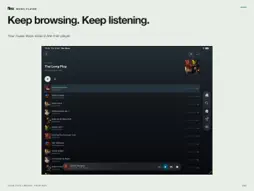
Your music library should feel like yours. Flex Music is an independent music player and playlist manager for personal Plex Media Server libraries. Sign in with Plex, choose your server and enjoy your music at home, remotely or offline. BROWSE AND PLAY Explore artists, albums, tracks, playlists, genres and moods. Search inside large playlists, rate tracks back to Plex, and keep browsing while the mini-player plays. Expand Now Playing for artwork, synced lyrics when available, visualizers and the waveform progress bar. YOUR QUEUE, YOUR WAY Use Play Next to put a track first, or Play After Next to add it after your manually queued tracks. Assign these actions to your playlist swipes. Manage Up Next and Previously Played, reorder playlists, add whole albums and clone playlists. OFFLINE AND DATA SAVER Download your music with no paid track limit. Choose storage limits and keep favourites offline. Data saver asks your Plex server to convert audio to your chosen bitrate, with separate Wi-Fi and cellular preferences and measured transferred-data totals. Conversion depends on your server; data saved is compared with the original media size. MADE FOR YOUR SCREEN Choose themes, artwork effects and visualizers. Larger displays have room for the player and queue side by side. iPhone Duo adapts from a compact cover-screen player to a stacked portrait layout and a side-by-side player and queue when opened in landscape. Controls stay clear of the system strip, and your player and queue are retained as the layout changes. Music casting is free on supported receivers. Lyric casting brings available lyrics to Google Cast displays with Flex Music Pro. FLEX MUSIC PRO Free: browsing, playback, Smart Search, ratings, on-device lyrics, music casting, themes and visualizers, offline downloads, the Pinned Playlist widget, and editing playlists up to 100 tracks. Pro unlocks editing larger playlists, saving smart playlists and listening sessions, premium home-screen widgets, alternate app icons, navigation icon themes and styles, and lyric casting. The Apple Watch companion is also included with Pro. CarPlay and Siri playlist playback are free. Monthly, yearly and lifetime plans unlock the same Pro features. Purchases are processed by the App Store and can be restored from Settings. Lifetime is a one-time purchase; subscriptions renew until cancelled in your store account settings. REQUIREMENTS A Plex account and access to a Plex Media Server containing a music library. Network access to that server is required for streaming and library management. Flex Music is independently developed by Elixir Consultancy Services Ltd and is not affiliated with or endorsed by Plex, Inc. Plex is a trademark of Plex, Inc. Google Cast is a trademark of Google LLC. Terms of Service: https://www.apple.com/legal/internet-services/itunes/dev/stdeula/

What's New

Version 2.0.0 2026-10-29
Flex Music 2.0 — a bigger update for your own music library. PLAYBACK THAT STAYS CLOSE Play and Shuffle now start in the mini player so you can keep browsing. ...Flex Music 2.0 — a bigger update for your own music library. PLAYBACK THAT STAYS CLOSE Play and Shuffle now start in the mini player so you can keep browsing. Expand into Now Playing with its handle, then slide back down. Enjoy smoother playlist scrolling, steadier controls, a more useful Up Next queue and consistent portrait and landscape layouts on iPad and larger screens. On iPhone Duo, use a compact player on the cover screen, a stacked layout in portrait, and the player and queue side by side when opened in landscape. Controls stay clear of the system strip, with your player and queue retained as the layout changes. Square artwork effects stay outside the cover and follow parallax. BUILD YOUR NEXT FEW SONGS Play Next puts a track first. Play After Next adds it after your manually queued songs, keeping their order. Use either from track menus or configurable swipe gestures, and jump straight to the playing song from its playlist menu. SMARTER DISCOVERY Use Smart Search with Plex filters, previews and editable starters such as Recently played, Unplayed gems and Rediscover. Save and edit smart playlists with Pro, start a mix from a track, and save a listening session as a playlist with Pro. LISTEN YOUR WAY Cast music to Google Cast and Sonos, manage speaker volume and queues, and show synced lyrics on compatible Google Cast displays with Pro. Music casting and on-device lyrics are free. Manual lyric search lets you preview and save a better match. LESS DATA, MORE OFFLINE MUSIC Optional Data saver asks Plex to convert audio before streaming, with separate Wi-Fi and cellular limits. Persistent stats show measured converted-audio usage and savings for eligible completed tracks. Converted tracks are now saved for replay and offline listening, with a cache browser and quality badges. New downloads follow your Data saver settings and reuse suitable saved audio. Offline downloads of any size and favourites sync are now free. MAKE IT YOURS New home-screen widgets, custom themes, more visualizers and independent artwork effects, alternate app icons and navigation icon styles. New installs start with Slate, Apple Line icons and Glass style; artwork effects, parallax, colorful icons and menu labels are off. Your saved preferences stay yours. The Pinned Playlist widget is free; other widgets, alternate app icons and navigation icon themes/styles require Pro. Editing playlists over 100 tracks remains Pro. MORE RELIABLE EVERY DAY Improved Plex playback reporting keeps recently played history current, including eligible offline plays after reconnecting and confirmed casting activity while connected. Better recovery after long pauses and returning to a track, corrected Watch-to-phone artwork, remembered playlist views, clearer Help and a refreshed guided tour. Menus use less space while retaining readable text and accessible controls. Settings use consistent rows and clearer explanations; Data saver playback and cached-track quality upgrades are more reliable. USAGE STATISTICS Optional PostHog usage statistics is on by default in configured builds. Events use a persistent random installation identifier, not a Plex account identity. Music titles, search text, credentials and screen recordings are excluded. Turn it off under Settings > About Flex Music > Usage statistics. Diagnostic logging is now opt-in. Requires iOS/iPadOS 18 or later; devices on iOS/iPadOS 15–17 cannot install this update. Data saver stats measure converted audio, not all network traffic. Receiver and server support varies.

Technical Analysis

Package Overview Basic metadata
Bundle ID com.elixircs.flexmusic
Current Version 2.0.0
Minimum iOS 18.0
Package Size App Store Size
Package Metadata 0 / 0 version records
Detailed binary, privacy manifest, framework, and Info.plist results have not been indexed for this package yet. The verified App Store and archive metadata above remains available.

Developer Information

Known Version Records

0 version records with stored package metadata

Stored metadata does not guarantee a package is currently available to download.

Details Version / IDs Version date Action