Preview

Description
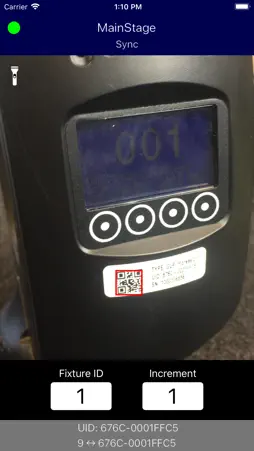
If you have patched your fixtures in dmXLAN, they already have a fixture id. When using this app, fill in the fixture id of the fixture you are about to scan. Next, scan the fixture. The application will send the UID of the fixture and the fixture number to dmXLAN. dmXLAN will now set the address of the fixture according to the patch. To use this application, there are a few requirements: - You need to have dmXLAN running on your network (https://www.elclighting.com/products/dmxlan-v4/). - A WiFi access point should be attached to your network, so your iOS device can communicate with dmXLAN. - You need to make sure that you've provided all your fixtures with a QR-Code with the UID of the fixture encoded. The QR-Code at least should have the following textual content: 'UID: XXXX-XXXXXXXX' , where the X represents a capitalised hexadecimal digit.
Technical Analysis
Package Overview Basic metadata
Bundle ID
ELC-lighting-bv.dmXLAN-QR Current Version 1.0
Minimum iOS 11.3
Package Size App Store Size
Package Metadata 1 / 1 version records
Detailed binary, privacy manifest, framework, and Info.plist results have not been indexed for this package yet. The verified App Store and archive metadata above remains available.
Known Version Records
1 version record with stored package metadata
Stored metadata does not guarantee a package is currently available to download.
| Details | Version / IDs | Version date | Action |
|---|---|---|---|
| 588.0 KB | v1.0 App Store ID: 841392870Build: 1.0 | 2021-05-26 11:27:39 | Get Version |