Preview


Description
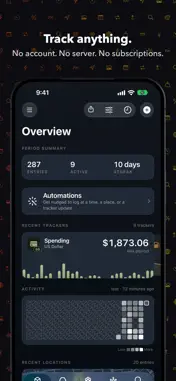
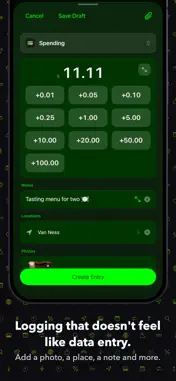
The tracker that doesn't track you. You're probably already tracking things: gas mileage in a ratty old notebook in your glovebox, a Note called "plant watering," your memory for the headaches. Plus a folder of single-purpose apps that each demanded an account. Coffee. Mileage. Mood. Spending. Baby feedings. Practice hours. Pain levels. Sleep. Pull-ups. The sourdough starter. TRACK ANYTHING Create a tracker for anything in seconds. Pick its unit (miles, dollars, cups, °F, percent, or one you invent) and log with the capture style that fits: a stepper, a tally pad, a dial you spin. Yes/no habits, ratings, colors, and short notes work too. CHECK IN, DON'T FILL OUT Bundle trackers into check-ins (a morning check-in, a workout, a refuel) and log them all in one pass, with the note, photo, and weather attached to the moment. Calculated fields do the arithmetic: price per gallon, cost per mile, days since. START FROM THE LIBRARY Browse ready-made check-ins (Rise & Shine, Refuel, Baby Log, Plant Care) and make them yours. Everything in the Library is free. SEE WHAT IT ADDS UP TO Trends, streaks, comparisons, distributions, heatmaps, and a map of where you've logged. Honest charts that never exaggerate your data, on a dashboard you arrange yourself. Scrub any chart with a finger. Every chart speaks VoiceOver. Share any view as an image. EVERYWHERE YOU ARE Free Home Screen widgets, including one that logs without opening the app. An Apple Watch app that logs with the Digital Crown. CarPlay buttons that log with one tap. And Datum for Mac, in step through your own iCloud. MAKE IT YOURS Dye the whole app your color: any tint, any backdrop, light or dark, not just an accent on a button. Charts, heatmaps, every screen wears your theme. Even our logo will, if you let it. Save your looks as presets. Your Datum won't look like anyone else's. MORE THAN NUMBERS Attach photos, voice notes, and text. Let a tracker capture location, weather, or your calendar automatically, only where you say so. Mirror Apple Health, Photos, Calendar or Reminders into a read-only tracker that stays on your device, or pull numbers from a web source. LET IT RUN ITSELF Automations remind you to log, or log for you: on a schedule, when you arrive somewhere or leave, or when another tracker gets an entry. PLAYS WELL WITH OTHERS Log by voice with Siri or wire Datum into your Shortcuts. Send a photo, a link, or text from any app straight into an entry with the share sheet. Import years of spreadsheet history from CSV. Share a check-in as a small file a friend can open in their own Datum, trackers included. YOURS. ACTUALLY YOURS. No account. No sign-up. No server of ours holding your life. Your data stays on your devices and in your private iCloud, syncing across your iPhone, iPad and Mac. We couldn't read it even if we wanted to. Export everything to CSV or JSON, or as a PDF report, whenever you like. It's your data; leaving is easy, so we make staying worth it. NO SUBSCRIPTIONS Datum is free for up to 10 trackers, and check-ins are always free and unlimited. So are the widgets. Unlimited trackers, attachments like weather and calendar events, calculated fields, connected trackers and automations are one-time purchases, each priced in Settings › Purchases, or all together in Datum Pro. Attachments, calculated fields, connected trackers and automations each come with one free try. Nothing renews. Nothing is rented. Track anything. Keep it yours.
What's New
Version 1.1 2026-10-25
This one puts Datum on your Home Screen, your wrist, your car and your Mac. HOME SCREEN WIDGETS, FREE Six of them, on iPhone and iPad. Log Entry tallies, taps ... Technical Analysis
Package Overview Basic metadata
Bundle ID
com.madsen.datum Current Version 1.1
Minimum iOS 26.0
Package Size App Store Size
Package Metadata 0 / 0 version records
Detailed binary, privacy manifest, framework, and Info.plist results have not been indexed for this package yet. The verified App Store and archive metadata above remains available.
Developer Information
Known Version Records
0 version records with stored package metadata
Stored metadata does not guarantee a package is currently available to download.
| Details | Version / IDs | Version date | Action |
|---|